Amplitude Session Replay Review: Features, Costs, and Limits – Katie


Amplitude Session Replay is a capable web and mobile replay tool, especially if you already use Amplitude for analytics. It flags rage clicks and dead clicks, connects replays to your event stream, and offers AI-powered session summaries on eligible plans.
I use session replay regularly as a UX researcher, so this is a practical review rather than a feature list. I also work at Userpilot, whose session replay tool competes with Amplitude’s. I’ve checked Amplitude’s features and pricing against its official documentation.
I’ll cover what Amplitude Session Replay does, how its pricing works beyond the headline numbers, and when a platform that combines replay, analytics, surveys, and in-app guidance might be a better fit.
Amplitude Session Replay: the quick verdict
- What it is: Visual playback of user sessions connected to Amplitude analytics, available for web and mobile.
- How pricing works: Event-based pricing, with 10,000 monthly replays on Free and Plus, 20,000 on Growth, and 50,000 on Enterprise. Higher volumes are available as an add-on.
- Biggest strength: Moving from a metric to the sessions behind it without leaving your analytics platform.
- Main limitations: Replay limits by plan, with AI summaries available as a paid add-on on eligible tiers.
- Choose Amplitude if you already use it for analytics. Consider Userpilot if you prefer a no-code workflow for turning replay insights into surveys and in-app guidance.
Amplitude Session Replay at a glance
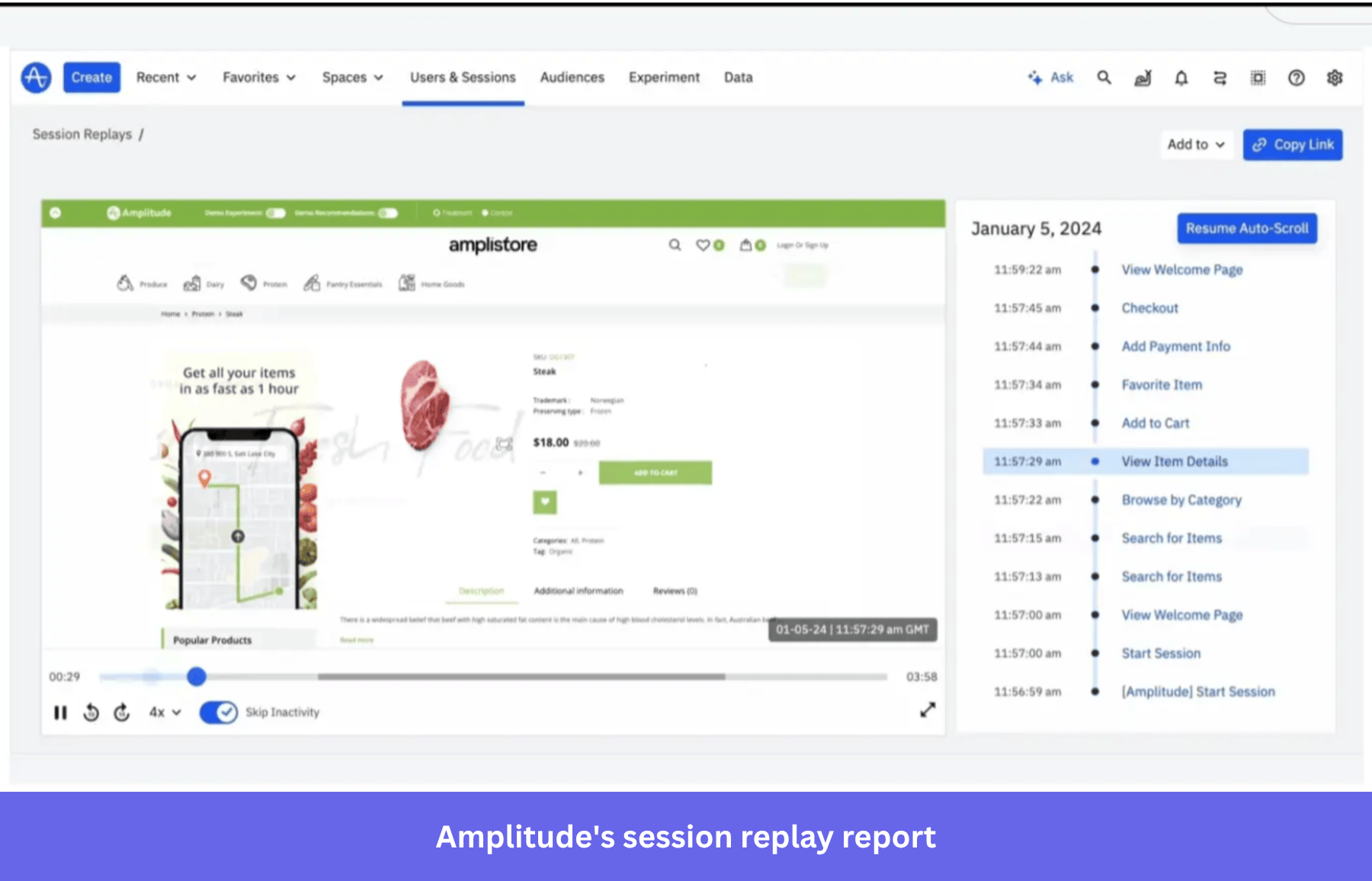
Amplitude Session Replay shows how users move through your product. On the web, it reconstructs sessions from DOM changes rather than recording traditional video. Because replay is connected to Amplitude’s event data, you can move from a metric in a chart to the sessions behind it.
Amplitude supports replay on both web and mobile, with iOS and Android SDKs for mobile apps. Recordings are retained for 30 days by default, with extended retention available on eligible plans.
Replays include frustration signals such as rage clicks and dead clicks, along with console and network error capture and privacy-masking controls.
The AI Session Replay Agent
Amplitude connects quantitative analytics with session-level evidence. You can open the relevant recordings from a chart rather than searching through sessions manually. Its Session Replay Agent can also analyze session recordings to surface patterns, highlight relevant moments, and suggest next steps. AI-based replay summaries are available as an add-on on Growth and Enterprise, not as a standard feature on every plan.
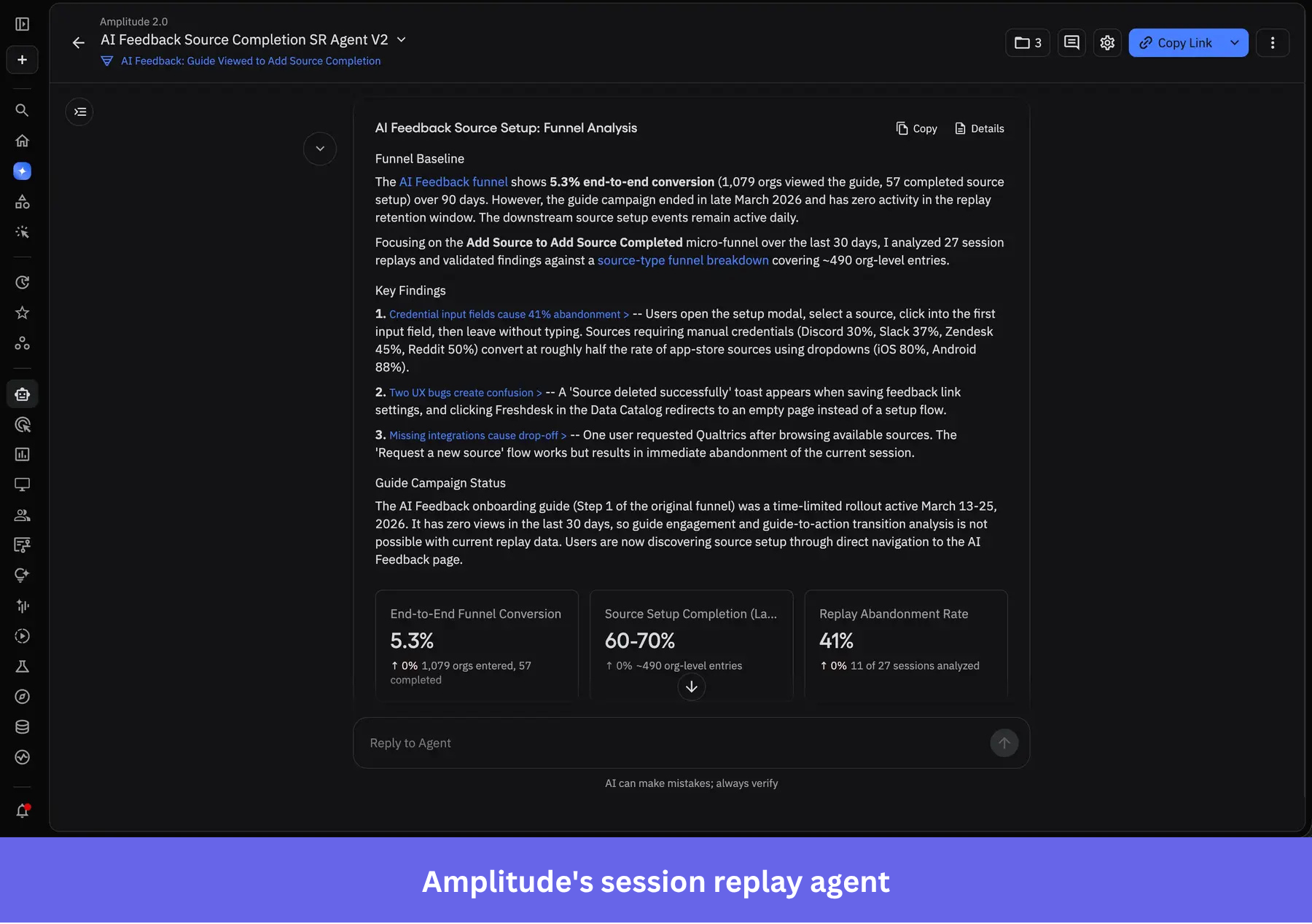
This matters because the hardest part of replay isn’t watching a recording. It’s knowing which sessions deserve your attention. Kevin O’Sullivan, Userpilot’s Head of Product Design, put it this way:
One of the challenges with session replay is still the skill of spotting patterns and probably not zoning in on just one session. Session replay is very devoid of, obviously, the user’s voice as well, what their intent was coming in.
When I’m looking into a feature I didn’t build, I’d rather be pointed toward three useful sessions than scrub through 30. That’s where AI-assisted analysis can help.
Setup and integration options
Amplitude offers several ways to set up replay, depending on your stack:
- A standalone SDK for more control over implementation.
- A Browser SDK plugin for teams already using Amplitude analytics.
- Google Tag Manager for a tag-based setup.
- A Segment wrapper for teams already using Segment.
Replay can work alongside autocaptured events and existing click tracking, so you don’t need to manually tag every element to get started. You can also control which sessions or devices are recorded, helping manage volume and privacy.
Privacy, consent, and compliance
Amplitude provides class-based masking through amp-mask, amp-unmask, and amp-block, along with default text masking and controls for capturing console logs.
Technical setup is only one part of the job. You also need to decide what information you can record, whether users need to consent, and how replay fits into your privacy notices and data-processing agreements.
The requirements depend on where your users are, what you collect, and your legal basis for processing it. GDPR and US state privacy laws have different rules, so terms of service or an opt-out alone may not be enough. Review your setup with legal counsel before rolling out replay, especially if you handle sensitive data.
Pricing: what the sticker price doesn’t show
Amplitude’s platform pricing is based on event volume rather than seats or recorded sessions alone. Its Free plan includes 2 million events and 10,000 session replays a month, which is enough to test whether replay fits your workflow.
Plus starts at $0 for the first 2 million monthly events and scales with usage. Growth and Enterprise have custom pricing and include 20,000 and 50,000 monthly replays, respectively. Both offer add-ons for higher replay volume and advanced features.
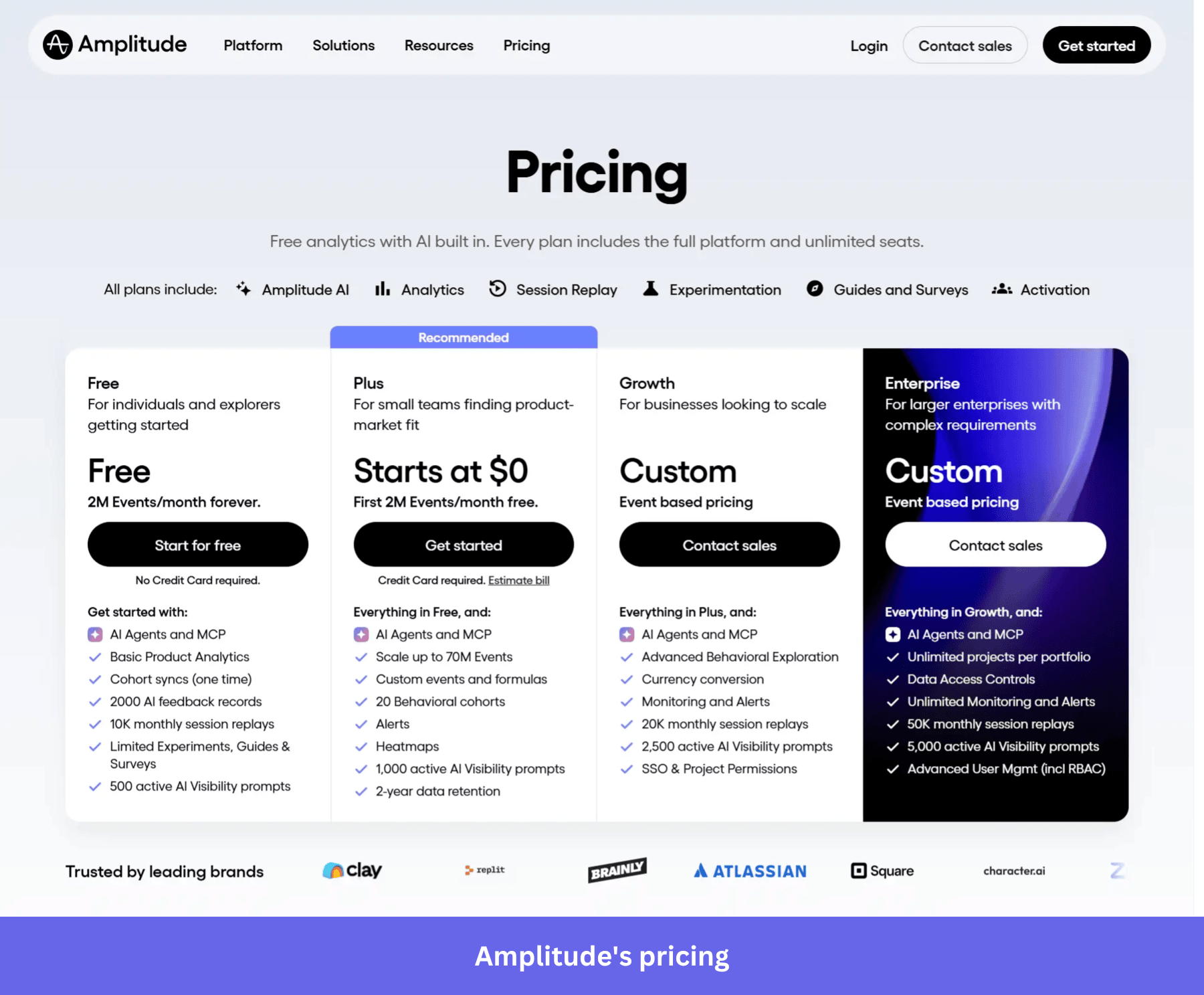
Comparing Amplitude’s price with other tools isn’t straightforward because they use different billing metrics. Some analytics platforms charge by tracked users, while replay specialists often charge by recorded sessions.
The better-value option depends on how people use your product. A large audience with relatively few tracked events per person may suit Amplitude’s model. A smaller audience generating a high event volume could make event-based pricing less attractive.
Event volume is easy to underestimate. Screen views, clicks, and other tracked actions add up quickly, especially in frequently used apps. Without a clear tracking plan, your event count can grow faster than your user base. Separately, sampling sessions can help you stay within replay limits, although it also means some user journeys won’t be recorded.
Before committing, identify the events you need, estimate activity using the number of sessions per user you already track, and ask Amplitude how your costs would change if usage doubled. For more detail, see our guide to Amplitude’s pricing.
Limitations worth knowing
Amplitude Session Replay has a few limitations to consider:
- Some content may not appear in replays: Canvas, WebGL, Flash, Lottie animations, and cross-origin iframes can create gaps in recordings.
- No continuous replay across projects: It doesn’t stitch a user’s activity across separate Amplitude projects into one session.
- Best value within Amplitude: Its main advantage is the connection between analytics and replay. If you don’t use Amplitude for analytics, that integration matters less.
- Recordings still need a purpose: Having thousands of sessions won’t help unless your team knows what to investigate. That’s worth considering when comparing session replay tools.
Is Amplitude’s session replay worth it?
It largely depends on your existing analytics setup and what you want to do after spotting a problem. Here’s how I’d make the decision:
| Choose Amplitude Session Replay if | Consider a bundled alternative if |
|---|---|
| You already use Amplitude analytics | You don’t want to adopt Amplitude just for replay |
| You need replay for both web and mobile apps | You prioritize no-code surveys and in-app engagement alongside replay |
| You want AI-assisted replay analysis alongside funnels, and the add-on fits your budget | Its replay limits or event-based pricing don’t fit your usage |
Userpilot as a bundled alternative
Replay shows you what users did, but it doesn’t always explain why they did it. You may also need surveys to understand their intent and in-app guidance to address the problem.
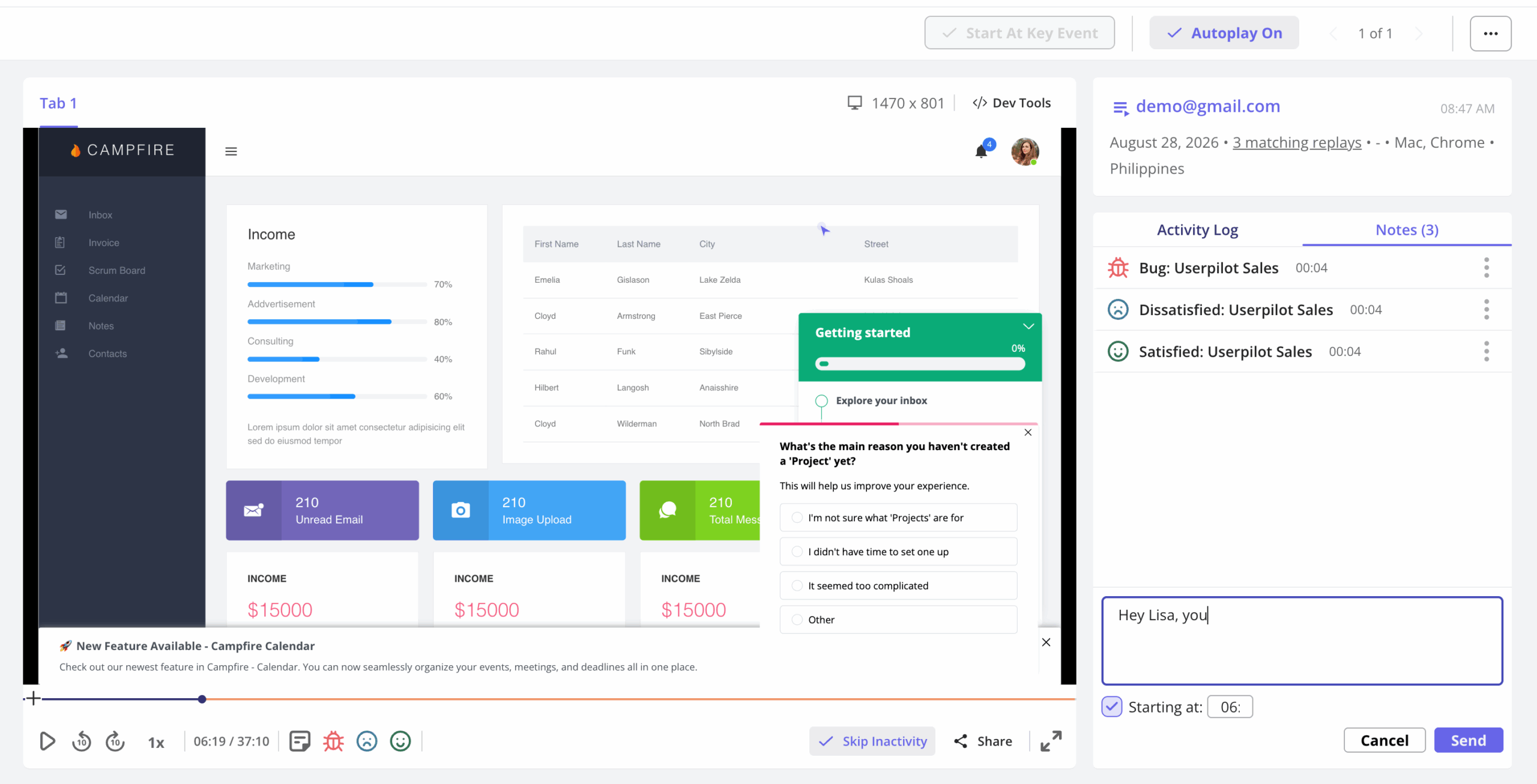
Userpilot brings those steps together. You can spot a drop-off in your analytics, watch the sessions behind it, and use frustration indicators such as rage clicks, dead clicks, U-turns, and form abandonment to find where users struggled. Then you can launch a survey to ask what went wrong.
Teams can also leave notes and reactions on recordings. That keeps feedback attached to the evidence, rather than scattered across messages or meetings.
I saw why this matters while reworking an analytics page with an interactive graph. In the sessions I reviewed, only about 10% of users engaged with the graph meaningfully. My designer and I initially wanted to remove it. But my manager pointed out that 10% of 1,000 users is still 100 people who might rely on it.
We made the graph collapsible instead. Now we’re tracking who collapses it so we can decide whom to interview. The session replays showed what people were doing, and the behavioral data helped us figure out whom to ask. The 10% figure comes from our own internal product observations, not an industry benchmark.
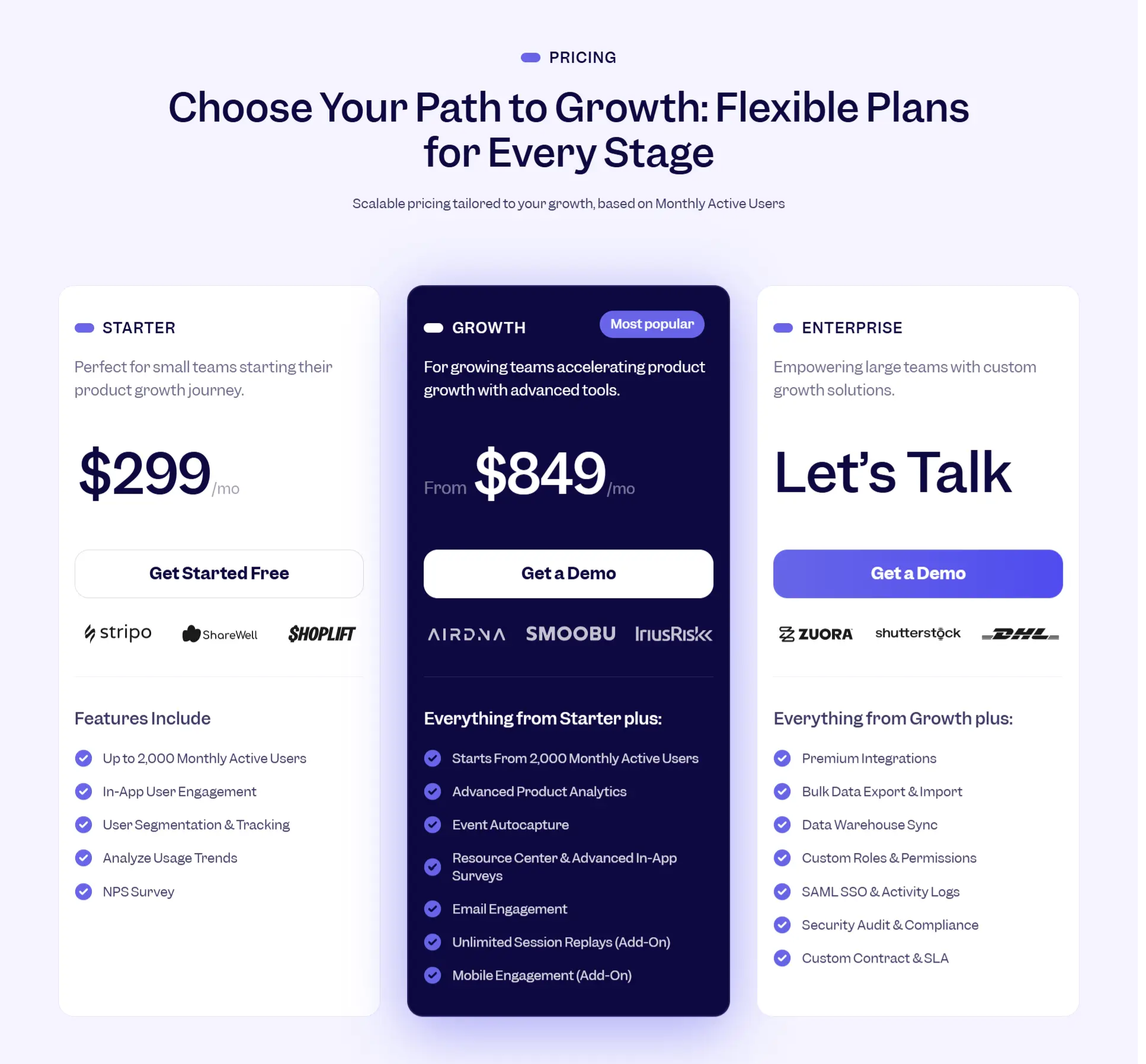
There is a pricing difference, too. Amplitude includes a set number of monthly replays by plan, with add-ons for more volume. Userpilot offers unlimited session capture as an add-on on its Growth and Enterprise plans. Which is better value depends on the rest of your stack and how many sessions you need to analyze.
The verdict
If you already use Amplitude for analytics, its session replay is a natural fit. You can move from a metric to a relevant recording without switching tools. If you add AI-assisted replay analysis, it can also help you prioritize which sessions to review.
Amplitude also offers guides and surveys, so the choice isn’t simply about which platform has more tools. It comes down to how your team works. If you want to investigate friction and respond with no-code surveys or in-app experiences in the same workflow, Userpilot is worth considering. You can compare plans on the Userpilot pricing page.
Want to spot friction in your product and address it without waiting for a developer? Book a Userpilot demo to see how it works.
Frequently asked questions
Does Amplitude have session replay for mobile apps?
Yes. Amplitude Session Replay supports web and mobile, including iOS and Android apps through its mobile SDKs. Older reviews describing the product as web-only are outdated.
How many session replays do you get, and what does it cost?
Amplitude includes 10,000 monthly replays on Free and Plus, 20,000 on Growth, and 50,000 on Enterprise. Plus starts at $0 for the first 2 million monthly events; Growth and Enterprise are custom-priced. Higher replay volumes are available as add-ons.
Do you need user consent to run session replay?
It depends on where your users are, what you record, and your legal basis for processing the data. Privacy notices, masking, consent settings, and data-processing agreements may all be relevant. Check the applicable requirements with legal counsel before enabling replay.
Does Amplitude Session Replay use AI?
Yes. Amplitude offers AI-assisted replay analysis to identify friction, summarize sessions, and surface patterns. Its AI-based session summaries are available as an add-on on Growth and Enterprise plans.
What are Amplitude Session Replay’s main limitations?
Limitations include monthly replay allowances, gaps in recording certain content (such as canvas and cross-origin iframes), and no continuous replay across separate projects. The biggest benefit is also connecting recordings to Amplitude analytics.
Is there a good alternative to Amplitude Session Replay?
Yes. If you want session replay alongside surveys, product analytics, and in-app flows, a product growth platform like Userpilot is worth evaluating. It lets product, customer success, and marketing teams analyze user behavior and act on what they learn.
About the author