When onboarding feels complicated, 74% of prospects abandon your product for simpler alternatives. This implies that improving onboarding is one of the highest-leverage opportunities to increase long-term user retention. That’s why product teams look into tools like Usetiful to ensure successful onboarding.
Usetiful promises to help simplify onboarding by implementing in-app guidance without coding. But before you commit, you need to know if Usetiful truly delivers for your specific JTBDs.
To help you decide, let’s explore the top Usetiful features, compare them to competitors like Userpilot and Appcues, and determine whether it’s the right fit for you.
What is Usetiful?
Usetiful is a no-code digital adoption platform that helps SaaS teams build product tours, onboarding checklists, and self-service support. Typical users include product managers, customer success teams, and onboarding leads who need to implement in-app guidance quickly.
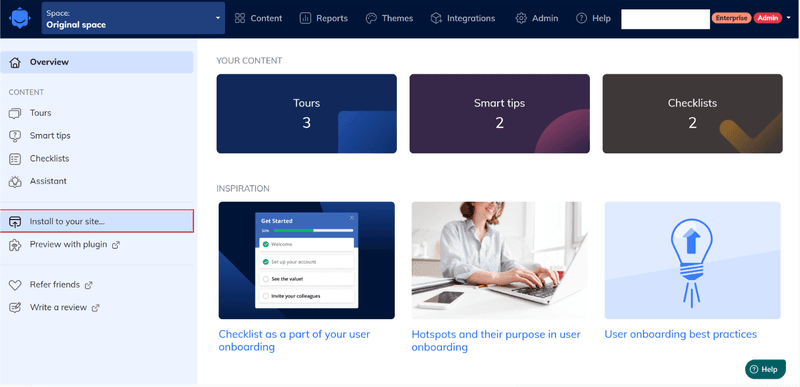
The platform works particularly well for single-page applications (SPAs) and offers a Chrome browser extension to preview content. I can also quickly select or sync on-page elements while I build in Usetiful. Its key use cases include:
- User onboarding
- Product analytics
- Self-service support
Unlike more robust platforms that I have used, Usetiful focuses on simplicity and affordability rather than advanced analytics or deep customization.
Top Usetiful features that improve user onboarding
Here’s what Usetiful offers to build in-app guidance and enhance your user onboarding experience.
Interactive product tours
Interactive product demos are one of Usetiful’s key features. I can build product tours through a no-code visual editor that requires zero design knowledge: just click elements in your app and add content like text, images, GIFs, or videos. I find this quite helpful and time-saving.
Product tours guide new users to their ‘Aha!’ moment faster by showing them how to complete key tasks rather than making them hunt through documentation. I can create multiple tours for different user segments (e.g., one for free users, another for premium customers) and trigger them based on tags, URL patterns, or on-page elements.

However, Usetiful’s customization is limited to font and color changes unless you’re comfortable writing CSS. More advanced platforms like Userpilot offer deeper styling options out of the box and native tooltips that follow elements across pages.
Onboarding checklists
Usetiful’s checklists break down complex onboarding into bite-sized tasks that users can complete at their own pace. The platform remembers where each user left off, so they can pick up exactly where they stopped without starting over.
Checklists tap into completion psychology to drive user engagement. Users get a dopamine hit each time they check off a task, which motivates them to keep going.
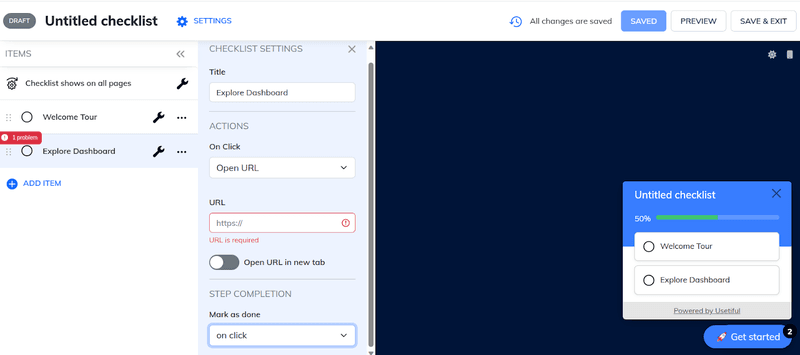
Although you can mark checklist items as complete based on defined page events, Usetiful’s checklist analytics only shows completion rates. This means that you won’t see which specific items cause users to abandon the process.
Smart tooltips and hotspots
Usetiful’s smart tips are contextual tooltips that appear when users hover or click on specific elements. I can add an optional hotspot beacon that draws attention to important areas before users even interact with them.
The tooltip itself attaches to page elements and can display helpful hints, explain confusing inputs, or guide users through complex forms. When a user hesitates at a form field, the tooltip appears with exactly the information they need.
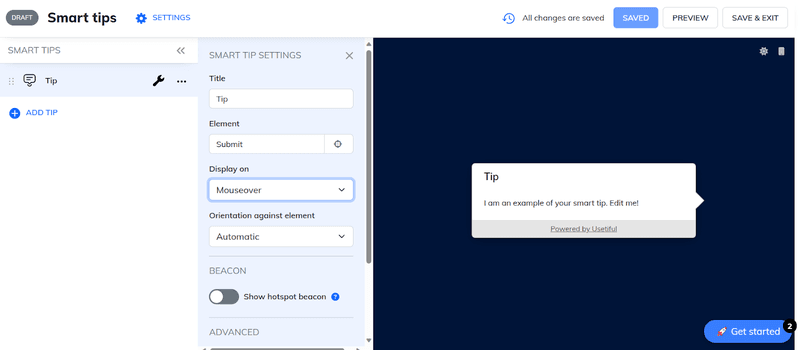
However, with Usetiful, if the same element appears on multiple screens, you’ll need to recreate the tooltip for each location. This significantly increases manual setup time and makes maintaining cross-page consistency difficult.
In-app banners and announcements
Usetiful’s banner feature lets you display notification bars at the top or bottom of your interface to communicate important messages without disrupting the user experience. I can start with predefined templates for common scenarios, such as sales campaigns or maintenance windows, then customize the message, positioning, and interaction options.
Banners catch attention without blocking critical functionality. This is crucial for announcing new features to existing users, promoting upgrade paths, and driving feature adoption. I then segment messages by user type to display relevant communication that drives adoption without feeling spammy.
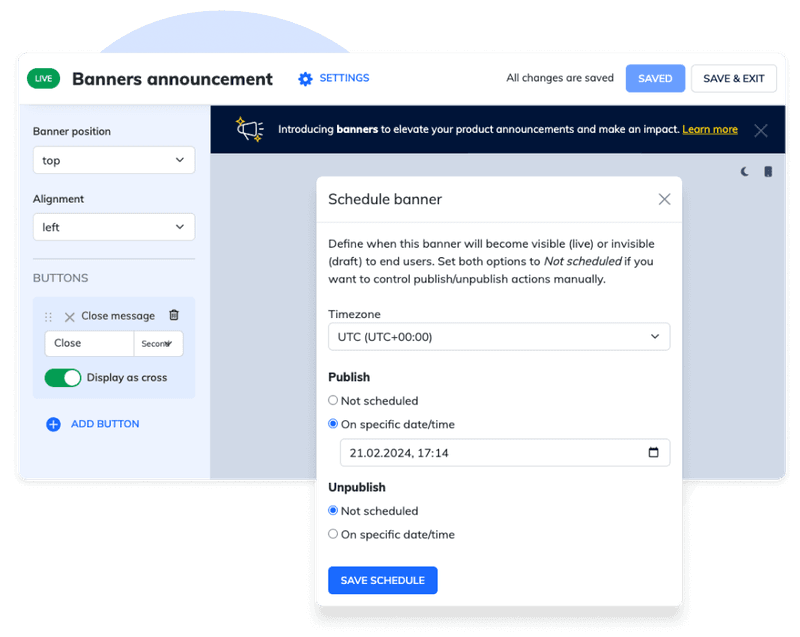
Usetiful’s dedicated announcement pattern is banners; other tools offer a wider set of announcement UI patterns. This can limit your options for more subtle, contextual cues or more disruptive, critical alerts.
Self-service knowledge base
Usetiful’s knowledge base lets you create and organize help articles with its no-code visual editor, supporting multimedia content such as images and videos. I like to organize articles into folders by topic or user segment, and publish them to a standalone portal with its own URL or make them accessible through an in-app assistant widget.
The assistant widget gives users instant access to help articles, product tours, FAQs, and external links without leaving the page. It includes an AI-powered search feature that provides summarized answers before directing users to the full article.
When users hit a roadblock during onboarding, they can search the assistant widget for solutions instead of waiting for a live support team.
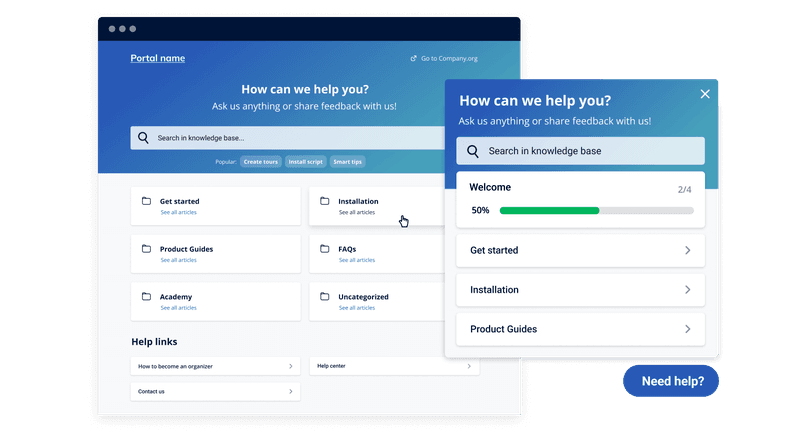
While Usetiful’s self-service feature is commendable, it doesn’t offer a native Zendesk knowledge base sync, but it integrates with Intercom. Also, you can see article views, but you won’t get data on search queries that returned no results or which articles successfully resolve issues.
User analytics and journey tracking
Usetiful’s reporting dashboard tracks how users engage with your in-app content. Usetiful analytics are strong for engagement with Usetiful content (e.g., starts, completions, and step-level completion). Still, they don’t replace full product analytics (like funnels, cohorts, and paths) across your app.
Its user profiles let you track individual users across your Usetiful content, view their tags and custom segments, and monitor their engagement history. For broader product analytics, I integrate with Google Analytics by triggering custom events at specific tour steps.
Analytics help you identify where users get confused or drop off during onboarding. For example, if 40% of users abandon your tour at step 3, you know that step needs work. Seeing which checklists have low completion rates tells you which onboarding tasks create friction.

Usetiful only tracks interactions with Usetiful elements: it can’t tell you how users behave in your actual product. You won’t get funnel analysis to see activation rates, cohort analysis to track retention by signup date, path analysis to understand user journeys, or session replay to watch what users actually do.
SPA support and no-code setup
Usetiful can handle single-page applications that update content dynamically without full-page reloads. Unlike some digital adoption platforms that rely solely on URL changes to trigger tours, Usetiful uses a combination of triggers and delays that respond to on-page content changes, element visibility, and user actions. This makes it work seamlessly with React and Angular, and handle complex scenarios such as Shadow DOM.
It’s a good fit for SPAs built with React or Angular, and it includes a manual method for targeting elements inside Shadow DOM when needed. Setup typically involves adding Usetiful’s JavaScript snippet to your pages. For React and Angular implementations, Usetiful also provides an NPM package option.

Usetiful supports interactive product tours on mobile. The “no-code” claim also has limits: advanced customization still requires CSS knowledge, and complex conditional logic may need developer support.
Usetiful vs other tools: How it stacks up
While we’re evaluating Usetiful, let’s compare it against other tools like Userpilot, Appcues, Pendo, and WalkMe. Here’s how they stack up:
| Tool | Features | Pricing | Main user personas | Where Usetiful falls short | Where Usetiful excels |
|---|---|---|---|---|---|
| Userpilot | In-app onboarding, product analytics, behavioral analytics. | Starts at $299/month (annually). | Mid-market SaaS product & growth teams. | Funnels/cohorts + richer behavioral analytics; can pair onboarding with more advanced analysis and session replay. | Lower complexity, simpler onboarding-focused setup; typically cheaper entry for basic guidance. |
| Appcues | Product analytics, multi-channel in-app engagement, mobile SDKs. | Starts at $300/month (annually). | SaaS teams running web and mobile onboarding campaigns. | Native mobile SDKs, multi-channel orchestration. | Cheaper/simpler for basic in-app guidance if you don’t need the heavier engagement stack. |
| Pendo | Enterprise product analytics, feedback, onboarding. | Custom pricing, free plan available. | Large SaaS companies with dedicated data teams. | Retroactive analytics, advanced segmentation, multi-product reporting. | Much simpler to roll out if you only need lightweight onboarding and KB/assistant. |
| WalkMe | Cross-app digital adoption and automation. | Custom pricing. | Enterprises training employees across multiple systems. | Enterprise automation, cross-system workflows. | Not built for heavy enterprise transformation. It’s better as a lightweight customer onboarding layer. |
Choose a platform that grows with you
While Usetiful’s affordable pricing makes it an attractive budget onboarding tool, this choice may not be a money-saving decision as you scale. You’d need to add a tool for cohort analysis and another for feedback. Before you know it, you’re paying for three platforms and spending hours stitching together insights that should live in one place.
Userpilot enables you to understand what drives activation, where users drop off, and which features correlate with retention: beyond basic completion rates. Book a demo and see how product teams drive measurable growth with onboarding, analytics, and feedback in one platform.
Userpilot strives to provide accurate information to help businesses determine the best solution for their particular needs. Due to the dynamic nature of the industry, the features offered by Userpilot and others often change over time. The statements made in this article are accurate to the best of Userpilot’s knowledge as of its publication/most recent update on January 22, 2026.
FAQ
What are the main features of Usetiful?
Usetiful’s core features include interactive product tours, onboarding checklists, smart tips, in-app banners, and a knowledge base assistant. The platform uses a no-code visual builder that works well with SPAs and supports mobile and web apps. Other key capabilities include user segmentation, NPS surveys, usage analytics that track tour engagement, and customizable themes.
Is Usetiful a good alternative to Appcues or WalkMe?
Usetiful works as an alternative to Appcues or WalkMe if your primary need is basic onboarding tours at a lower price point. However, it lacks features that make Appcues and WalkMe valuable for scaling teams. For example, Appcues offers native mobile SDKs, multi-channel workflows, and deeper analytics, while WalkMe provides enterprise-grade workflow automation and cross-application support.
How does Usetiful help with onboarding in SaaS products?
Usetiful helps SaaS onboarding by creating step-by-step product tours that guide users to their ‘Aha!’ moment without requiring code. You can:
- Build interactive walkthroughs using modals, tooltips, and slideouts that trigger automatically when users reach specific pages or features.
- Create onboarding checklists that break complex setup processes into trackable steps with progress bars that motivate completion.
- Deploy smart tips that provide contextual help at friction points to reduce errors and support tickets.
About the author