Interactive Walkthroughs in 2026: Outcome-First Onboarding Has Replaced The Feature Tour


As someone who has been in customer success for a while, I’ve seen my fair share of feature tours and walkthroughs. My conclusion is simple: feature tours are weak, but interactive walkthroughs improve onboarding if they’re done right.
The statistics are damning. The average user onboarding process across SaaS has a 36% activation rate in 2026. This means two-thirds of signups leave before experiencing real value. Even worse, 55% of users will drop a product entirely if they don’t see that value quickly enough.
Most times, this failure shows up before your product is even given a chance. A user signs up, goes through your onboarding tour, gets overwhelmed or underwhelmed, abandons your product… The end.
Good interactive walkthroughs, therefore, must do more than just replace a demo or a tour. So, how do you do it? How do you ensure that your walkthrough never underperforms?
First, let’s answer a not-so-simple question.
Do interactive walkthroughs still work in 2026?
Yes, and the data on how interactive walkthroughs improve onboarding is specific. Products with interactive onboarding see 50% higher activation rates than those relying on passive tours, and walkthroughs cut time-to-value by 40%. These are not marginal improvements.
Here’s some more data:
- The average SaaS activation rate sits at 36% as of April 2026. However, products using interactive onboarding flows consistently beat that benchmark by half.
- 55% of users will drop a product entirely if they don’t see value quickly. Your onboarding flow needs to achieve its goal within the first few minutes, or the window closes.
- Walkthroughs reduce support ticket volume by 20-30% by delivering on-screen, contextual guidance that preempts the most common questions before they’re asked.
- Users retain features significantly better when they “do” and not just “watch.” This is why driven actions outperform passive tours every time.
- Personalized interactive onboarding experiences make users 49% more likely to become repeat customers, compared to generic flows.
To summarize the data, a well-built interactive walkthrough that leads users to their first success trumps every other onboarding format.
The maintenance concern
The objection I hear most often with interactive walkthroughs isn’t whether they work. It’s whether they’re too fragile to maintain. Product UIs change, steps break, and a tooltip is left pointing at a button that no longer exists, creating more frustration than having no walkthrough at all.
It’s a real concern. But I believe it’s manageable with three adjustments:
- Build walkthroughs that answer one clear question: The teams I’ve seen with the lowest maintenance overhead are the ones who scoped their walkthroughs tightly: one outcome, one path, one activation event. This narrower scope means fewer failure points and faster fixes when things break.
- Adopt a no-code tool: No-code tools allow you to build walkthroughs without burning engineering hours. And, frankly, I won’t have it any other way. If a button changes positions, drag and drop your tooltip to the new position; no engineers needed.
- Use a tool with step-monitoring built in: Userpilot includes system alerts that notify you when a specific walkthrough step stops triggering, so breakage doesn’t sit undetected for weeks while users hit a dead end.
Why do many interactive walkthroughs underperform?
I’ve heard this question a lot. If interactive walkthroughs are so good, why do so many of them underperform? The answer is simple: poor execution.
So, let’s consider some mistakes many make when designing walkthroughs, and how you can avoid them.
The most common mistakes
- Trying to replace the entire demo: A walkthrough that covers every feature like a demo exhausts users before they reach value. An effective walkthrough must guide users through a single outcome: set up your first project, connect your first integration, and invite your first teammate. Scope your flow down to one question and one answer.
- Not defining the activation milestone before building: Many teams build their interactive walkthrough first before defining success (or activation) around it. In the end, the flow feels complete, your metrics seem high, but true activation never happens.
- Optimizing for walkthrough completion, not activation: What’s worse than defining activation around your already-built walkthrough? Not defining it at all! If your goal is to get the highest walkthrough completion rate, you’ve already failed.
- Sending every user through the same flow: If your product has different use cases, but your walkthrough is the same for everyone, you’re doing it wrong. Segmenting users by role or goal before step 1 is not optional in 2026.
- Designing a walkthrough like an afterthought: The signs will always be there… No progress bar, disjointed design language between the product and the walkthrough, mismatched UI patterns, etc. A good walkthrough doesn’t have to be sophisticated, but it must be consistent and well thought-out.
The feature-tour problem
I’ve seen many who set out to build interactive walkthroughs, only to end up with an extensive feature tour that explains the product.
The results are always the same.
An account is created. The user covers plenty of ground, touring one feature after another. Then, they stop engaging.
When I dig into these accounts, I typically find a product tour: here’s the dashboard, here’s the analytics tab, here’s how to export a report. Sure, the user has seen what the product looks like, but they never reach their first real win inside it.
Abrar Abutouq, one of our PMs, ran into a precise version of this problem with Userpilot’s email feature. The funnel showed a sharp drop-off at the domain verification step, but the fix didn’t require an engineering ticket or a product redesign. In her words:
“Within a few hours, I created a targeting tooltip and showed it to users and highlighted the correct steps for them to make it clear what to do next. That helped a lot to reduce friction and support users in real time without involving our dev team.”
That’s the outcome-first instinct in action. Instead of explaining the email feature, the walkthrough removed the specific friction point standing between users and their first success with it, and the drop-off closed within days.
Building successful interactive walkthroughs: Lessons and examples
If I’m to summarize all of the lessons I’ve learned from watching myself and others fail at onboarding, it’ll come down to 5 things:
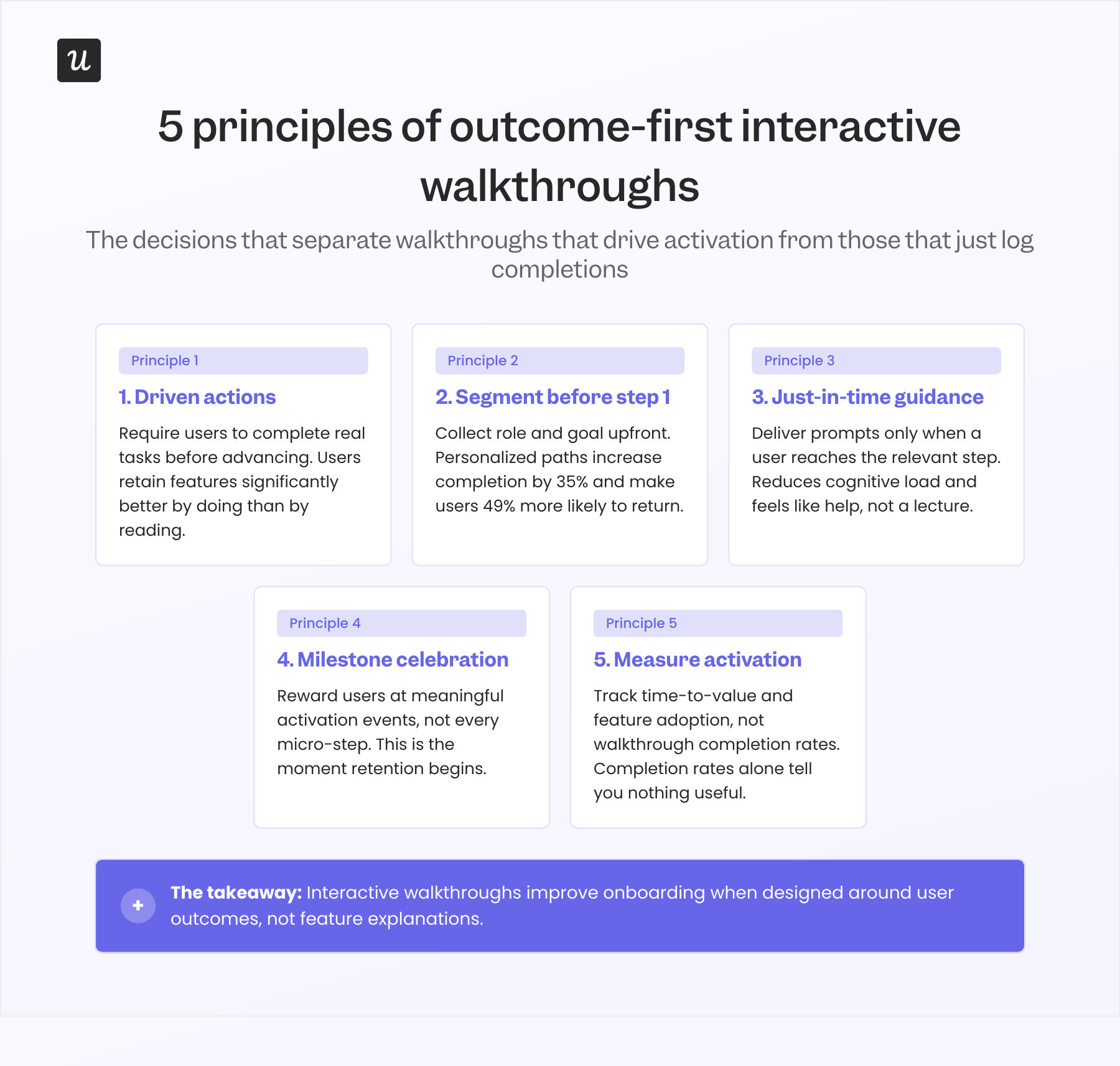
Let’s see how this works in practice by considering some examples of effective interactive walkthroughs that improve onboarding.
1. Kontentino: Segmenting users before step 1 (+10% activation in month 1)
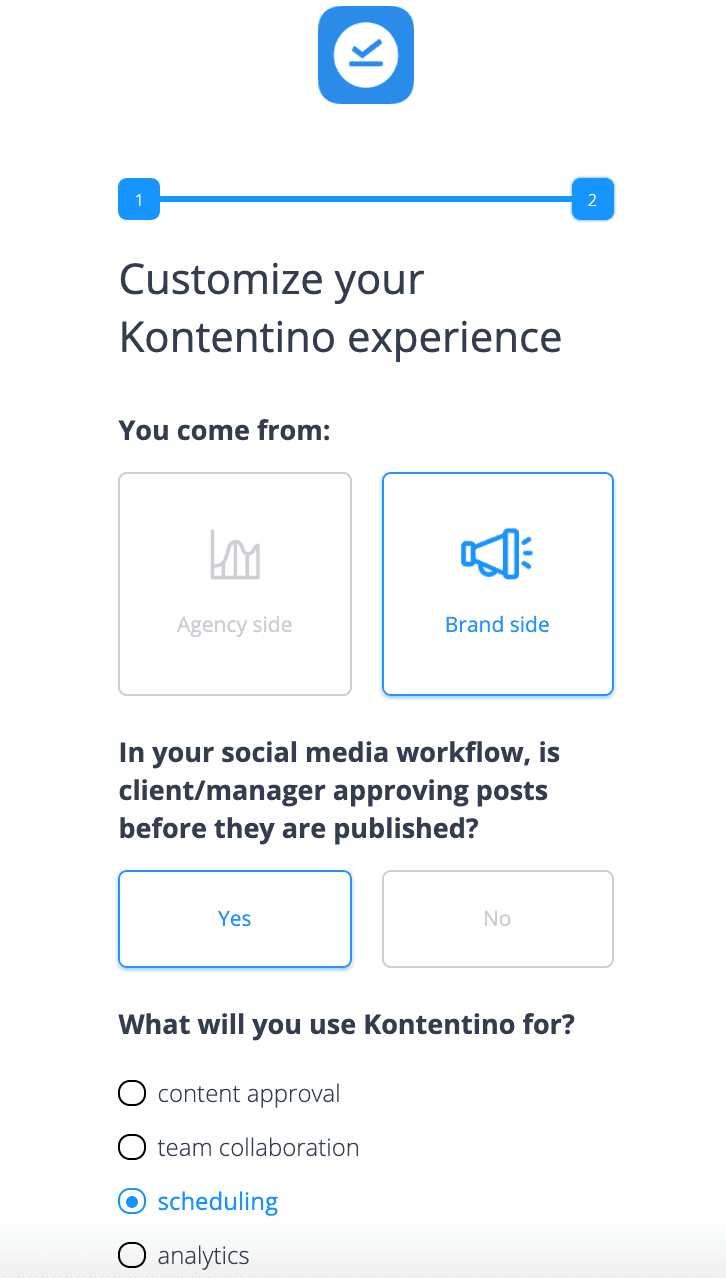
Kontentino, a social media management tool, increased user activation by 10% within the first month of deploying an interactive walkthrough. The key to this success was following the second principle: segment first, guide second.
Their onboarding flow opens with a welcome survey that collects role and use case before funneling users to the appropriate flow.
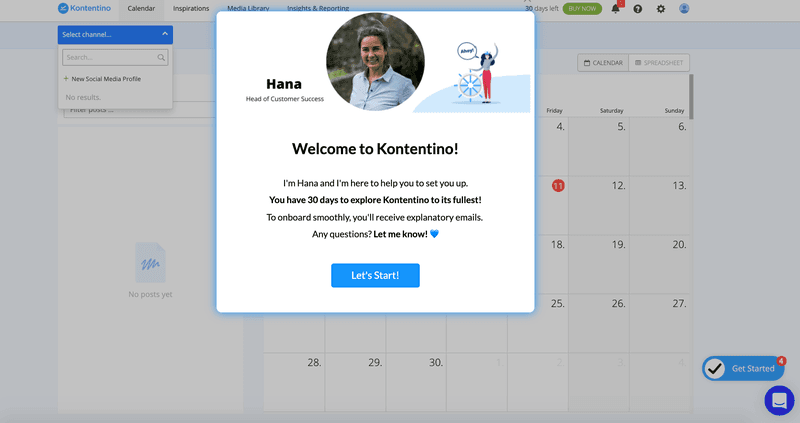
A personal welcome message from Hana follows immediately, before the first product screen appears:
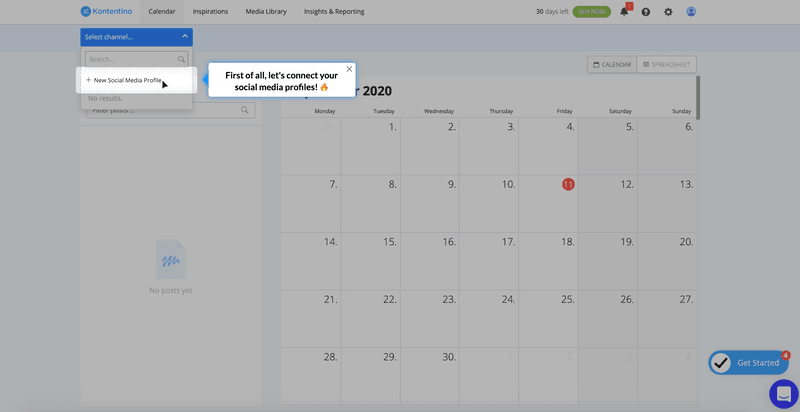
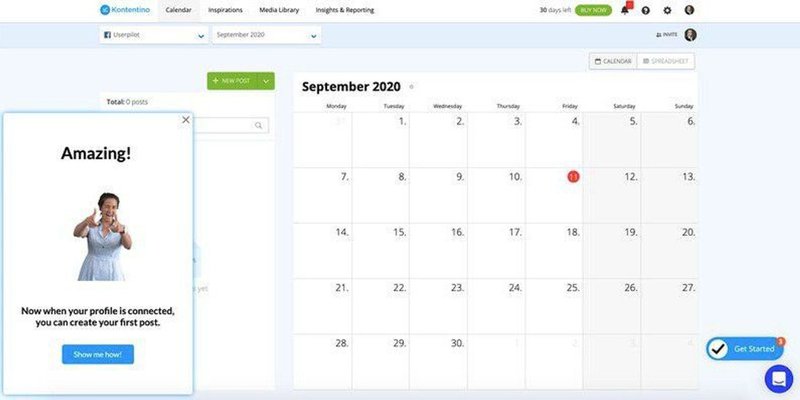
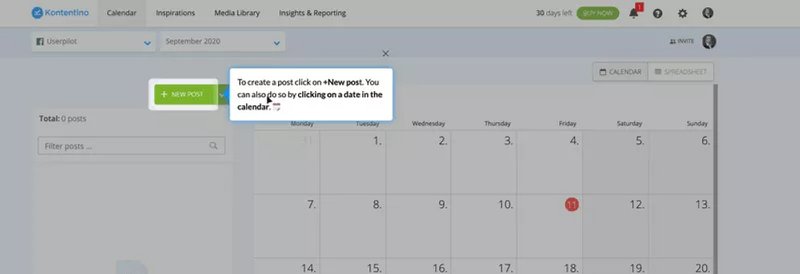
The walkthrough then drives users toward two specific activation milestones: linking a social media account and scheduling their first post. Both steps use driven actions rather than passive instruction:
Completing the first milestone triggers a celebratory message that marks the moment the user first experiences the product’s value:
The second walkthrough, scheduling the first post, also follows the same use of contextual guidance and driven actions.
2. Rocketbots: Driving users to the aha moment (15% to 30% activation, 300% MRR growth)
Rocketbots had a problem: their users weren’t connecting messaging services to their inbox fast enough, which meant they weren’t reaching the product’s aha moment. To fix this, they transformed their entire onboarding flow.
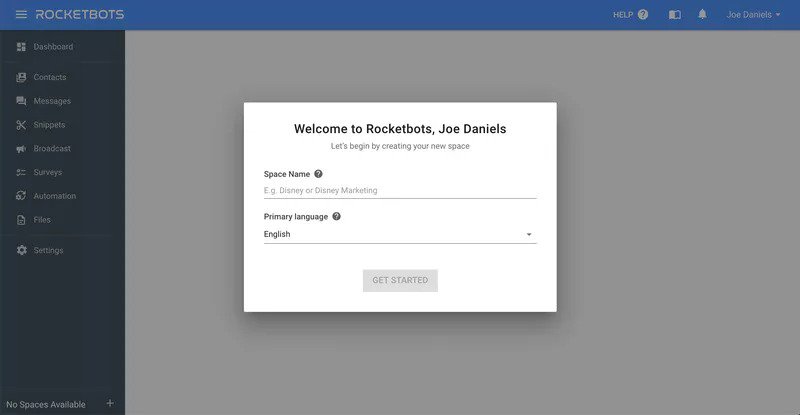
First, new users land on a welcome screen that requires them to create a space.
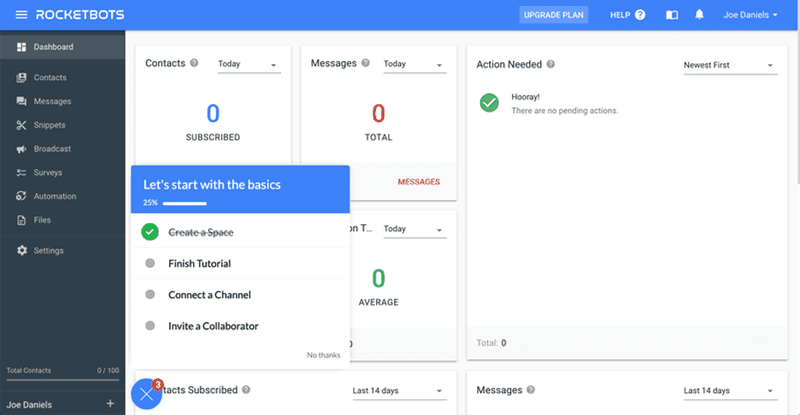
Then, an onboarding checklist gives the user a clear view of what’s left to do, removing any uncertainty.
The tutorial walkthrough uses tooltips to show users the buttons they need. Personally, I’d use driven actions to ensure users connect a messaging service as part of the process, but the button placements within the tooltips still require users to be attentive.
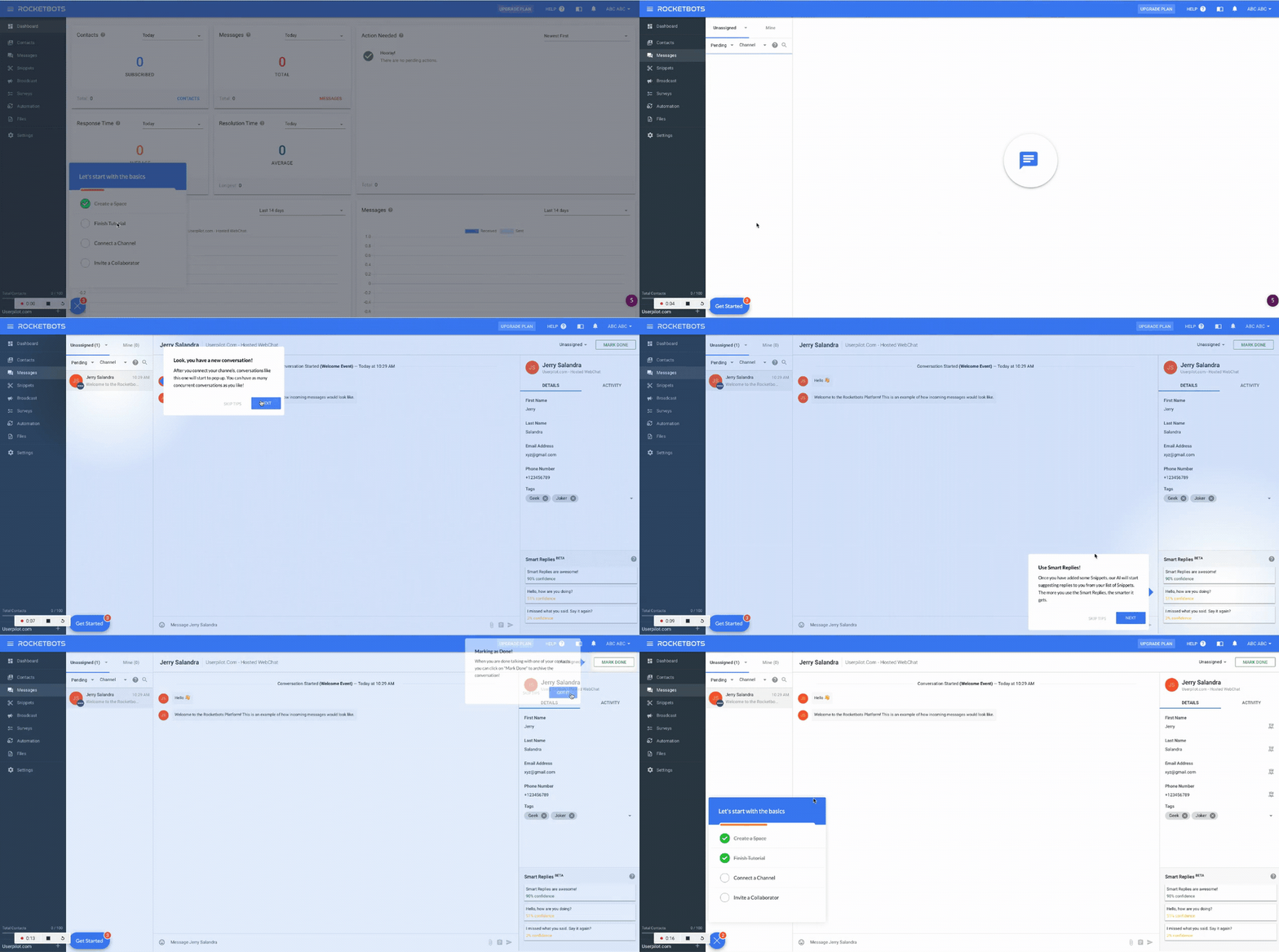
Finally, users are to connect a messaging service to complete the checklist.
The result? Activation doubled from 15% to 30%, conversion hit 5%, and MRR grew 300%. All from a walkthrough that answered one question: how do I connect my first service?
3. Attention Insight: Milestone-driven activation (+47% activation rate)
Attention Insight had a solid heatmap analysis product and a one-click trial signup. The problem was user activation: people were signing up, looking around, and leaving before completing the setup that would have demonstrated the product’s value.
They did what I would: rebuilt the onboarding flow around activation events using driven actions. By the end of the first walkthrough, users had already set up their first heatmap and were ready for the next activation event: defining “Areas of Interest.”
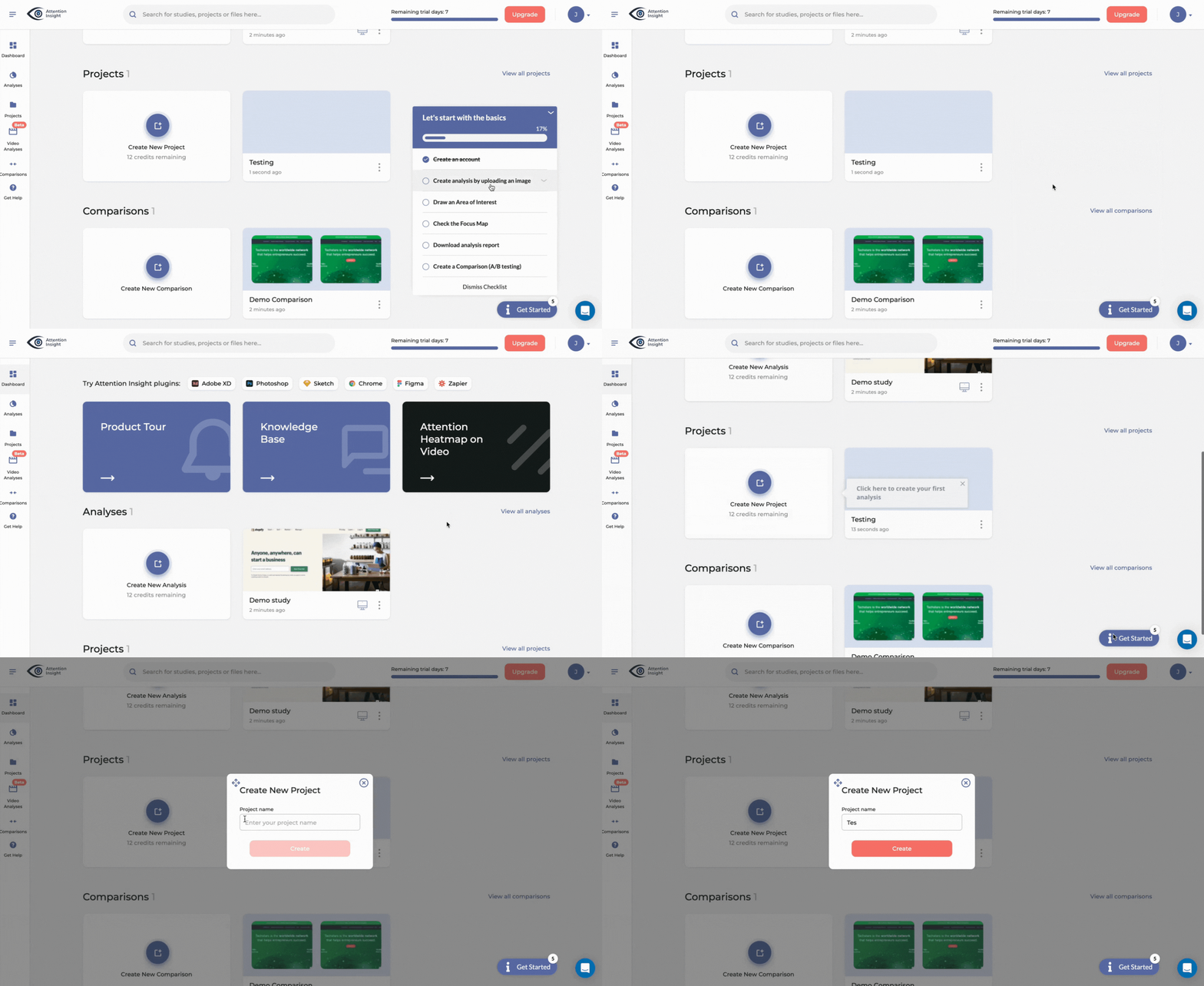
Activation rates jumped 47%. 69% of users now complete the key onboarding steps. The change was purely in how the walkthrough was built: driven actions instead of passive prompts; one outcome in place of a full feature overview.
4. Kommunicate.io: Contextual guidance that closes the feature discovery gap (+3% feature usage)
Kommunicate.io had a different problem: users kept requesting customization options that already existed on their chat-based support tool.
They accurately diagnosed the problem as a discovery problem and built a walkthrough to show users what they needed to know. The walkthrough only appeared in context when users were ready for it, rather than upfront.
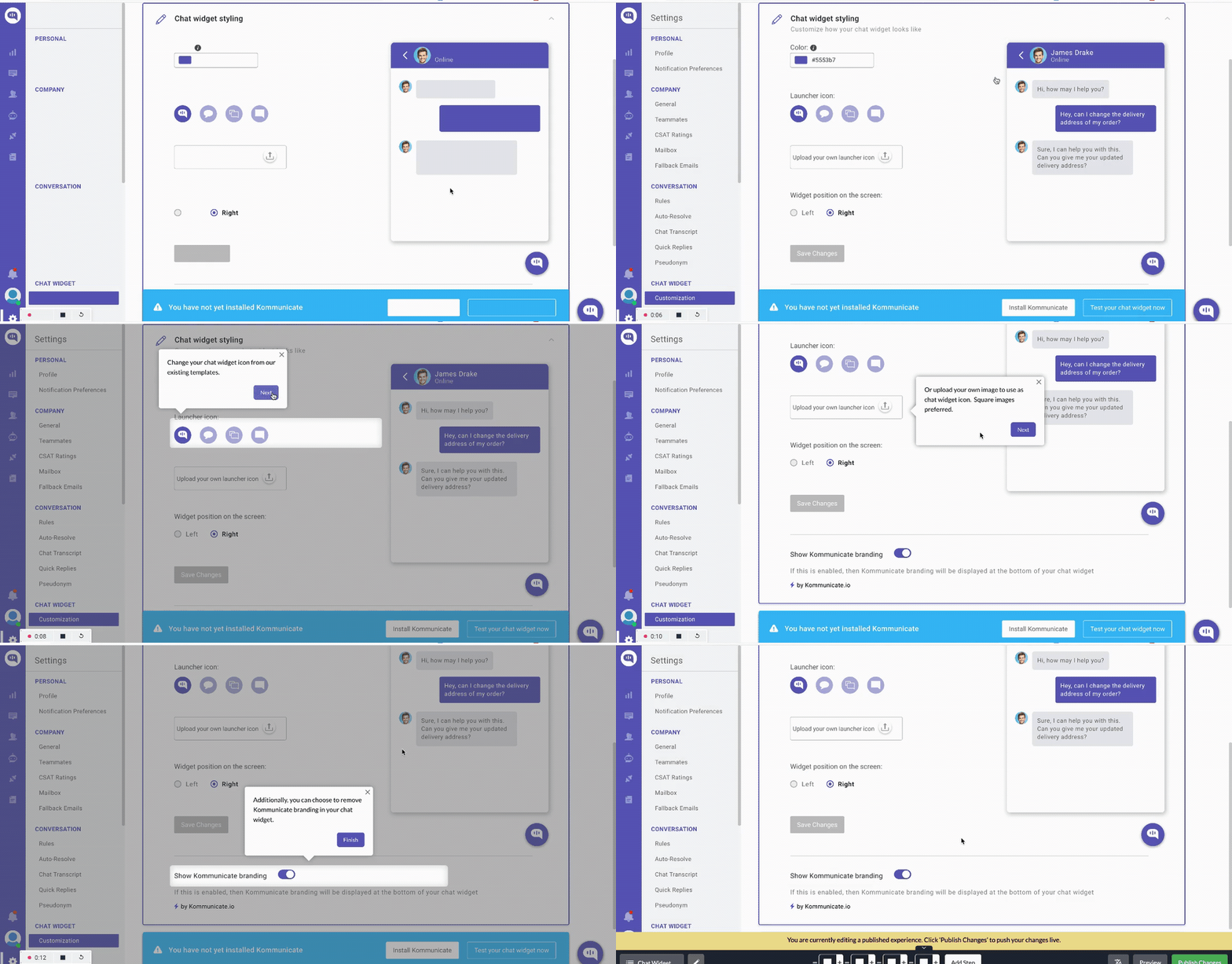
Here’s how the project’s team lead described their result:
“Since the introduction of feature adoption cues, 86% of people have completed the chat widget customization goal. This translated into a 3% increase in the feature’s usage. It’s a substantial increase for us. Even if it’s just a 5% increase, it then translates into a 2-3% increase in revenue, which has a substantial impact on our MRR.”
5. RecruitNow: Walkthroughs as a 24/7 self-service support layer (1,000+ training hours saved)
RecruitNow, an applicant tracking system, hit a CS scaling problem fast: onboarding new customers and localizing support for European expansion was consuming hundreds of hours of face-to-face training per month.
To fix this, they replaced their synchronous training system with an interactive walkthrough. They also provided a resource center of video tutorials and automated localization.
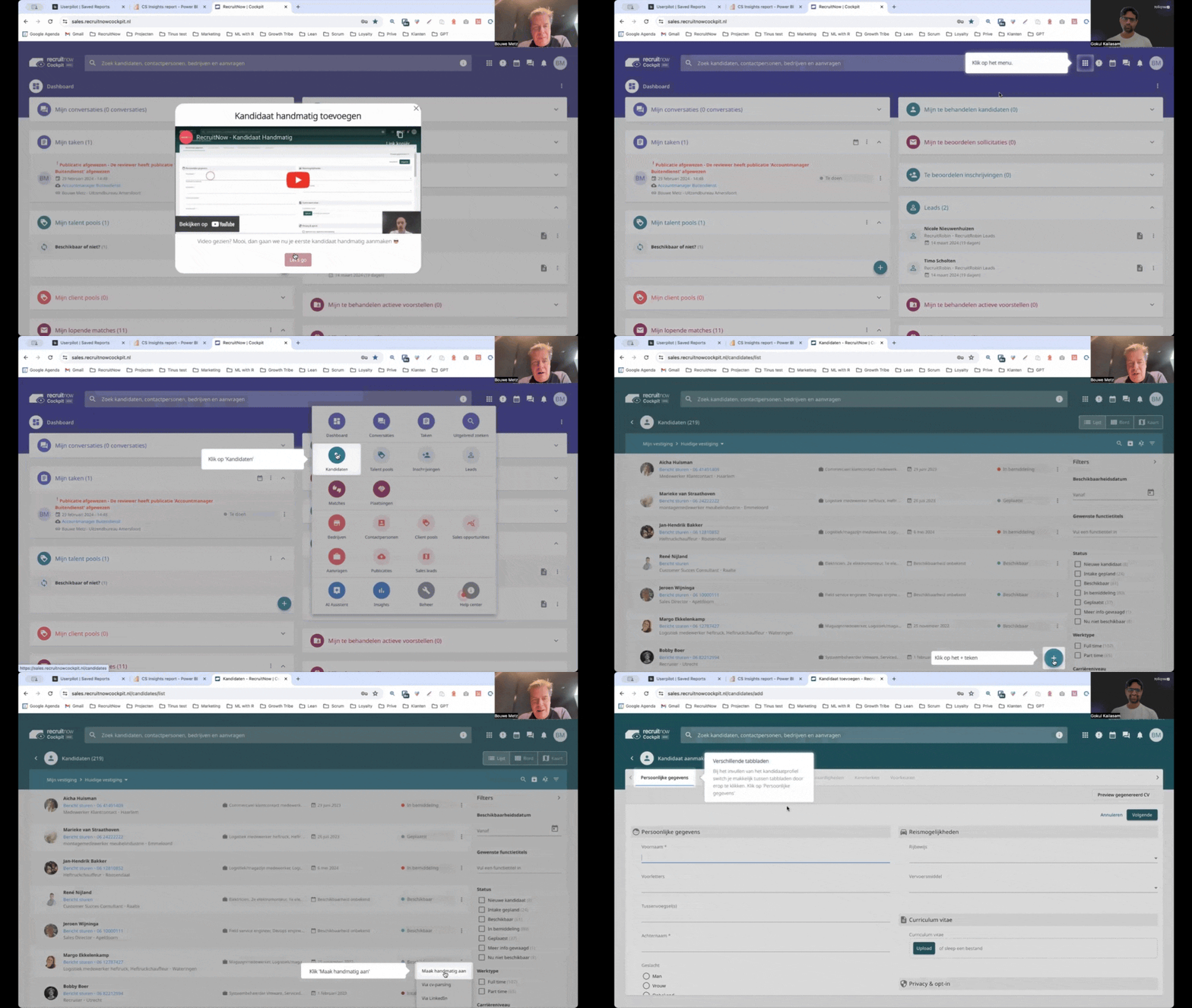
The result was a 24/7 self-service support layer that took over their training needs. Their Customer Success team could now focus on high-touch requests that truly required their attention.
How AI is changing who builds interactive walkthroughs
The AI era is changing the way we build and use software. In fact, two major shifts have happened that require you to rethink your onboarding strategy.
AI as a builder
Remember the tour maintenance problem discussed earlier? It’s much worse today than it ever was, as AI tools have massively reduced product development and shipping times.
Despite shipping a product growth platform ourselves, we’re not exempt from the problem.
As our CEO at Userpilot, Yazan Sehwail, frames it:
“As producing and building features become a lot cheaper, instead of every quarter, you’re releasing one or two features, now you’re releasing 7, 8, 9. It becomes even harder for product teams to manually have to track each one and understand usage for each one.”
At Userpilot, we responded to this by creating Lia, an AI agent within the Userpilot software that builds interactive walkthroughs for you based on your stated goal (improving activation, reducing trial-to-paid drop-off, lifting adoption of a specific feature, etc.).
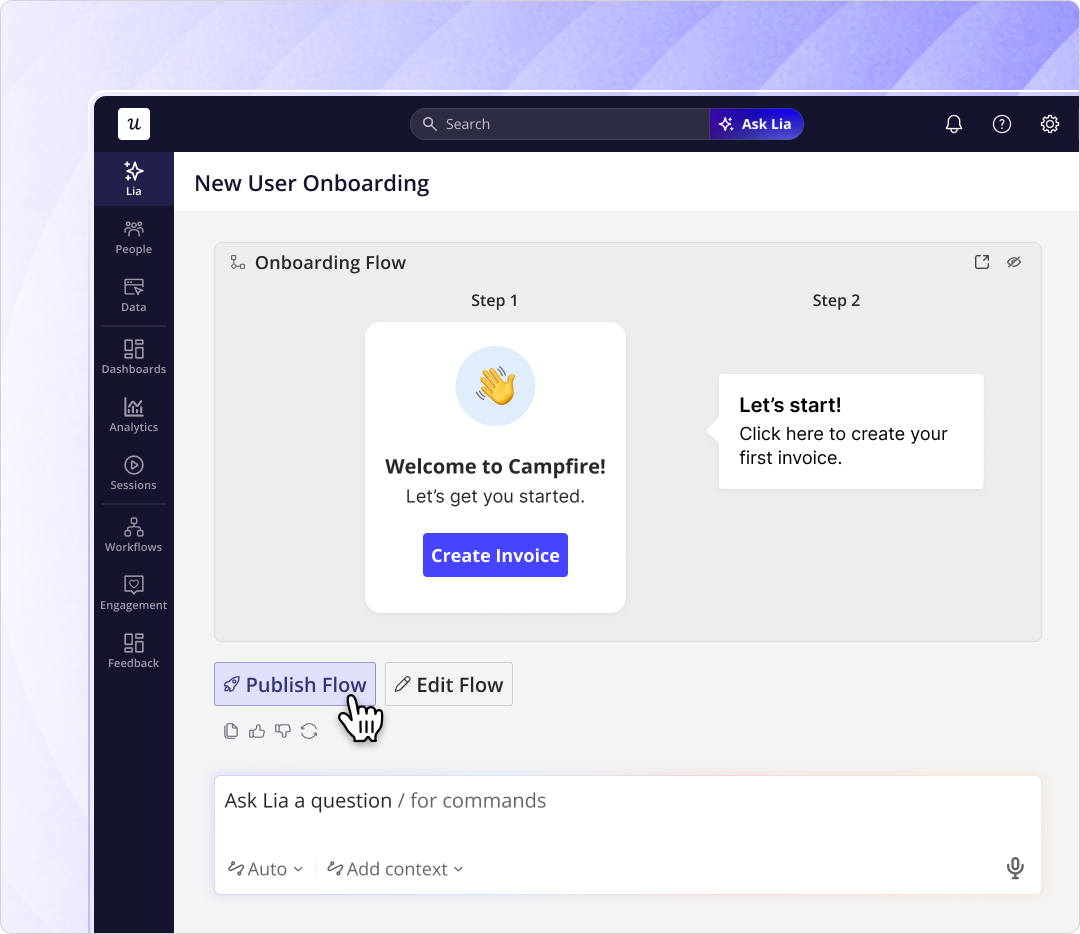
Whether you’re using Lia or something else, if your product team is shipping faster due to AI-assisted programming, you must respond by building walkthroughs just as fast.
AI agents as product users
AI agents are changing the way we use software. Every software provider is racing to provide APIs or MCP connections that enable AI agents to navigate and operate their product.
Even among the humans who use your software directly, many now prefer to ask their favorite AI chatbot to provide software usage instructions. This means your onboarding approach must change.
I like to think of this as a design problem. The design question is no longer “how do we teach this user to use our product?” but “how do we help this user reach their outcome, whether they’re navigating directly or working through an agent?” The onboarding path is no longer a single linear sequence.
For our CS team at Userpilot, the answer has been to build a less reactive onboarding system. I used to get pulled in every time onboarding broke; not anymore.
Our onboarding systems now rely on walkthroughs, Lia-generated flows, and a robust resource center to make reactive CS intervention unnecessary. We’re not there yet for every use case, but we’ve come a really long way.
Turn your onboarding into an activation system
If I were building a walkthrough from scratch today (for a new feature or product), my first question would be: What does the user need to do right away to reach activation?
Every design choice and decision will rest on the answer to that question.
When you’re ready to begin, Userpilot gives you everything you need to build interactive walkthroughs that improve onboarding: a no-code walkthrough builder, Lia for AI-assisted flow creation from a goal prompt, and analytics that track activation events that predict retention rather than walkthrough completion rates.
About the author