Let’s explore how Userpilot and Mixpanel compare when it comes to performing user analysis.
- Userpilot is a product growth platform that drives user activation, feature adoption, and expansion revenue. It also helps product teams collect user feedback, streamline onboarding, and gather actionable insights from analytics.
- Mixpanel is a powerful product analytics tool that allows product teams to track and analyze in-app product engagement. It allows your team to see every moment of the customer experience clearly, so you can make changes that work.
Mixpanel is a popular analytics platform, but Userpilot’s unique features and capabilities make it a better choice for companies seeking more specialized insights and streamlined user experience management. Here are the main advantages of using Userpilot over Mixpanel:
- Actionable analytics: With Mixpanel, you can only get half of the job done, which is getting insights. Meanwhile, you go from insights to actions without switching tools in Userpilot. Think of identifying at-risk users and targeting them with personalized support.
- Advanced user segmentation: Regarding targeted segmentation, Userpilot has a broader array of attributes, like in-app behaviors and demographics. These features ensure more precise insights for tailored user experiences.
- Seamless user insights integration: Unlike Mixpanel, Userpilot’s integrations extend beyond analytics, allowing you to connect qualitative insights from user feedback, surveys, and NPS scores directly into the platform.
- User-friendly and simple: Userpilot has a more intuitive interface and guided setup, making it accessible even to users with limited technical backgrounds.
Get a Userpilot demo and drive your product growth code-free.
Userpilot vs Mixpanel for user analytics at a glance
| Feature | Userpilot | Mixpanel |
|---|---|---|
| Actionable analytics | ✅ Go from insights to actions all within one platform with analytics and engagement capabilities | ❌ Analytics features only |
| Autocapture | ✅ With an option to turn autocapture of events on for the staging environment only – this will allow users to test out the element capture restrictions | ✅ Supports autocapture of common events, but you must explicitly enable it in the code configuration |
| Funnels | ✅ Supports using content engagement events like tooltip interaction, survey answer, etc., as filters via Segments | ✅ Measures conversion through a defined series of events over a time window. Not support using qualitative data as a filter out of the box |
| User Paths | ✅ See a number of steps both before and after a specific event with various filters and breakdown options | ✅ See the most common paths taken after (or before) a specific event |
| Cohorts (or Retention Report) | ✅ Presents retention as a week-by-week (or day/month) table and trend line. You can filter by segment or property, and even measure company-level retention | ✅ Provides a visual retention curve and a detailed table by cohort, with options to switch between percentage or absolute numbers |
| Dashboards | ✅ Use templates or create custom dashboards from analytics reports by dragging and dropping widgets | ✅ Allows combining multiple reports in one view (dashboard) |
| Session Replay | ✅ Records and replays user sessions in-app with the ability to create notes, mark bugs, comment, and share clips | ✅ Built-in session replay with qualitative playback of user sessions |
| NPS Surveys and Analytics | ✅ Built-in NPS surveys for user feedback with a dedicated NPS dashboard (score trends, response breakdown) | ❌ No native NPS survey feature in platform docs |
| Custom Surveys | ✅ Supports custom in-app surveys for feedback | ❌ No built-in survey/feedback collection feature |
| User Profiles | ✅ Available out of the box. Profiles show user details (ID, country, sign-up date, etc.), top events & pages, session history (with replay links), NPS/survey responses, and content engagement attributes (user data enrichment) | ⚠️ Exists but must be configured manually. It lacks native integrations for qualitative context – no built-in surveys or NPS tracking, and session information isn’t captured unless you use additional features |
| Data Security & Compliance Certifications | ✅ SOC 2 Type II, ISO 27001, HIPAA, GDPR + encryption, VPC isolation, backups, data-deletion API, advanced security controls (SSO, roles) | ✅ SOC 2 Type II, ISO 27001, ISO 27701, encryption in transit and at rest, user-permission access control, privacy/GDPR compliance support
⚠️ Do note that it recently suffered a security breach that exposed some customer identifiable information and analytics data for a subset of users, including its enterprise client OpenAI. |
Try Userpilot Now
See Why 1,000+ Teams Choose Userpilot

What is user analysis?
User analytics is the process of capturing and analyzing user behavior within your product. This helps to understand how different segments behave in-app, identify friction points and drop-off areas, and make data-driven decisions.
Must have features for user analytics tools
Choosing the right user analytics tool is important for understanding your customers’ behavior and optimizing their journey. Here’s what you should look for:
- Event tracking: The chosen tool should come with the ability to set up events for monitoring in-app behavior. It should be capable of tracking both client and server-side events so you can have a better understanding of how users interact with your product.
- Analytics dashboards: These include no-code reports and dashboards that you can easily build to draw meaningful insights from collected data. It’s also highly recommended that these dashboards include advanced segmentation filters, allowing you to filter data for a better understanding of specific user groups.
- Surveys: In addition to behavioral data, it’s also necessary that the chosen tool is capable of collecting and analyzing feedback. Such direct data from customers can help you understand customer expectations and work on improving your product.
Userpilot for user analytics
At Userpilot, we built our user analytics around a simple idea: You shouldn’t have to jump between tools to go from understanding behavior to actually changing it.
You analyze events, sessions, and trends, then act on those insights right away with in-app flows, prompts, or emails. All in the same workspace. After the initial setup, product teams can run this loop on their own without constant engineering help.
And as analytics becomes more operational and closer to real user data, safety matters even more. This is why, especially in contrast to Mixpanel’s recent security incident, we put a strong emphasis on access control, environment separation, and protecting sensitive user information by default.
User interaction data capture in Userpilot
- Autocapture with environment control: You can auto-capture UI interactions with environment-level control. This allows you to turn on autocapture only in staging to test element restrictions before pushing anything live to production.
- Session-level analytics with permissions control: Sessions are a first-class analytics object in Userpilot. You automatically collect a “Session started” event with duration and event count metadata, and you can trend total sessions as a native metric.
- Session replays: Comes with various filters so you can easily find the exact session you want to see. You can also leave notes, comments, mark bugs, skip inactivity, etc., with Userpilot session replays, so collaboration is easier than ever.
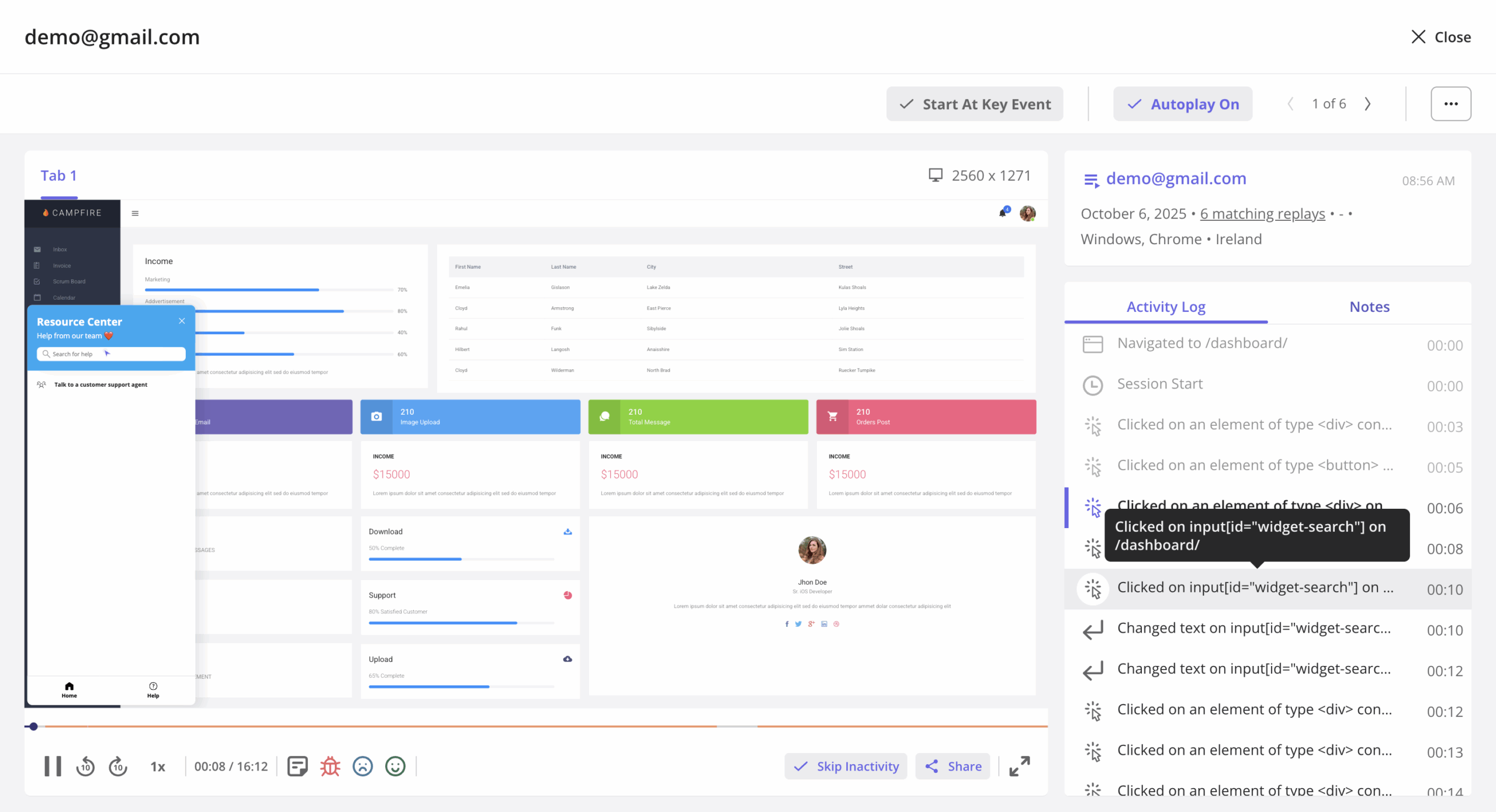
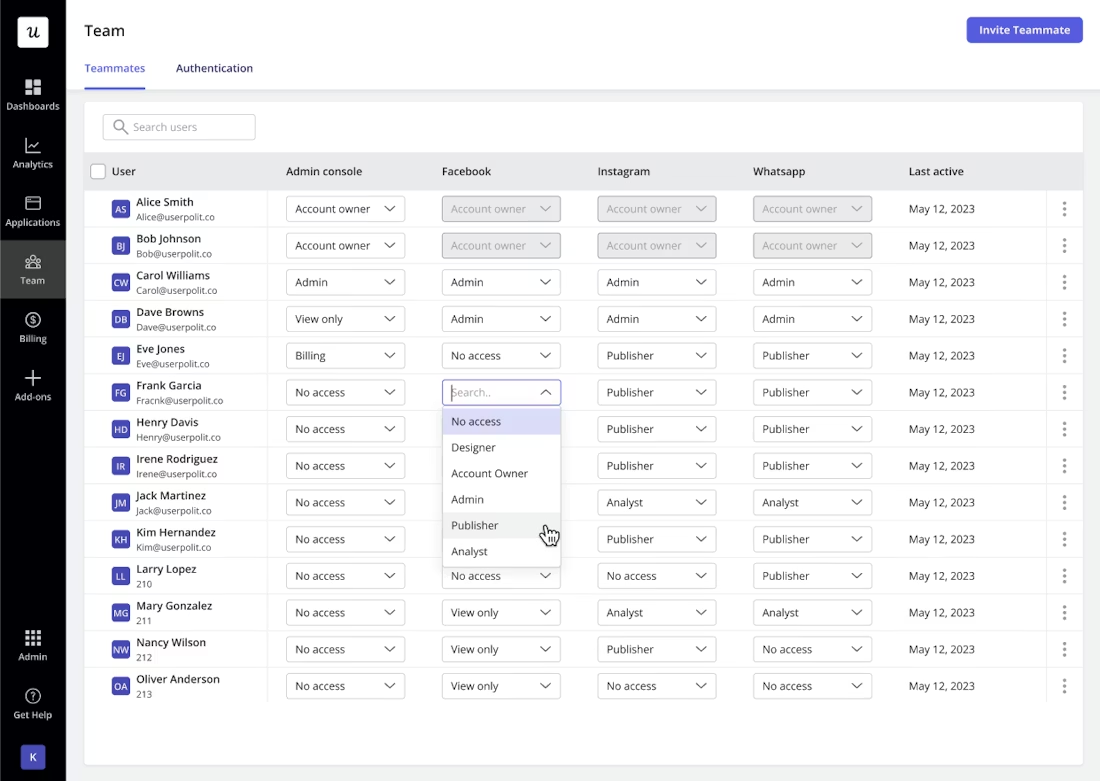
Access to session replays is role-based, so you can control exactly who is allowed to view replays inside your organization.
- Data integrations: Userpilot has native integrations with popular analytics tools like Amplitude, Mixpanel, Google Analytics, and more. This makes it possible to sync your event data across multiple tools within your tech stack.
User analytics reports and dashboards in Userpilot
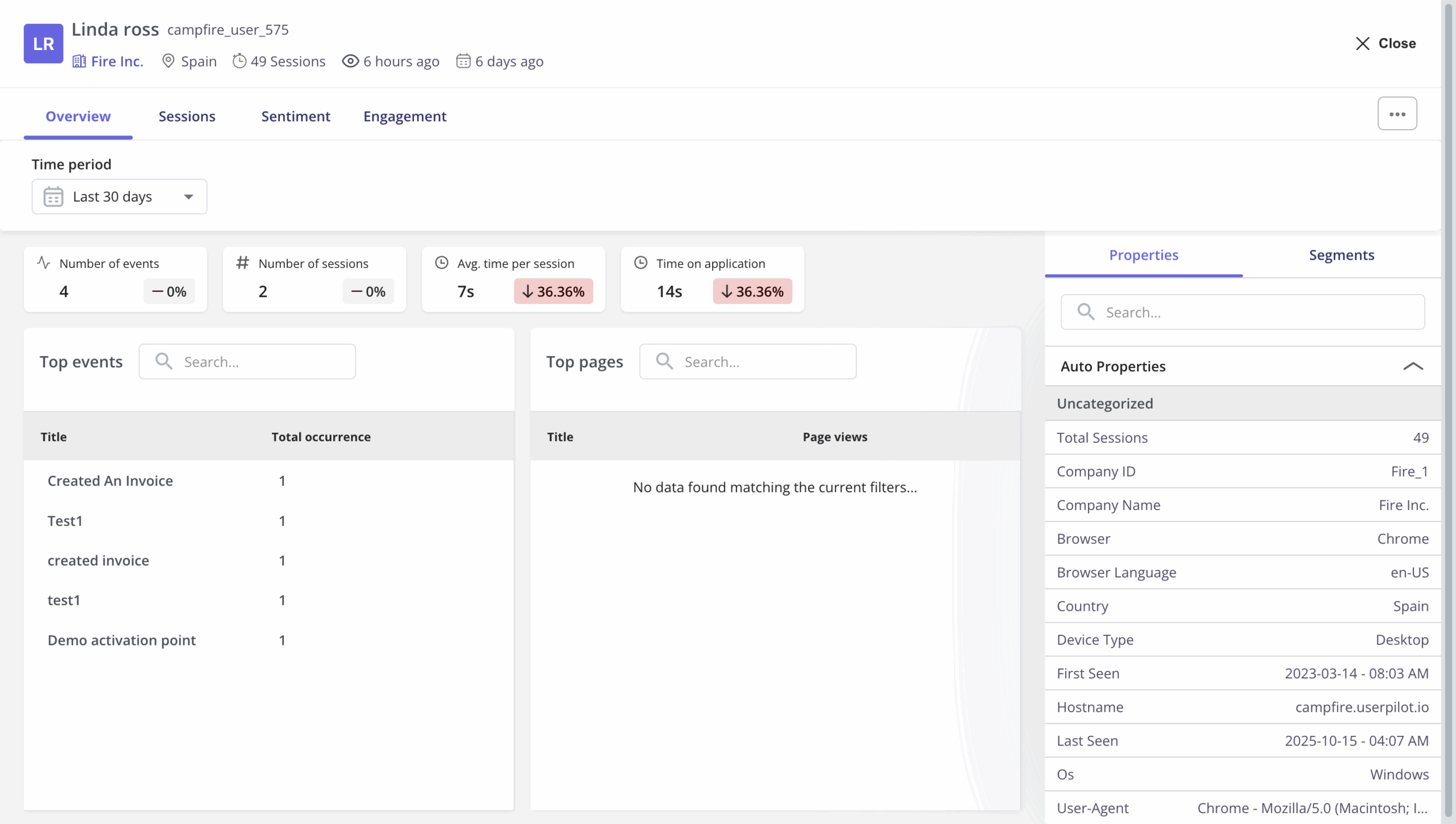
- User & company profiles with full behavioral + feedback context: Every user and company has an out-of-the-box profile that ties together top events, top pages, session history, session replays, and survey/NPS feedback. This is something that takes hours to configure if you were using Mixpanel. This is not to mention that it doesn’t include qualitative data like survey answers.
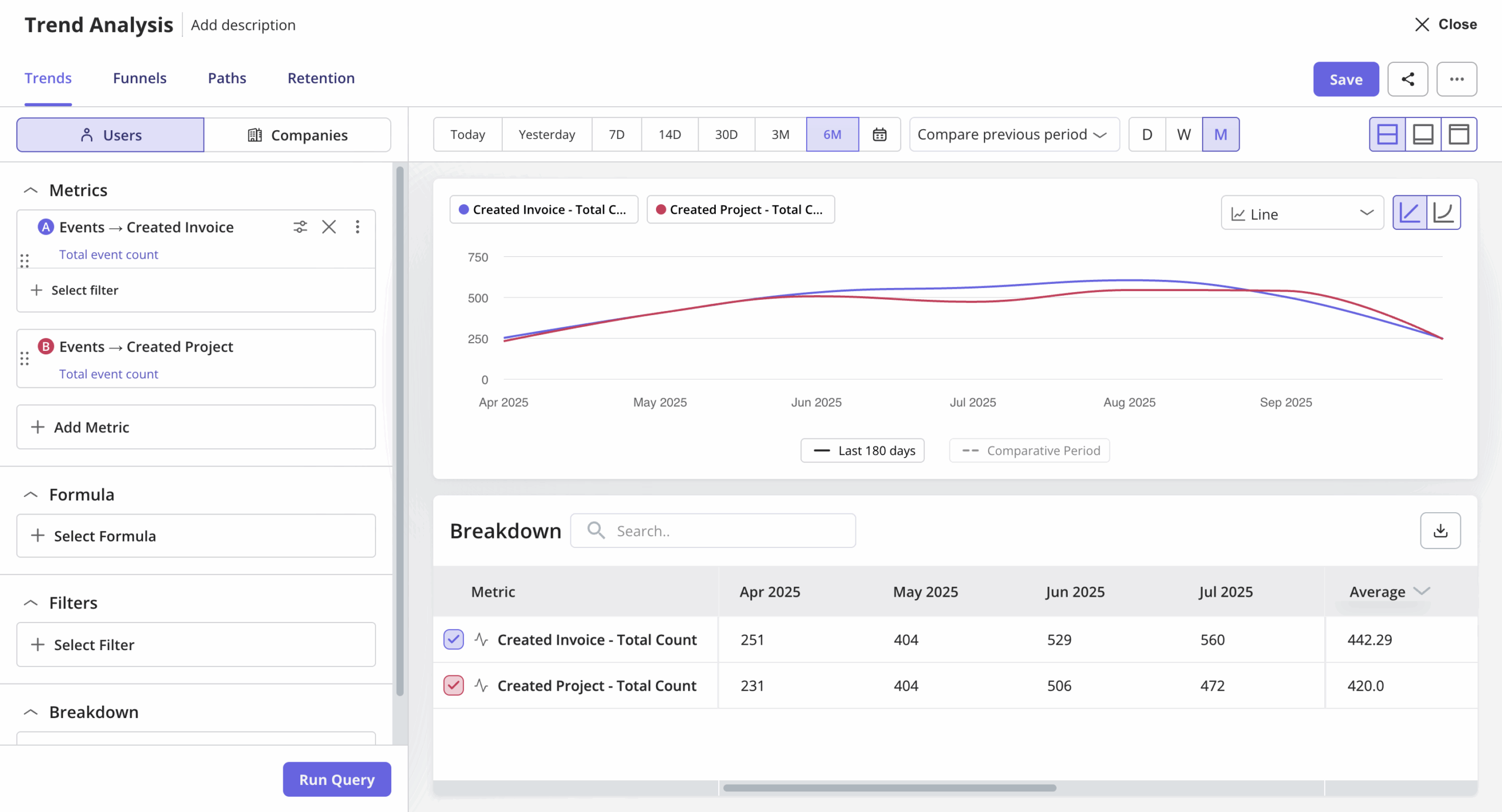
- Trends reports with formulas, breakdowns, and property aggregation: You can add multiple metrics to a single trend report and layer custom formulas on top of raw metrics while still comparing the original data side-by-side.
You can break down different metrics by different properties in the same report, and apply property aggregations like average, sum, min, max, median, or distinct count. We also add company-level trend views with “total event count” and “count per company” options for you.
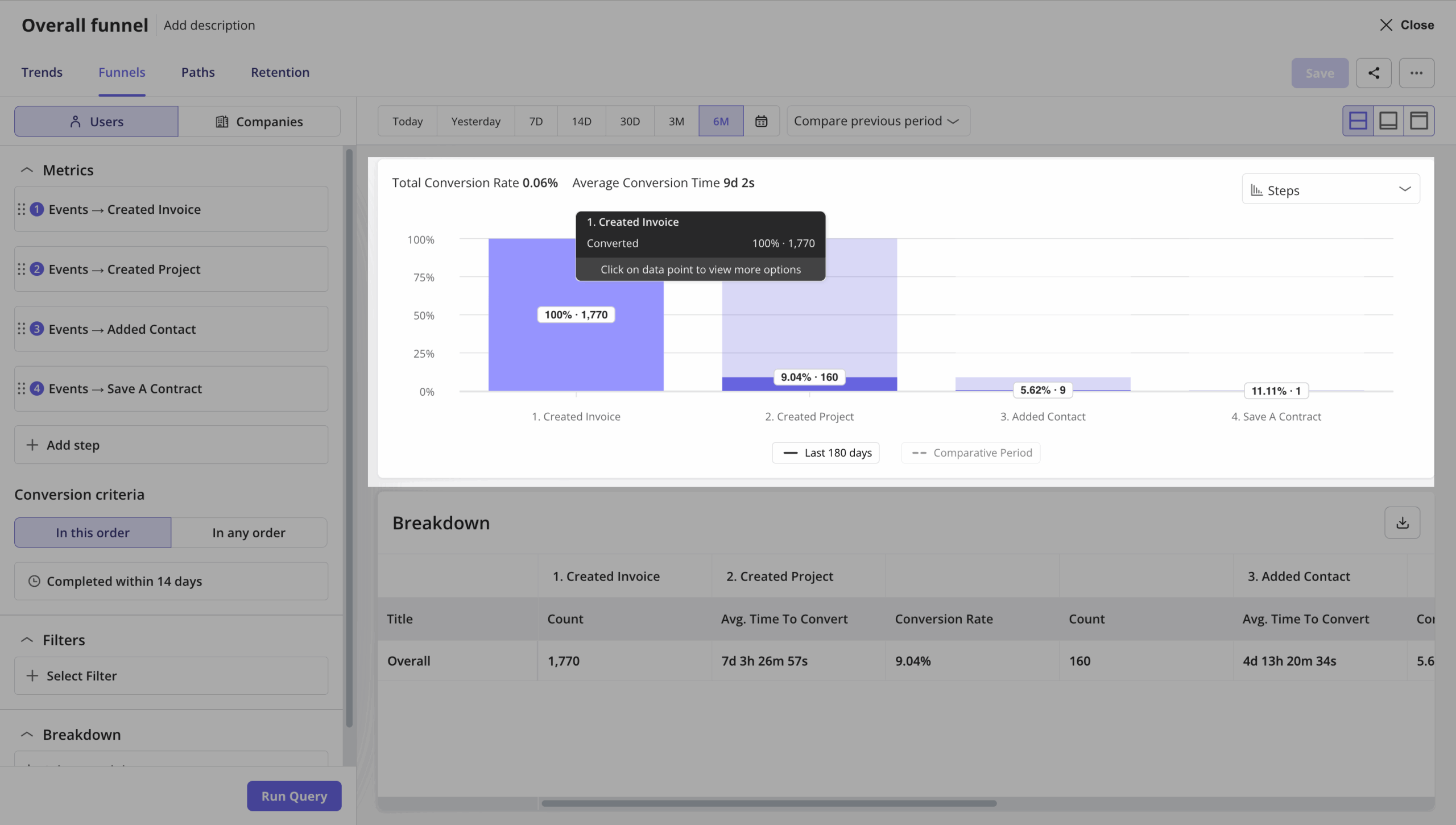
- Funnels built on events and sessions: Funnels aren’t limited to event sequences anymore. You can define conversion logic based on the number of sessions, not just clicks. This lets you analyze activation or adoption as a true usage journey. You can also filter funnels by segments inline, without rebuilding reports.
- Paths with before/after visibility around key behaviors: Path reports now show both the steps before and after a selected key metric, so you can see what actually leads users into critical actions and what they do right after. This is especially useful for diagnosing onboarding friction or feature discovery gaps.

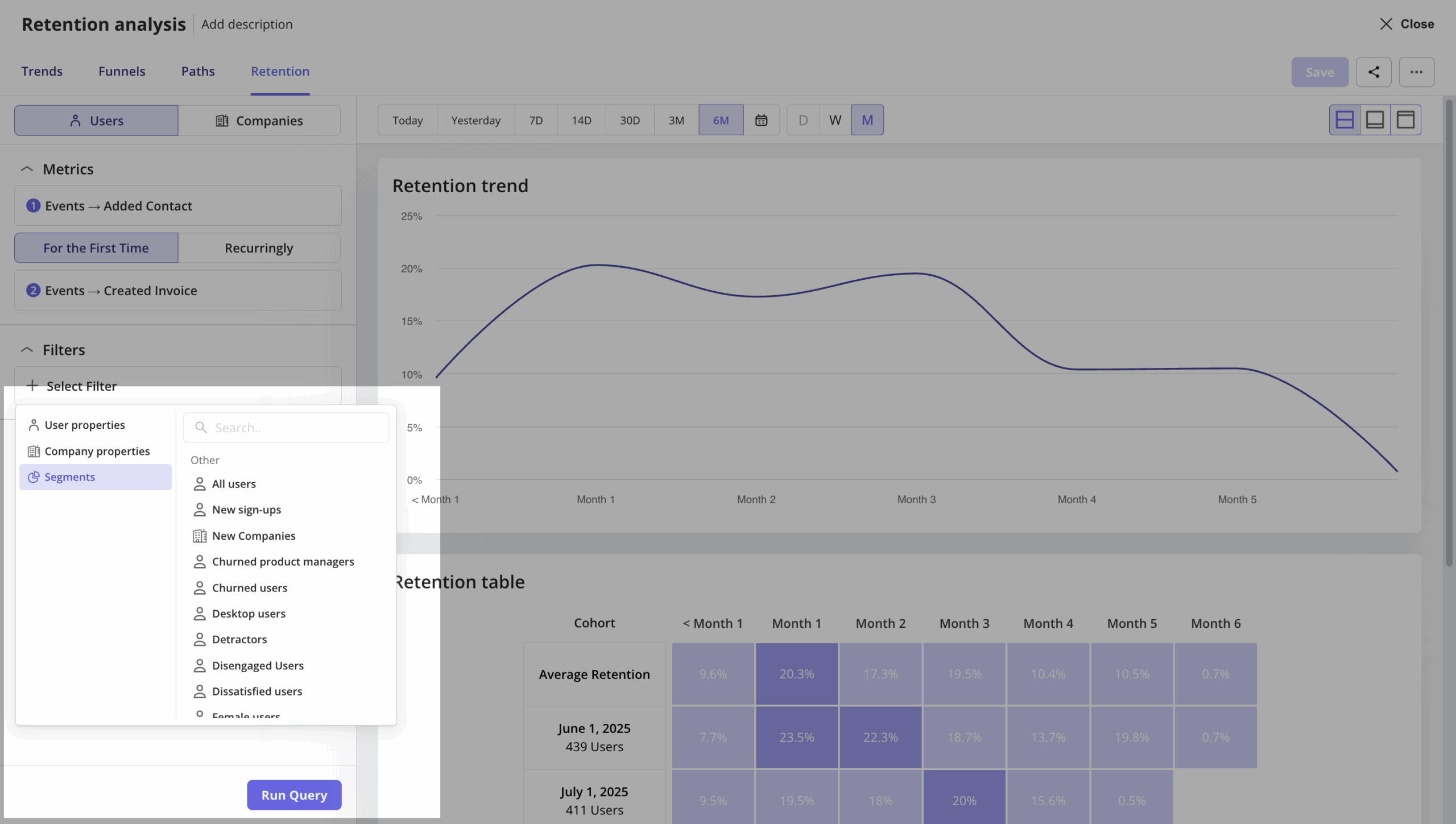
- Retention and segmentation are built into every analysis: Retention is fully segment-aware. And with Segments now available as inline filters in all reports, you can instantly compare how different cohorts retain, convert, and engage without duplicating reports.
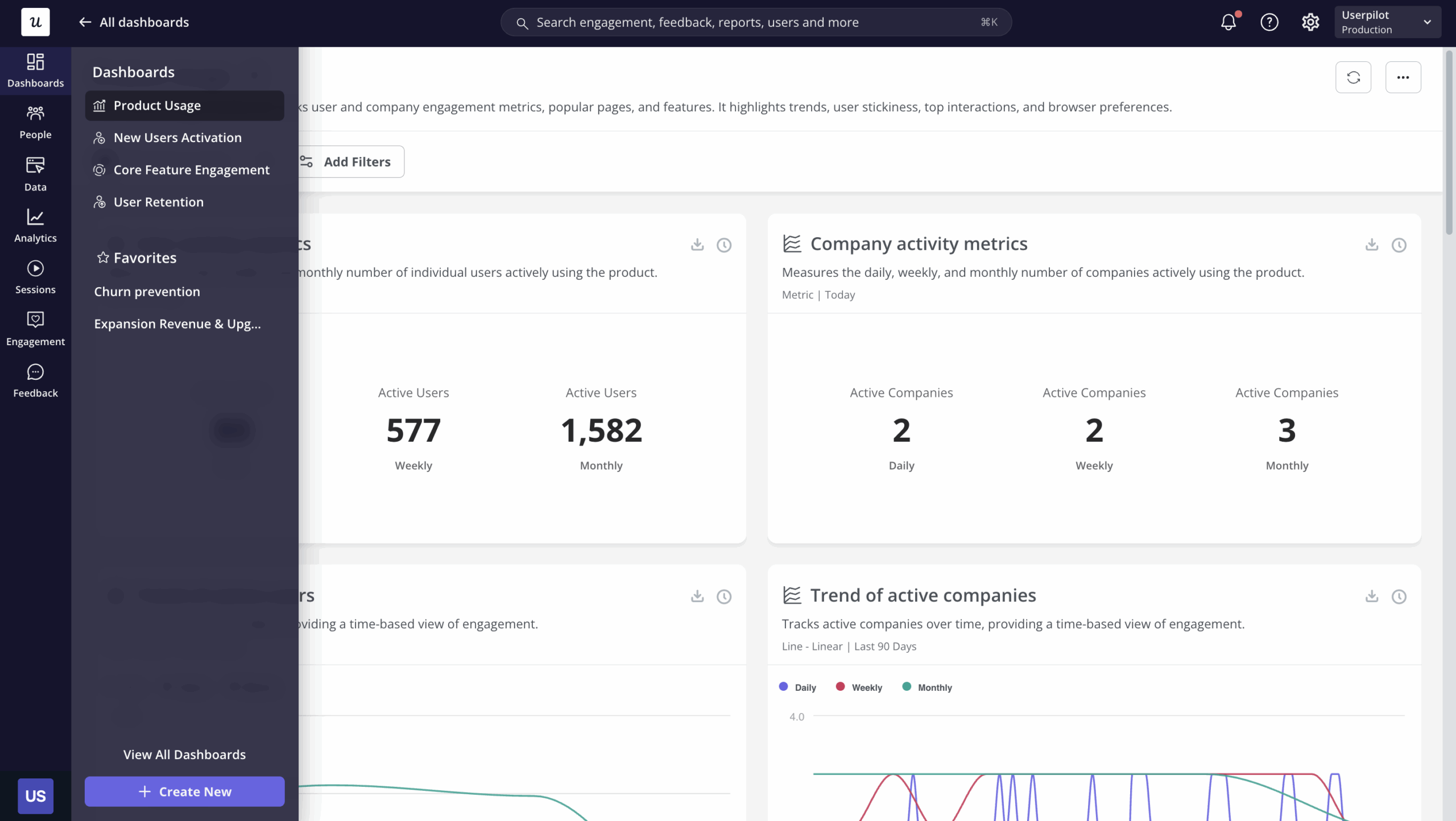
- Dashboards and report organization built for teams: Pre-defined dashboards available for main product metrics with minimal setup, so you can get user insights in minutes. You can also organize reports into Folders by project, team, or use case. This matters when analytics scales beyond one PM. Dashboards combine trends, funnels, paths, retention, and sessions so you always have a live view of product health without jumping between tools.
The exciting news is that we are going to make this entire analysis process even faster and easier for you. Our upcoming AI agent, Lia, will help you surface crucial growth insights like which segment is more likely to convert, or if your new feature adoption is looking good, and so on.
You can join our beta for the first look at these powerful AI capabilities!

User feedback data in Userpilot
In-app surveys are an effective way to collect direct feedback from users without being at the whim of their email inboxes. Userpilot’s built-in functionality lets you create surveys, translate them, and track granular survey analytics that offer additional user insights.
Here are the Userpilot features you can use when building in-app surveys:
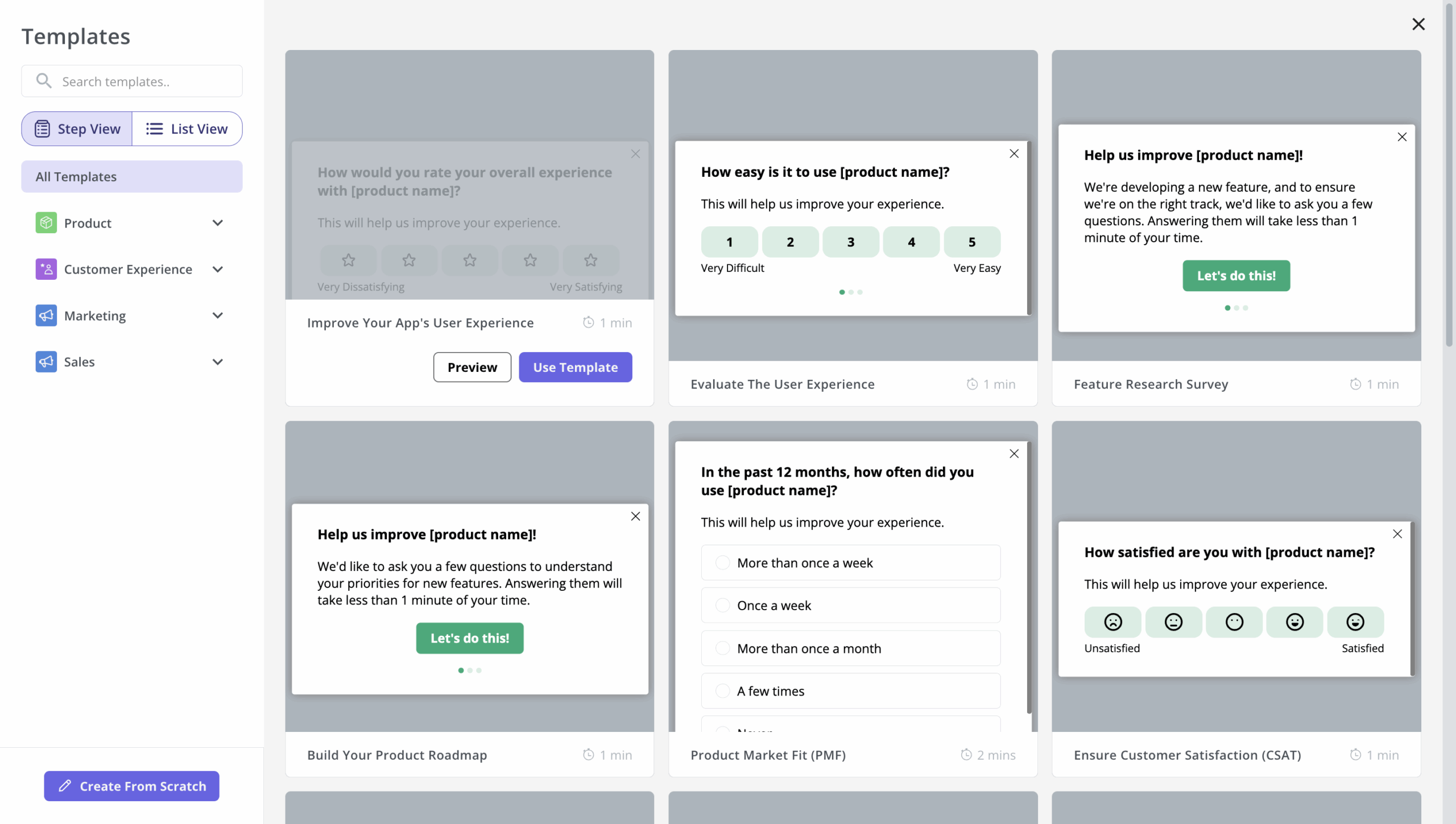
- Survey templates: Userpilot’s no-code survey builder has 14 templates to choose from. These include NPS, CSAT, and CES surveys, among others, for collecting quantitative and qualitative feedback from users. You can add a series of questions to gather valuable insights.
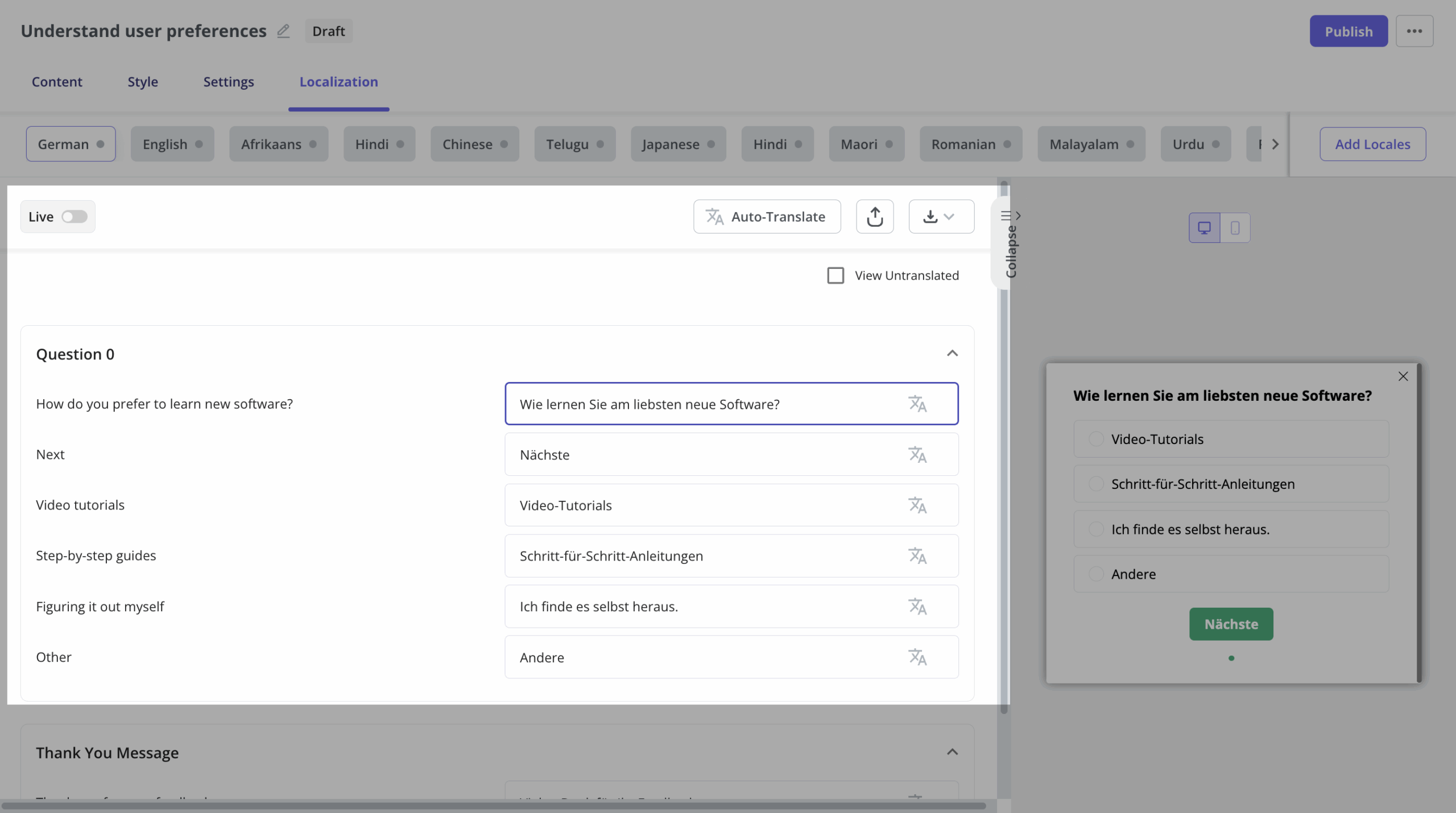
- Localization: Userpilot’s AI localization feature lets you translate surveys in a matter of minutes. All you need to do is add the desired locale and leave the rest to Userpilot. You can also make manual tweaks to translations if needed.
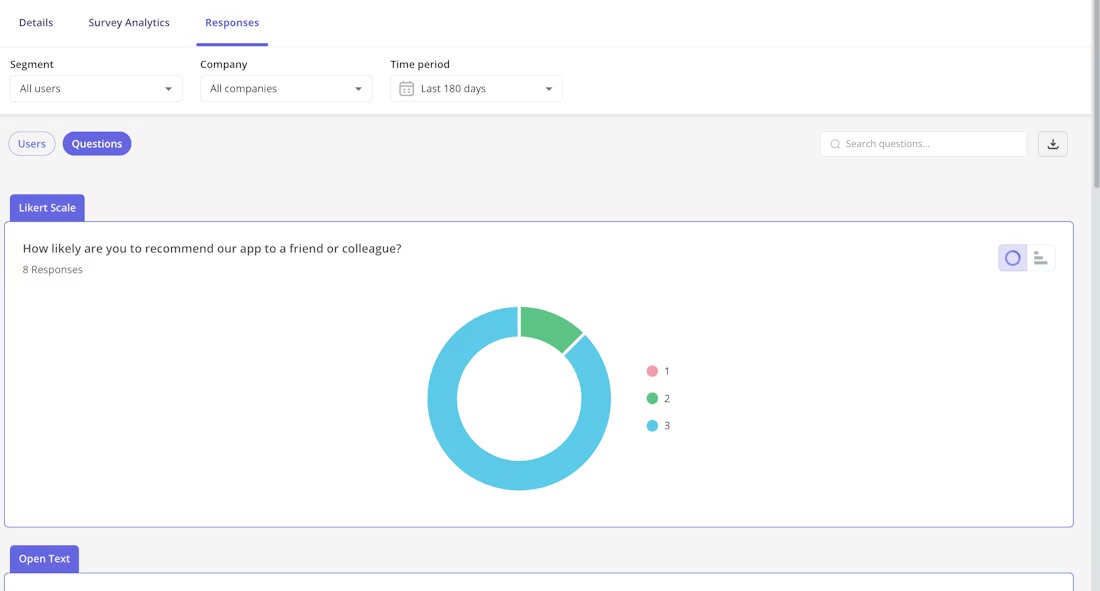
- Feedback analytics: Userpilot has detailed analytics that show what percentage of users chose a specific option, summarize the most popular choices, and let you browse through open-ended responses to extract insights from qualitative feedback.
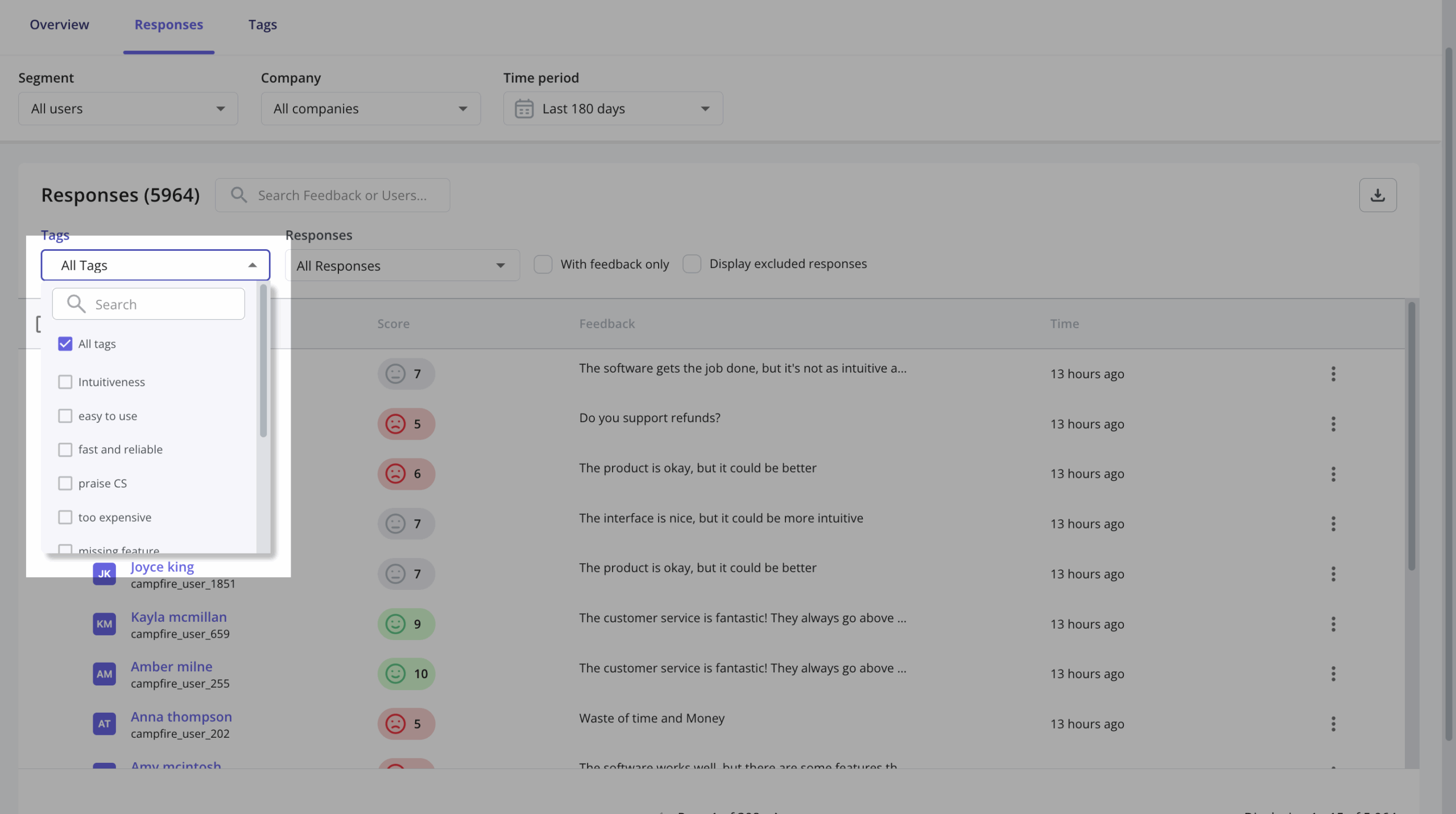
For analyzing NPS responses, you even have tags to sort answers and identify themes.

While Mixpanel Offers Great Features, Userpilot Takes Your User Analysis to the Next Level!

Mixpanel for user analytics
Mixpanel provides deep, granular, user-level analytics that can help teams build profitable products.
From my experience, it’s excellent for deep behavioral analysis, but the workflow largely ends at reporting. Acting on those insights usually requires switching tools or looping in engineering, which slows teams down.
Here are the features available for user analytics on Mixpanel:
User behavioral data in Mixpanel
- Mixpanel’s event tracking as the core data model: In Mixpanel, everything starts with events. You define what to track, send those events via SDKs, and then build reports on top. It’s powerful, but it also means most of the analytical value depends on how well engineering implements and maintains your tracking. By contrast, a lot of meaningful interaction data is available to product teams in Userpilot with far less reliance on ongoing dev work.
- Session Replay exists, but collaboration is limited: Mixpanel does let you jump from analytics reports or funnels directly into session replays (web or mobile) to see how users interacted with your product.
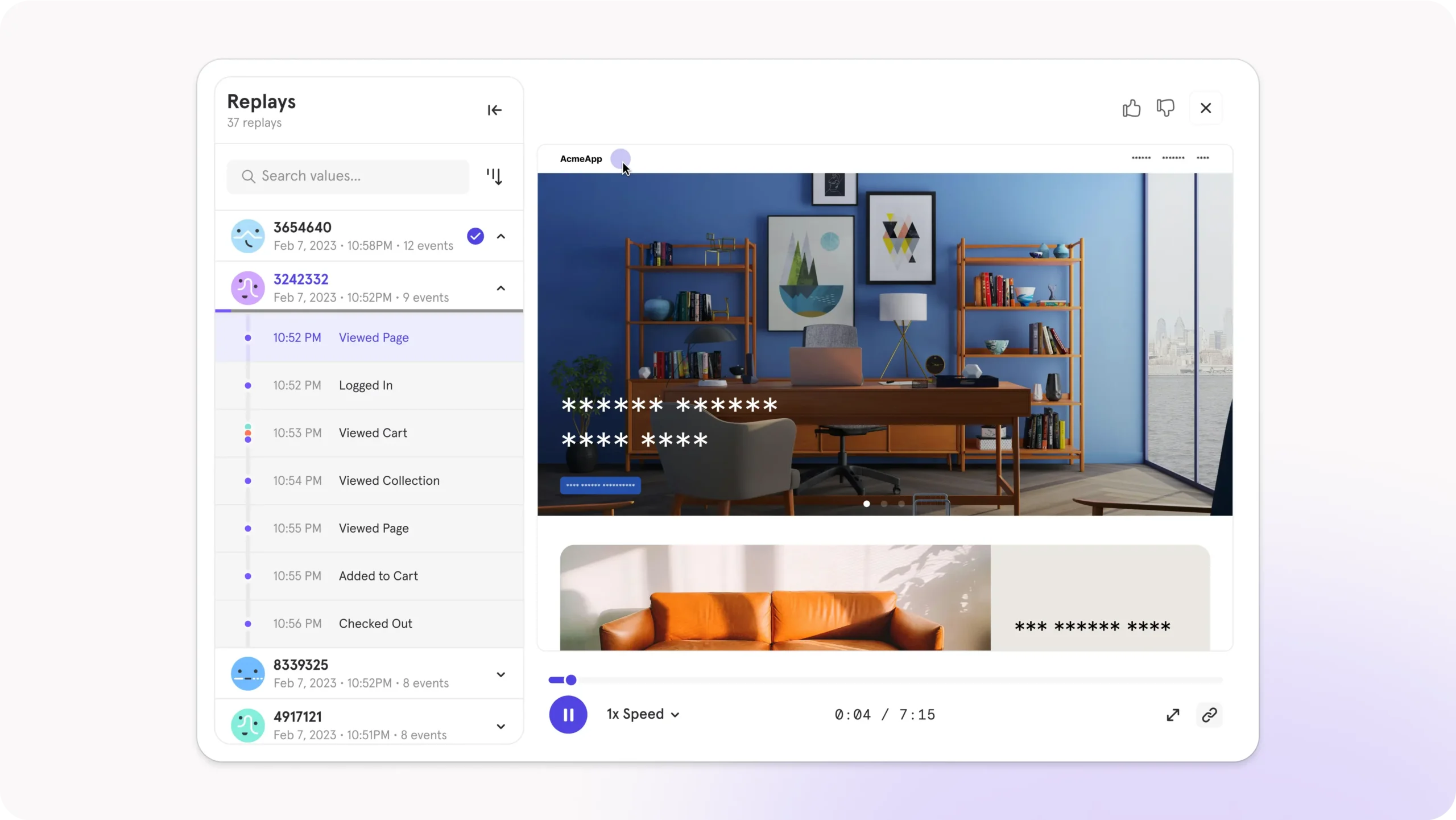
However, I found there’s no native support for collaborative workflows like marking bugs, leaving comments, or annotating sessions for teammates.
Meanwhile, at Userpilot, all of these are built as part of a truly collaborative product workflow. Product teams can annotate, act immediately, and tie insights directly to product changes.
- A/B and multivariate testing: Mixpanel provides a suite of tools for A/B and multivariate testing. Testing new forms, text, images, and workflows can help analyze hypotheses and improve the user journey. However, this is not a native feature in Mixpanel. This means you can only use Mixpanel to measure testing results, not actually carry out an experience.
User analytics reports in Mixpanel
- User profiles require setup and stay mostly metadata-driven: Mixpanel does support user profiles, but they’re not truly “product-ready” out of the box. You need engineering to wire identity resolution and property updates. And what you mostly get is metadata (properties + past events).
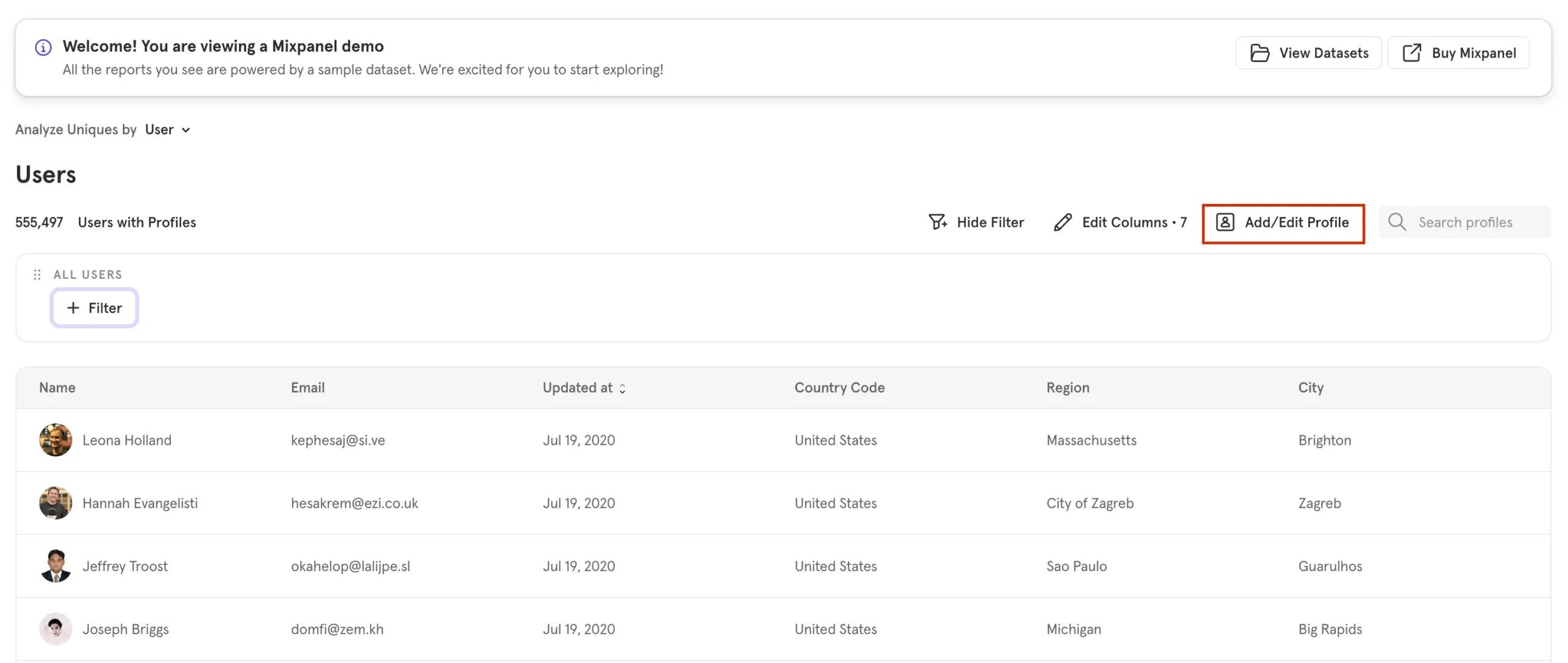
In Userpilot, user profiles are immediately actionable: you see sessions, top events, survey responses, and feature usage, and you can trigger in-app actions directly from that context.
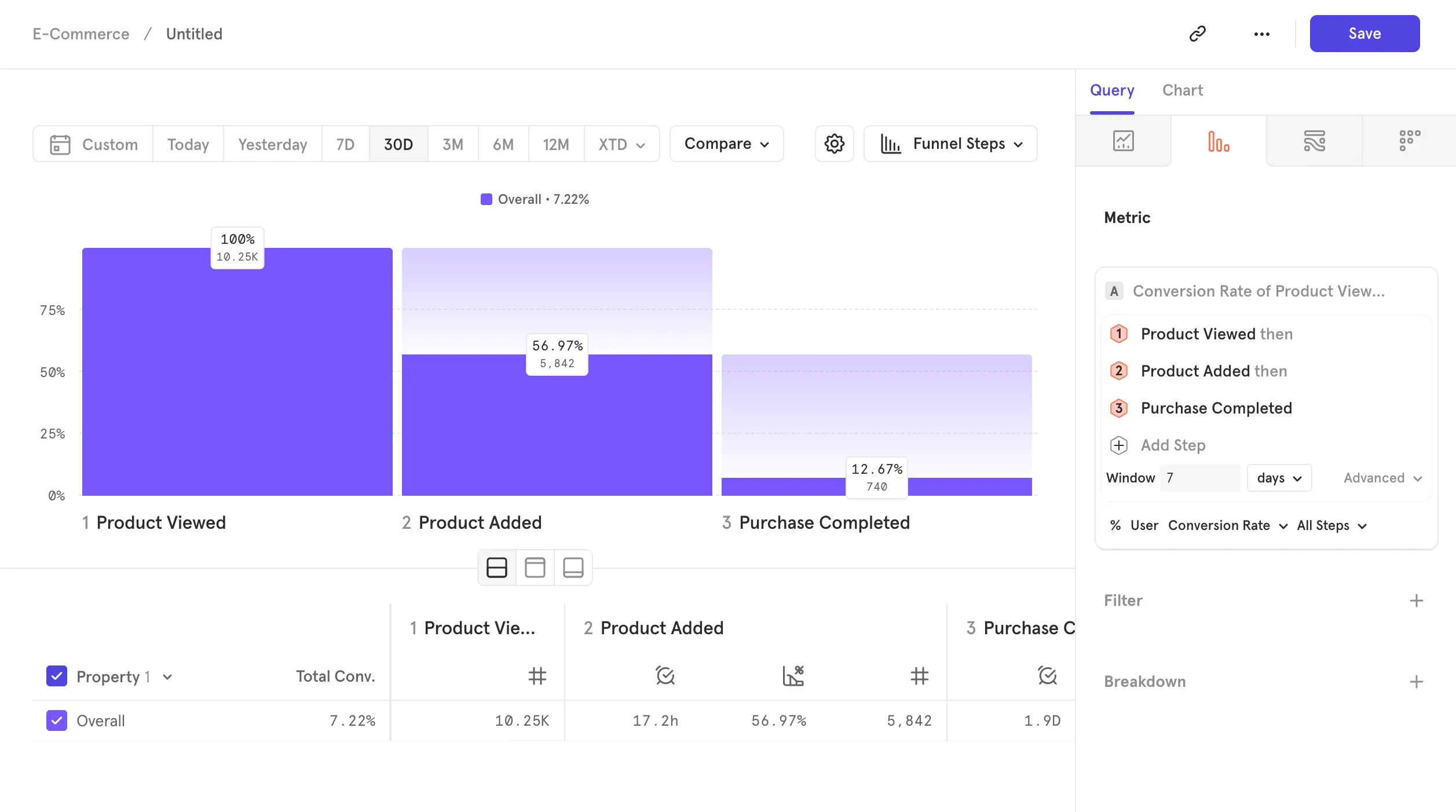
- Funnels, retention, and cohorts for behavioral analysis: Mixpanel is very strong at visualizing funnels, retention curves, and cohort behavior over time. I’ve always seen it as a robust analysis layer for answering “what happened?”.
In-app surveys in Mixpanel
Mixpanel doesn’t support in-app surveys, so you can’t collect direct customer feedback with it. Therefore, to collect in-app feedback, you’ll have to use third-party tools that integrate with Mixpanel. Some tools in the list include Survicate, Hotjar, Chameleon, etc.
Pros and cons of Userpilot
While Userpilot’s versatile feature set and relatively affordable entry-level plan make it an attractive option for most SaaS companies, there are bound to be certain scenarios where it simply isn’t the right tool for the job.
Here are a few scenarios where you should look for a different tool other than Userpilot:
- Tight budgets: Userpilot is the best and most affordable option for mid-market SaaS companies that want to get the most bang for their buck with plans including unlimited feature usage, fully interactive walkthroughs, advanced analytics, integrations, and a wide array of feedback collection mechanisms. All starting at $299/month. However, startups with really tight budgets might need to look elsewhere.
- Employee onboarding: Userpilot’s Chrome extension and no-code flow builder only work with your product, meaning you can’t use Userpilot to onboard employees to third-party apps. For onboarding internal teams, WalkMe is a viable solution that you should consider.
Pros of Userpilot
As a full-suite digital adoption platform, Userpilot has all the features you need to onboard users, track analytics, and gather feedback from customers without writing a single line of code. Here are a few pros of using Userpilot as your product growth solution:
- Analytics and action all in one tool: With Userpilot, you can analyze behavior and act on it immediately. We combine event tracking, session replay, in-app flows, surveys, and feedback, so you don’t need a separate marketing or engineering stack to turn insights into onboarding, guidance, or nudges.
- Fast and accessible to non-technical teams: We built Userpilot so that product teams don’t have to wait on engineering to get meaningful data. In one of our customers’ cases – Amplemarket, their team could label new autocaptured events and have actionable data live in “5–10 minutes, without a single line of code.”
- Session replay + feedback + analytics = complete behavioral context: With Userpilot, after a release, you can watch session replays to spot bugs or friction, see actual usage, collect customer feedback via in-app surveys, and tie that all back to events or features without switching between tools. In Amplemarket’s own words:
“Whenever a new feature is released, we watch 10-15 session replays to understand how it works. It made our product designers 80-90% more confident in developing new solutions.”
That’s the kind of flow from data to insight to action that just doesn’t exist naturally in a standalone analytics tool like Mixpanel.
Cons of Userpilot
Of course, no tool is perfect, and there are a few cons to consider before choosing Userpilot as your user onboarding or product growth solution:
- Employee onboarding: Currently, Userpilot only supports in-app customer onboarding.
- Freemium plan: There’s no freemium Userpilot plan, so those bootstrapping their startup and need sub-$100 solutions should consider more affordable onboarding platforms.
Pros and cons of Mixpanel
Let’s look at the most common scenarios where Mixpanel is NOT the right tool for your user analysis workflow, and you should be considering other Mixpanel alternatives:
- You need better customer support: Mixpanel has been criticized for its poor customer service. You may have a hard time getting software problems fixed quickly, as you rarely get an instant response from the support team.
- You want behavior-driven product tours: If you are seeking to guide users through your product’s features using behavior-driven triggers, a solution like Userpilot is more appropriate.
- You want advanced segmentation: You can create targeted user segments based on specific parameters such as pricing plans, company, location, required actions, NPS score, and more on Userpilot.
Pros of Mixpanel
Let’s have a look at the pros of using Mixpanel:
- Sophisticated features: These capabilities, which enable granular data analysis, are a significant advantage of using Mixpanel, enabling deeper insights into user behavior, interactions, and trends. For example, with the event tracking feature, you can track user sign-ups, product purchases, clicks on specific buttons, and more.
- A free plan that is sufficient for small SaaS companies: This free plan offers valuable features and resources such as integrations, collaborators, templates, and essentials to get started quickly. However, with MTUs ‘ pricing structure, you’ll quickly run out of the allowed event limit, making it hard to scale and maintain.
Cons of Mixpanel
While Mixpanel is a powerful product analytics tool with many great features, there are still some downsides. Here are the main cons based on popular Mixpanel reviews on G2:
- The free plan works well for small SaaS businesses, but enterprise-grade features can be expensive depending on your needs.
- You will need the help of your engineering team to set up and configure the tool. The platform’s advanced functionalities, custom event tracking, and segmentation might require a steeper learning curve, especially for those without a strong background in data analysis.
- While Mixpanel offers various analytics features, its attribution modeling capabilities might be more limited.
- There is no user feedback or engagement functionality, so you need third-party tools.
- Despite having enterprise-grade security standards, Mixpanel recently experienced a data breach that affected a number of its clients, including the big-name OpenAI.
Userpilot vs Mixpanel: Which one fits your budget?
Understanding the cost implications is paramount when selecting the right solution for user analysis, so here’s a detailed pricing comparison of Userpilot and Mixpanel.
Pricing of Userpilot
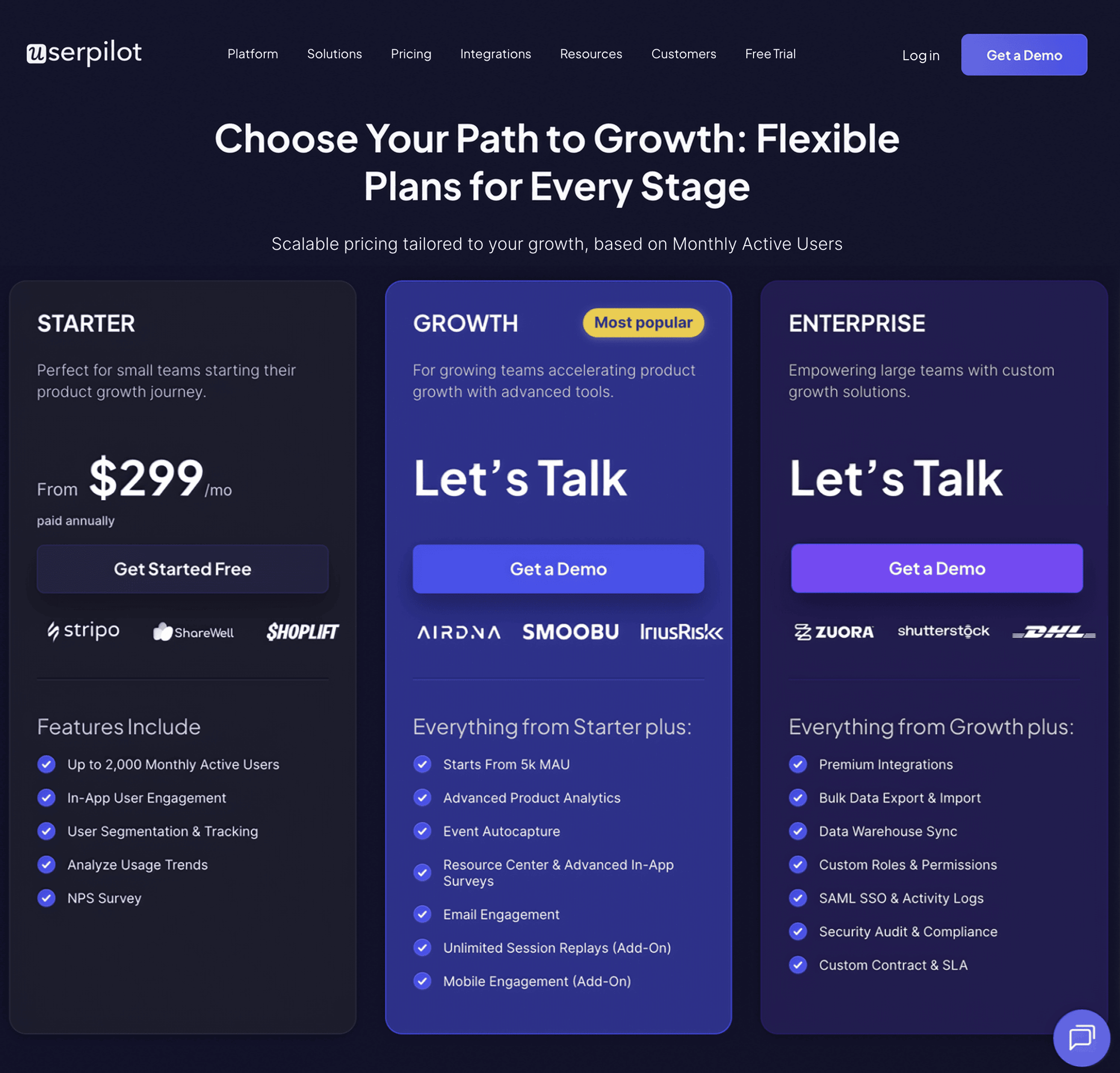
Userpilot offers flexible pricing based on your monthly active users (MAUs). Plans start at $299 per month for smaller teams and scale as your user base grows.
Below are the pricing tiers you can choose from:
- The Starter plan begins at $299/month (billed annually) for up to 2,000 monthly active users. It includes in-app user engagement, usage trend analysis, NPS surveys, and essential product analytics—ideal for mid-market SaaS teams getting started.
- The Growth plan offers custom pricing and adds advanced analytics, retroactive event auto-capture, in-app surveys, session replay, and more. It’s the most popular choice for growing teams that need deeper insights and scale.
- The Enterprise plan offers custom pricing and includes everything in Growth, plus bulk data handling, custom roles and permissions, SOC 2 Type 2 compliance, and enterprise-level support.
Not sure which plan is right for you? Book a demo to talk with the team and find the best fit for your needs.
Pricing of Mixpanel
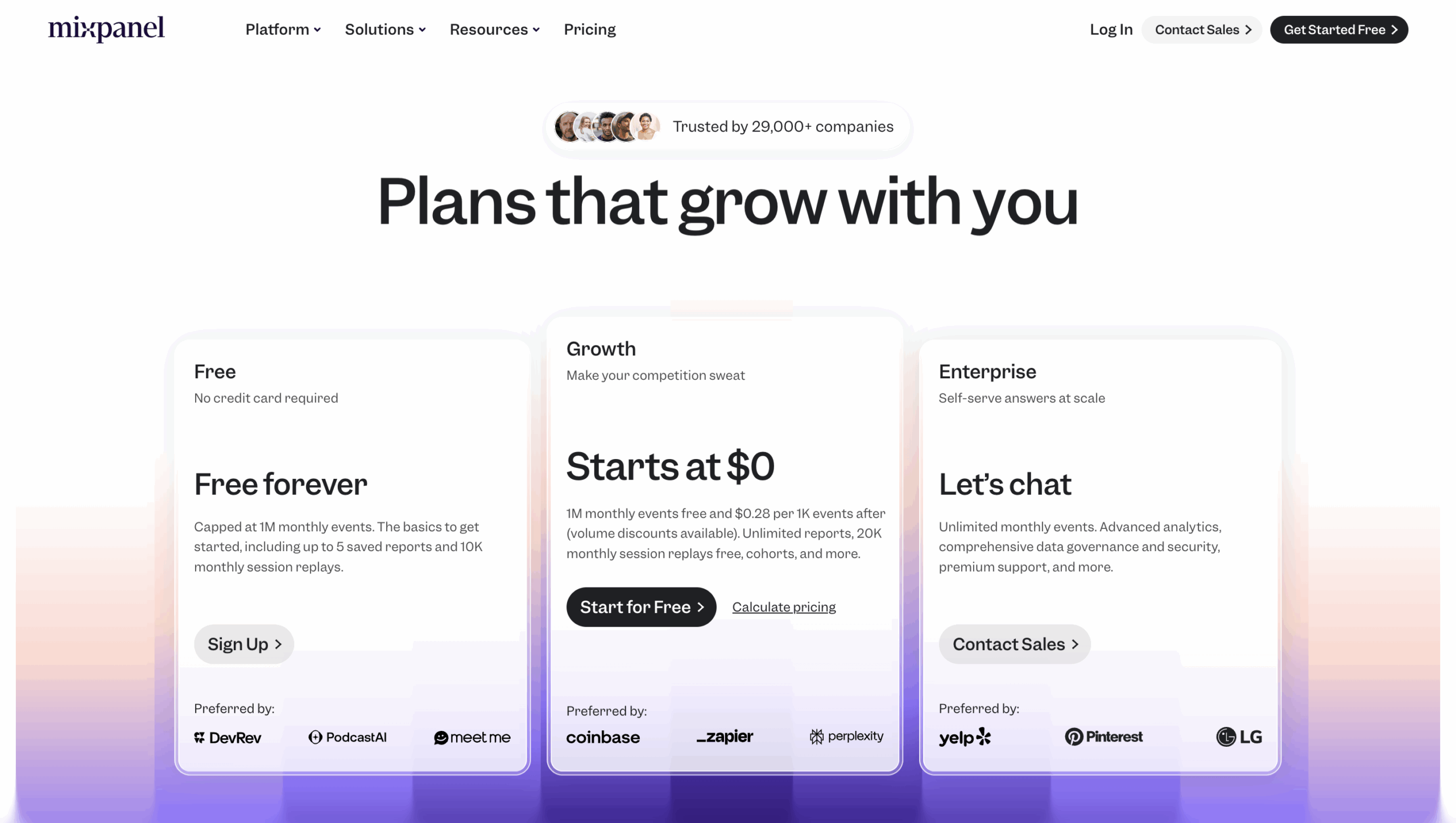
Mixpanel’s pricing runs from a free entry point to high five-figure enterprise contracts.
And in my experience, the real cost is driven almost entirely by scale. What looks affordable at the start can grow fast as event volume and user tracking increase.
Compared to Userpilot’s more predictable platform-based pricing, Mixpanel’s usage-based model requires much tighter cost monitoring as you grow.
- Free plan ($0): Includes up to 1M monthly events with access to core reports like funnels, retention, and flows. It’s a solid starting point for early-stage products validating analytics.
- Growth plan (usage-based): Once you exceed the free threshold, you pay per additional event (publicly listed at ~$0.28 per 1,000 events). Costs fluctuate month to month depending on product usage.
- Enterprise plan (custom): Built for very large volumes and advanced governance. According to Vendr data, real-world contracts commonly range from ~$27,000/year for ~300M events to ~$63,000/year for ~600K MTUs, with costs increasing further based on add-ons like session replay and data pipelines.
Userpilot vs Mixpanel – Why Userpilot might be a better choice?
Mixpanel is a popular analytics platform, but Userpilot’s unique features and capabilities make it a better choice for companies seeking more specialized insights and streamlined user experience management.
Here are the advantages of using Userpilot over Mixpanel:
- Actionable analytics: With Mixpanel, you can only get half of the job done, which is getting insights. Meanwhile, you go from insights to actions without switching tools in Userpilot.
- Advanced user segmentation: Regarding targeted segmentation, Userpilot has a broader array of attributes, like in-app behaviors and demographics. These features ensure more precise insights for tailored user experiences.
- Seamless user insights integration: Unlike Mixpanel, Userpilot’s integrations extend beyond analytics, allowing you to connect qualitative insights from user feedback, surveys, and NPS scores directly into the platform.
- User-friendly and simple: Userpilot has a more intuitive interface and guided setup, making it accessible even to users with limited technical backgrounds.
What do users say about Userpilot?
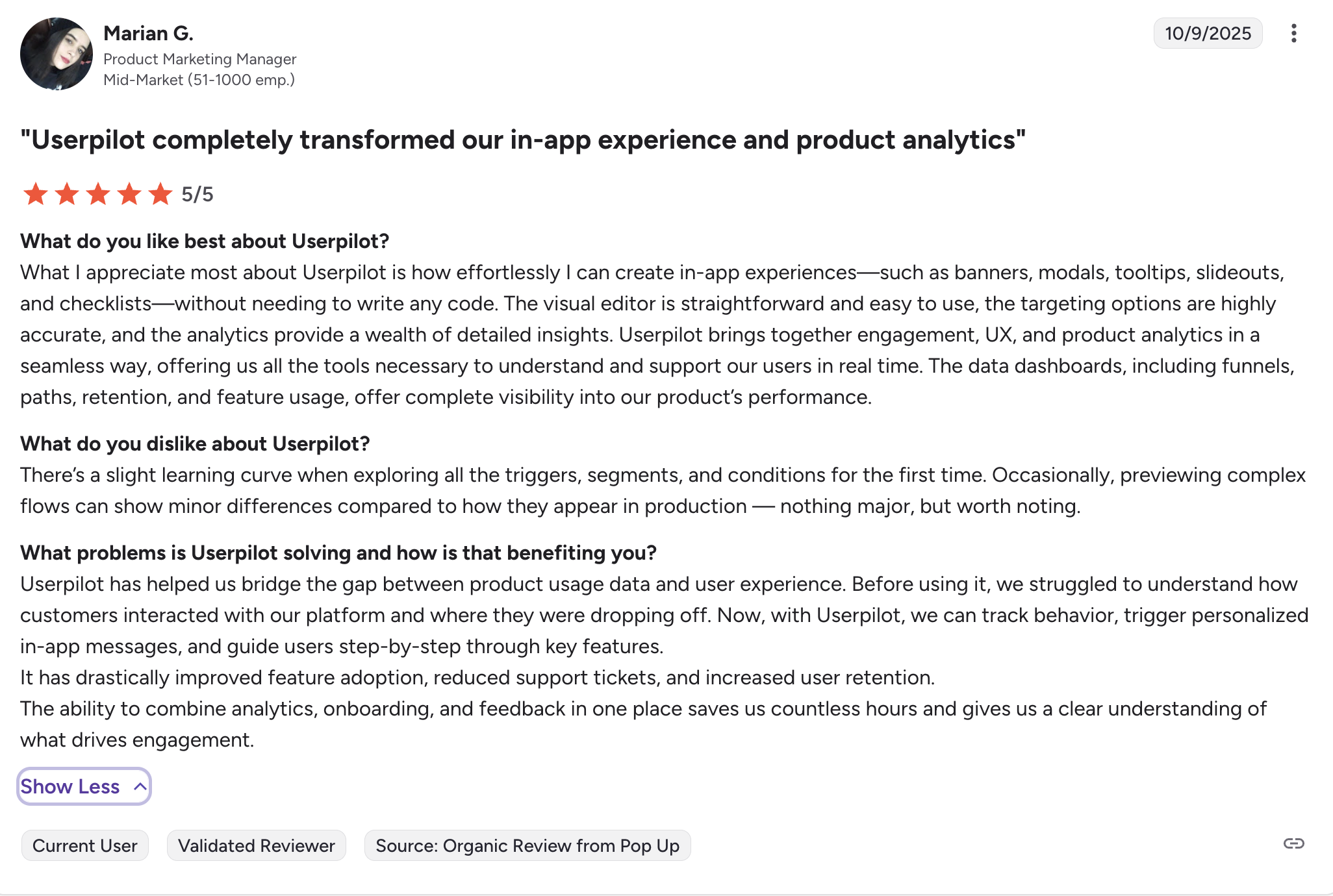
Most users laud Userpilot for its versatile feature set, ease of use, and responsive support team:
“What I appreciate most about Userpilot is how effortlessly I can create in-app experiences—such as banners, modals, tooltips, slideouts, and checklists—without needing to write any code. The visual editor is straightforward and easy to use, the targeting options are highly accurate, and the analytics provide a wealth of detailed insights. Userpilot brings together engagement, UX, and product analytics in a seamless way, offering us all the tools necessary to understand and support our users in real time. The data dashboards, including funnels, paths, retention, and feature usage, offer complete visibility into our product’s performance.”
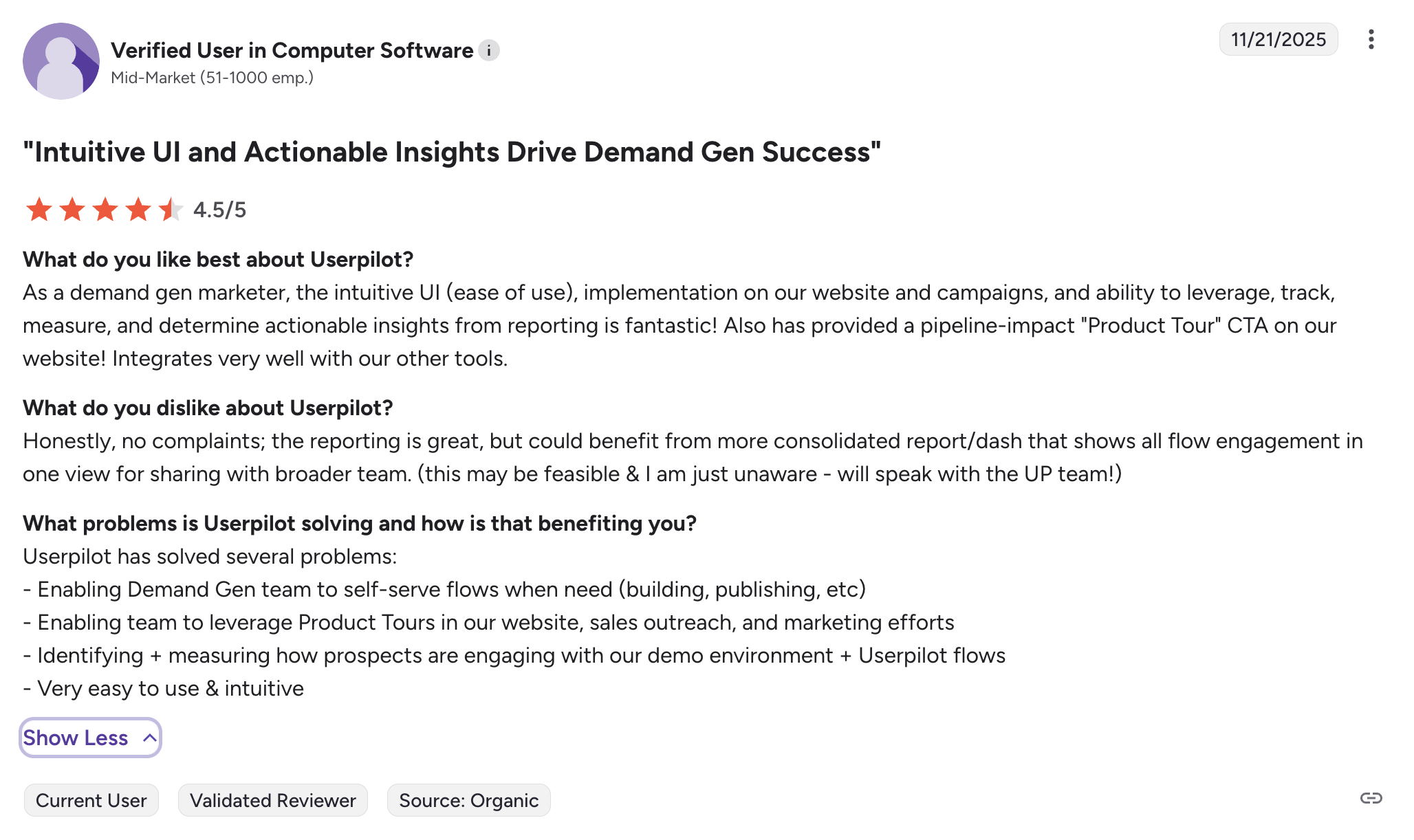
Of course, other users are also kind enough to share constructive criticism regarding specific features like event tracking filters:
“Honestly, no complaints; the reporting is great, but could benefit from more consolidated report/dash that shows all flow engagement in one view for sharing with broader team. (this may be feasible & I am just unaware – will speak with the UP team!)”
So, Userpilot or Mixpanel?
If your goal is deep, event-level analysis at scale, Mixpanel is a solid choice.
But if you care about moving faster from understanding behavior to actually changing it inside your product, Userpilot gives you a more complete workflow.
We built Userpilot for teams who don’t want analytics to live in isolation, but to directly drive onboarding, activation, and adoption without engineering bottlenecks.
If you want to see how that looks in your own product, book a demo, and we’ll walk you through it.
Try Userpilot – A More Flexible and Intuitive Option than Mixpanel for User Analysis
Userpilot strives to provide accurate information to help businesses determine the best solution for their particular needs. Due to the dynamic nature of the industry, the features offered by Userpilot and others often change over time. The statements made in this article are accurate to the best of Userpilot’s knowledge as of its publication/most recent update on December 1, 2025.
About the author