When I evaluate onboarding and engagement tools as part of product management work, integrations are always part of the conversation, especially with platforms like Appcues. But after years of competitor research, I’ve learned that more integrations don’t always mean a better setup.
They often mean more data moving between systems, more permissions to manage, and more things that can quietly break. The Mixpanel–OpenAI incident is a good example of that risk, where customer metadata was exposed through a third-party analytics integration.
Most articles on Appcues integration types only stop at listing Appcues integrations, but in this one, I’ll also explain when it’s safer and smarter to choose a platform that already covers analytics and feedback without stitching everything together.
Main Appcues integration types
At a high level, Appcues integrations fall into three buckets:
- Native integrations: These are built and maintained by Appcues itself. They’re usually the most stable, require minimal setup, and give you cleaner access to user properties and completed events.
- Zapier-based integrations: These help you automate simple workflows without code. They’re great for lightweight use cases, but less ideal when you need low-latency data or complex mapping at scale.
- Webhooks: This option gives developers the most control. You can send raw event data to your own systems, but you’re also responsible for handling requests, retries, and failures.
Appcues offers “native” integrations for major tools like Salesforce, HubSpot, and Segment. These are generally robust and easy to set up. However, for many other tools, Appcues pushes you toward Zapier.
Zapier is a great tool, but relying on it for core product data has risks. It adds latency and costs extra money as you scale. Also, it creates a third point of failure.
What often gets missed is that integrations are more than a convenience. They also directly affect how reliably you can map events, keep attributes updated, and guide specific user segments in real time. If your data arrives late or fails quietly, your onboarding logic fails with it.
Another technical detail that matters is the direction of data flow.
- One-way sync usually means sending onboarding events out to your analytics or CRM. Most Appcues integrations work this way. For example, you tell Salesforce that a user finished a tour.
- Two-way sync means the tool can also receive data to change behavior in real-time. For example, pulling a “Plan Type” field from HubSpot to determine which flow a user sees.
Key Appcues integration use cases
When researching Appcues, I found it helpful to look past individual tools and instead group integrations by what teams are trying to achieve with them. Across Appcues’ ecosystem, most integrations fall into a small number of recurring use cases:
- Analytics and measurement: Teams use integrations to track events like when a tour is started, completed, or skipped, and then measure how those actions affect user behavior over time. This is how you know which onboarding flows actually work.
- Data pipelines and automation: Sometimes you just need to automate super-simple workflows. For example, sending onboarding events to Google Sheets or triggering internal alerts without writing code.
- Segmentation and targeting: Pulling in attributes lets you target the right users with the right message, instead of showing the same checklist or hotspots to everyone.
- CRM and lifecycle workflows: Connecting product usage to customers and contacts helps sales and marketing teams act on real product data, not just guesses.
These use cases are what help me (and several teams) choose which integrations are actually worth setting up.
Appcues integrations for analytics
When I reviewed Appcues’ documentation, one thing became clear: most analytics integrations receive the same core engagement data. Things like flow started, checklist completed, or nps survey step dismissed are what typically get sent across tools. Because of that, the choice of analytics platform often matters less than teams expect.
But if you’re already using Appcues, it’s worth comparing analytics tools based on how you prefer to explore and visualize that data. Our product analytics tools comparison is a good place to start.
In case you’re not using Appcues yet, platforms like Userpilot can simplify this entirely by combining engagement and analytics in one place, without stitching multiple tools together.
1. Amplitude
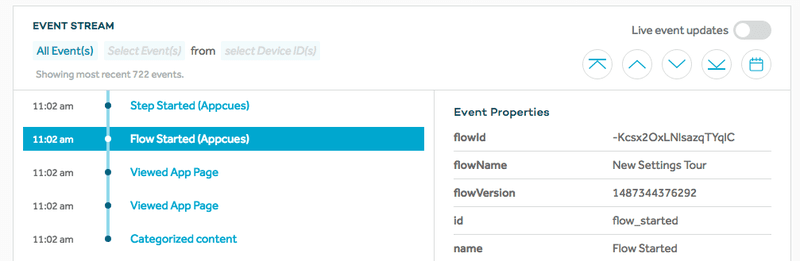
Amplitude is a favorite for product managers who love deep dives. The Appcues integration here allows you to send flow events, like “Flow Completed” or “Step Seen”, directly into Amplitude charts. This is useful for correlating onboarding completion with long-term retention.
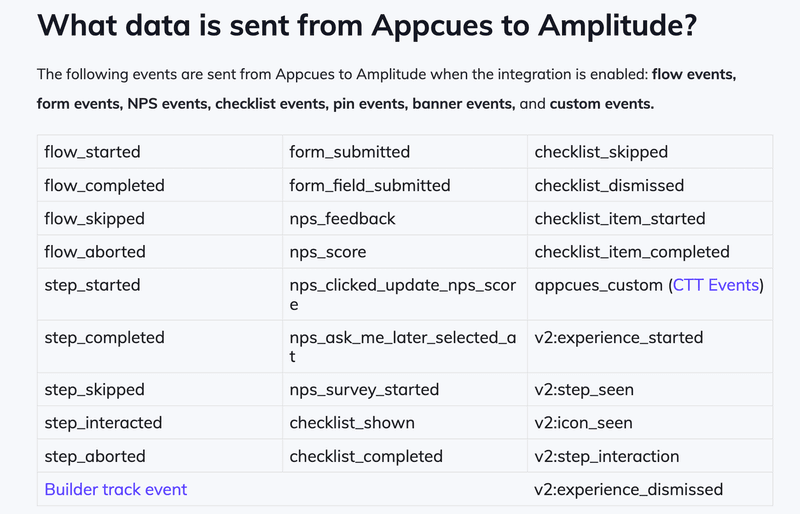
However, keep in mind that for advanced bi-directional data syncing, you often need to look at alternatives. If you want to see how Amplitude analytics features compare when paired with different adoption tools, it is worth doing a side-by-side comparison.
2. Mixpanel
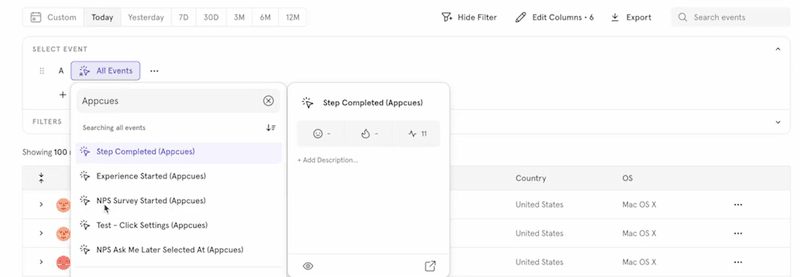
Similar to Amplitude, Mixpanel focuses on user actions. Teams could use this to answer questions like, “Do users who finish the ‘New Feature’ tour actually use the feature?” Sending interaction data from Appcues helps populate these reports.
For Mixpanel, Appcues sends events tied to in-app actions, like clicks on key page elements inside a tour. These events help track time between onboarding and meaningful usage, since it gives clear details on whether a checklist or prompt actually nudged users toward real behavior.
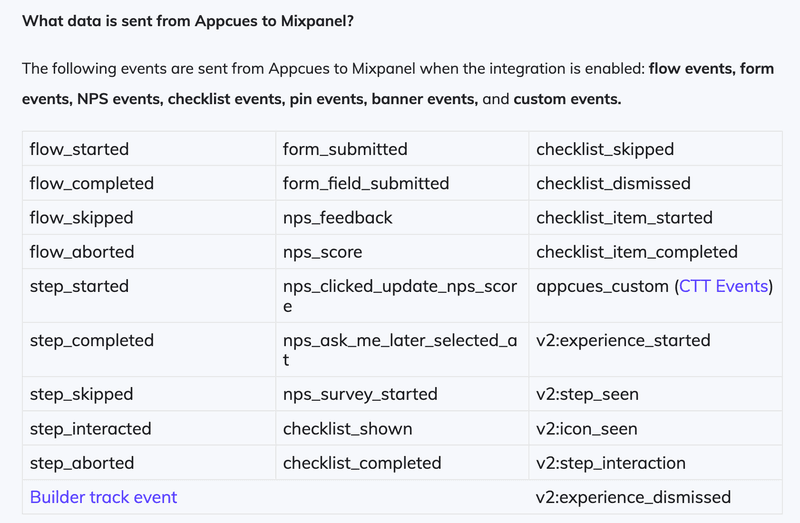
As you can see, these are mostly foundational engagement events that track how users interact with your in-app experiences. However, you need Mixpanel on top of Appcues to actually make sense of this data.
3. Heap
Heap is known for its automatic event capture. The Appcues integration complements that by adding explicit onboarding interactions, which makes it easier to see whether guidance influenced user behavior instead of just coinciding with it.
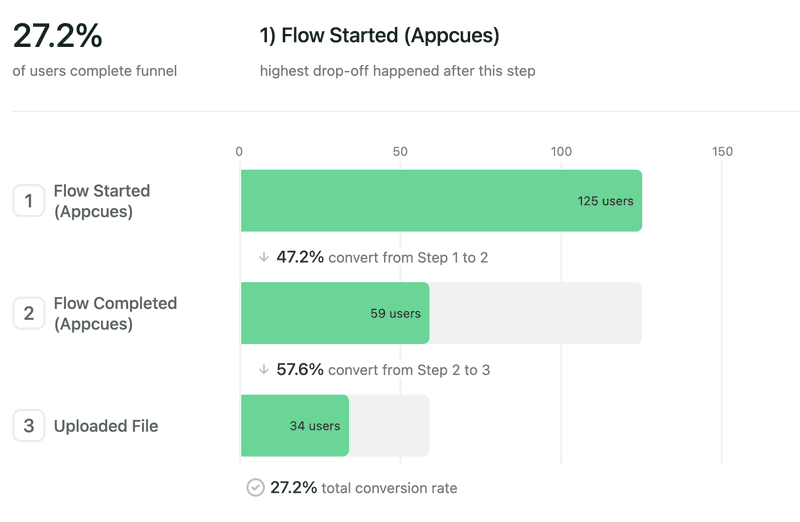
With this setup, Appcues sends intentional signals (such as interactions with hotspots or completed onboarding flows) into Heap. These events add context to Heap’s auto-captured data and make it easier to validate which behaviors are tied to onboarding versus general product usage.
If you are using Heap, you should check how Heap for product analytics handles these custom events to ensure you aren’t doubling up on data tracking.
4. Google Analytics
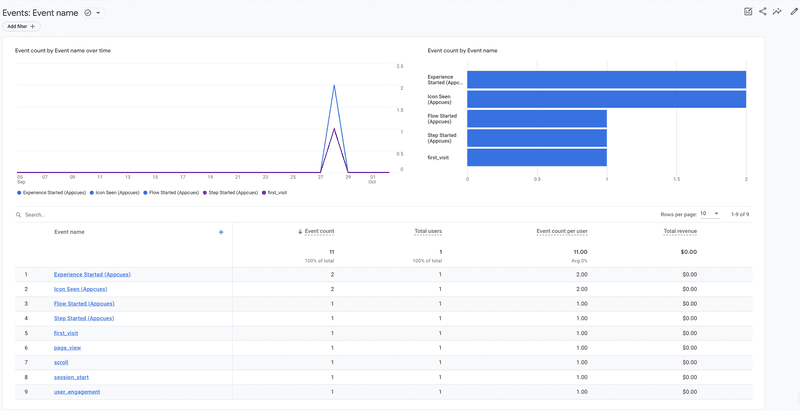
Google Analytics was and remains one of the most widely used web analytics tools. Appcues sends events here, which is great for seeing how in-app guidance affects session duration or bounce rates. Here, Appcues mainly sends high-level engagement events.
You could use this to connect onboarding activity with broader traffic and session trends, but I don’t recommend relying on it for detailed behavioral analysis. It’s better suited for directional insights than deep product questions.
Keep in mind that GA4 can be tricky with event parameters. I often advise teams to look for Google Analytics alternatives if they want more granular product-specific insights without the setup headache.
5. Kissmetrics
Kissmetrics is person-centric. Connecting Appcues here helps you tie specific onboarding behaviors to individual user profiles, which is vital for mapping out the customer journey touchpoints that lead to conversion.
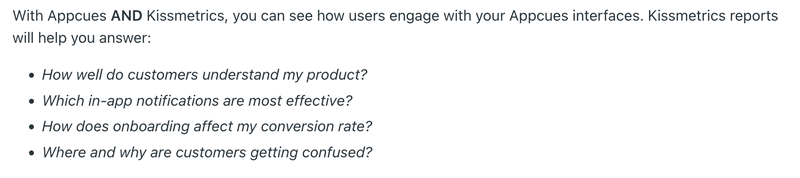
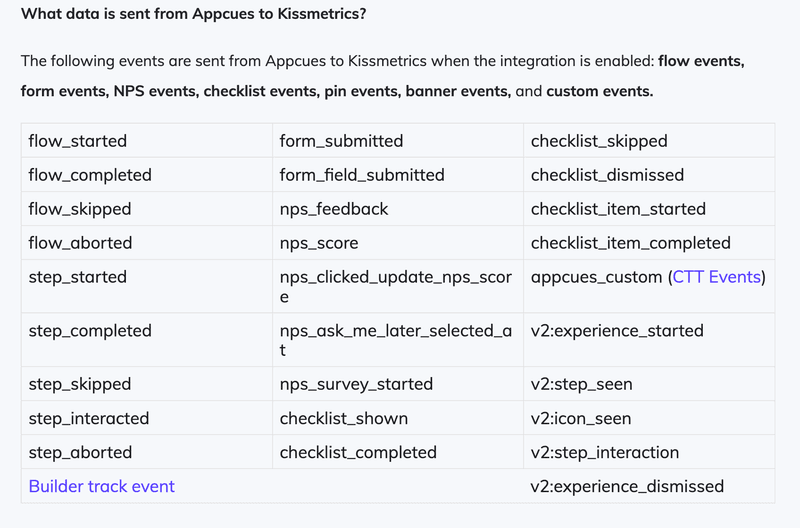
Appcues feeds completed flow events into Kissmetrics, so you can map onboarding actions directly to customer conversion paths. This is useful for understanding which features or messages influenced a user before they upgraded or converted.
6. Woopra
Woopra focuses on the end-to-end customer journey. By piping Appcues data into Woopra, you can visualize drop-off points in your onboarding funnel. This is essential for customer journey analytics, helping you spot exactly where users lose interest.
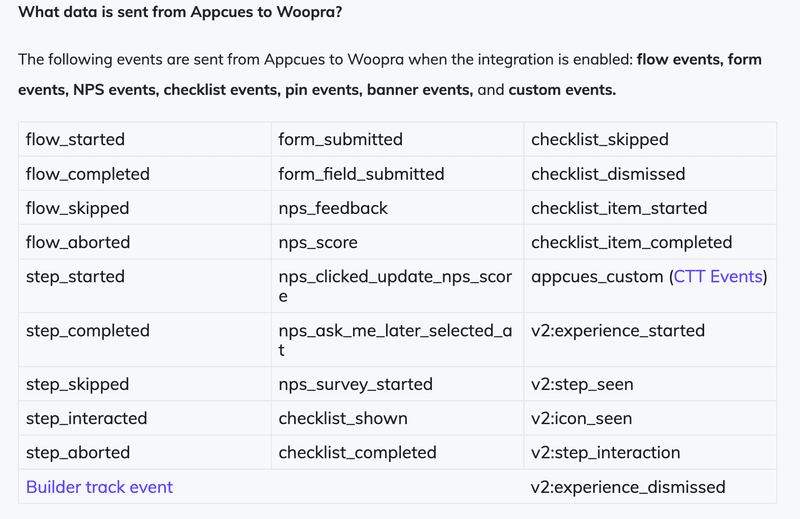
With Woopra, Appcues events help stitch onboarding actions into a chronological journey view. This can be useful for seeing how early guidance affects later engagement and identifying where users drop off before they reach meaningful value.
7. Localytics
If you are heavy on mobile, Localytics is a strong contender. Appcues supports it, so you can bridge web and mobile engagement data, though managing cross-platform identities can sometimes get messy.
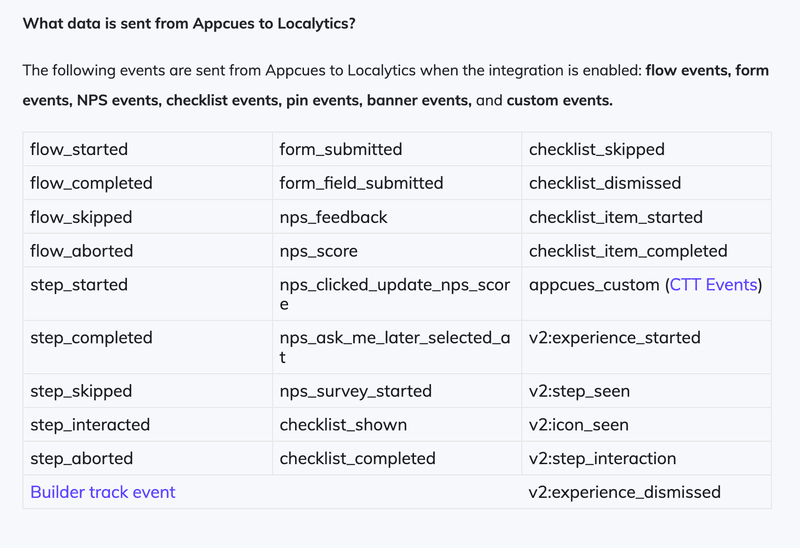
Appcues sends engagement events tied to onboarding interactions into Localytics. This could help teams understand how guidance performs across devices and whether mobile users experience friction that web users don’t. Just make sure you’re keeping an eye on identity matching to avoid fragmented data.
8. FullStory
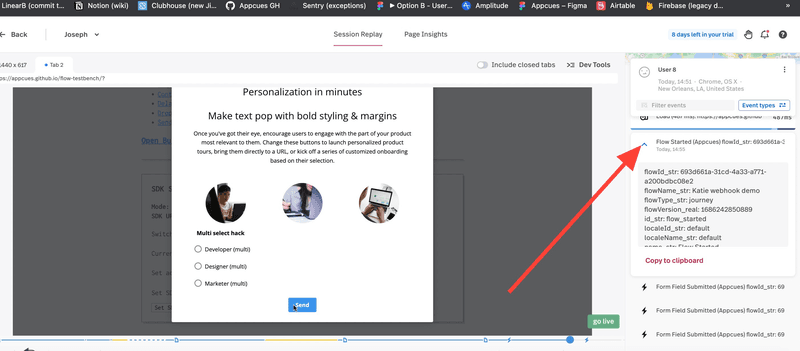
This is one of my favorite categories: session replay. Integrating Appcues with FullStory puts a bookmark in your session recordings. When a user interacts with a flow, you can watch the replay to see how they interact with it. Did they rage click? Did they hesitate? If you want to dive deeper into this technology, check out this guide on what session replay is and how it works.
Whenever a user interacts with Appcues guidance, that moment is tagged in FullStory. You can jump straight to that point, see where users hesitated, and understand whether a tour or prompt caused friction or confusion.
9. Hotjar
Similar to FullStory, Hotjar gives you heatmaps and recordings. The integration tags recordings with Appcues events. This context is critical. Watching a user struggle is one thing; knowing they struggled after seeing a help modal tells you your modal might be the problem.
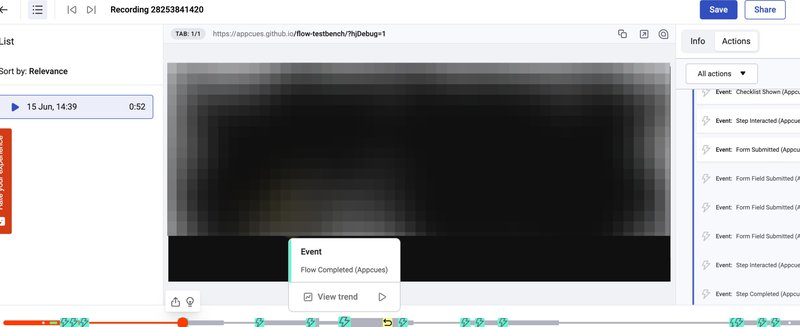
This is an ideal setup for when you prefer visual context. Seeing heatmaps alongside onboarding interactions helps me decide whether to adjust copy, placement, or trigger logic. It’s especially useful when surveys indicate confusion but don’t pinpoint where it occurs.
In case Hotjar pricing is a concern for you, several Hotjar alternatives offer tight integrations with adoption platforms.
10. Logrocket
LogRocket is primarily designed for debugging and technical troubleshooting. When paired with Appcues, it gives engineering teams visibility into what happened when onboarding flows failed to trigger or behave correctly.
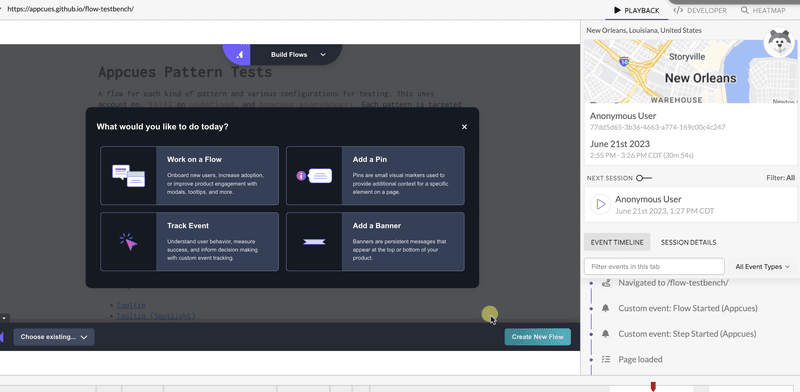
When Appcues actions fire, LogRocket captures the session replay along with console logs and network activity. This can help pinpoint key technical issues quickly, without guessing or reproducing bugs manually.
Appcues integrations for data pipelines
Data pipeline integrations are all about scale and control. Instead of connecting Appcues to every tool one by one, teams can use these to route events and attributes through a central layer. That keeps data consistent and makes automation easier across the whole stack.
11. Segment
Segment acts as a central hub for product data. The Appcues integration works well when you have a complex stack and want to distribute onboarding data to multiple tools.
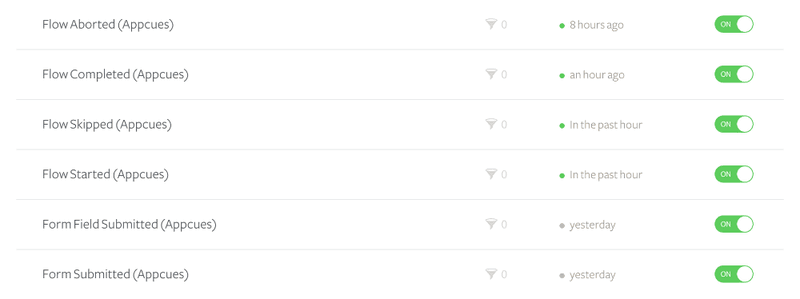
Appcues sends interaction events and user attributes into Segment, and from there, you can route them to analytics tools, CRMs, or warehouses. This avoids duplicating setup and keeps product data consistent across teams.
12. Zapier
Zapier is ideal for simple, no-code workflows. With Appcues, it’s useful for triggering lightweight actions without involving engineering.
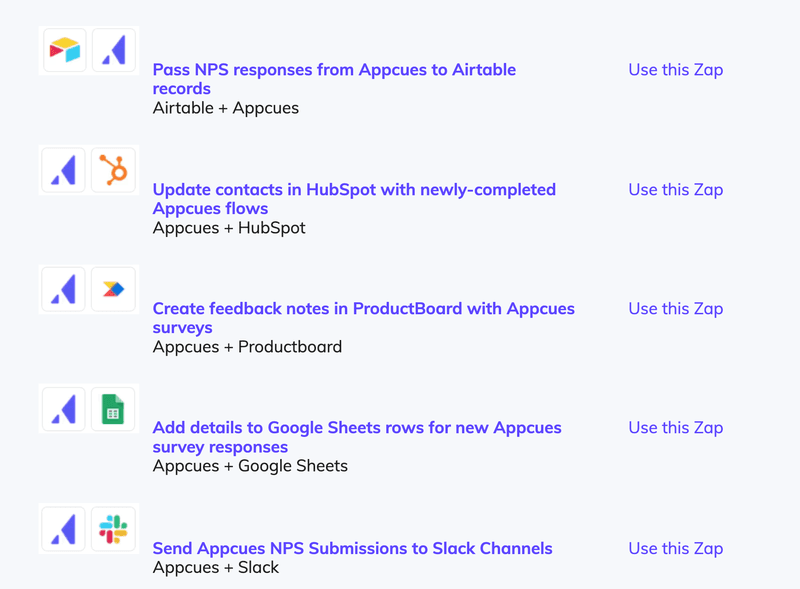
Appcues sends trigger events into Zapier, which then acts, such as saving data to Google Sheets or sending a request to another app. This is useful for lightweight automation where speed matters more than depth, but be careful not to rely on it for core data paths.
13. RudderStack
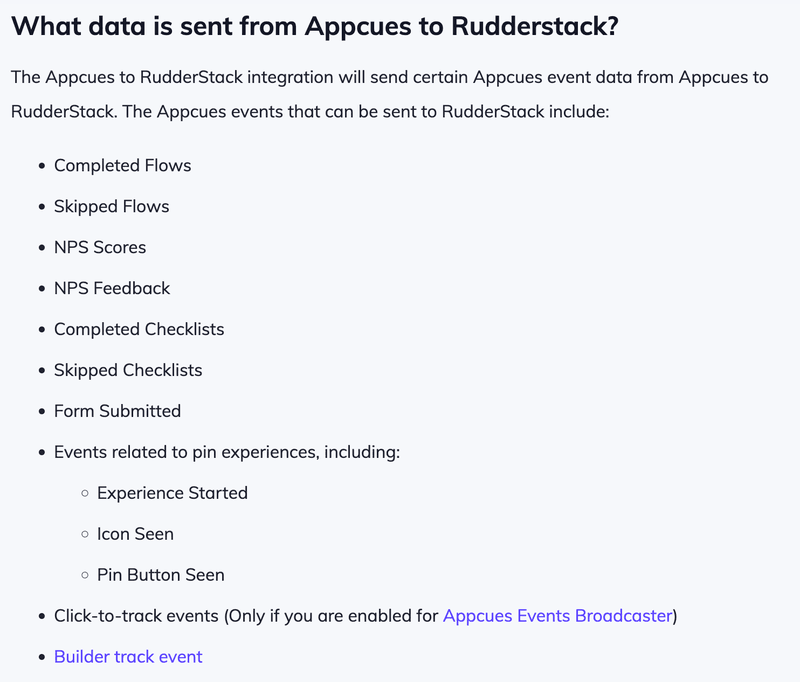
RudderStack is an open-source alternative to Segment. For engineering-led teams that want total control over their data pipelines, this integration allows you to route interaction events directly to your data warehouse without the high costs often associated with enterprise CDPs.
With RudderStack, Appcues sends raw events and attributes directly into the pipeline. From there, teams can route data to warehouses or analytics tools with more control over transformations and storage.
Appcues integrations for CRM and marketing automation
This is where onboarding data starts driving business outcomes. These integrations connect what users actually do in the app with the systems sales, marketing, and lifecycle teams rely on every day.
14. Salesforce
The Appcues integration with Salesforce allows you to see which users have engaged with your content directly inside the CRM. Sales reps love this, especially because it lets them see which tours or features a prospect engaged with, and helps tailor conversations.
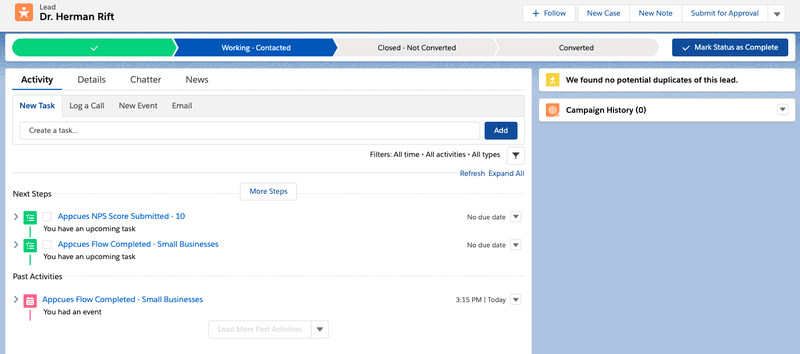
Appcues sends events like tour views or completed onboarding flows into Salesforce records. Sending data back into Appcues to personalize flows usually requires extra setup, but even one-way visibility adds real value.
The catch is that getting data out of Salesforce to personalize Appcues flows often requires an Enterprise plan or custom development. For a robust setup, you usually want a Salesforce integration that supports two-way syncing of attributes.
15. HubSpot
Sending Appcues events to HubSpot timelines allows for powerful workflows. When onboarding behavior shows up alongside marketing and sales data, teams can act on real product usage instead of assumptions. That ability to segment and automate based on behavior is where HubSpot becomes most useful.
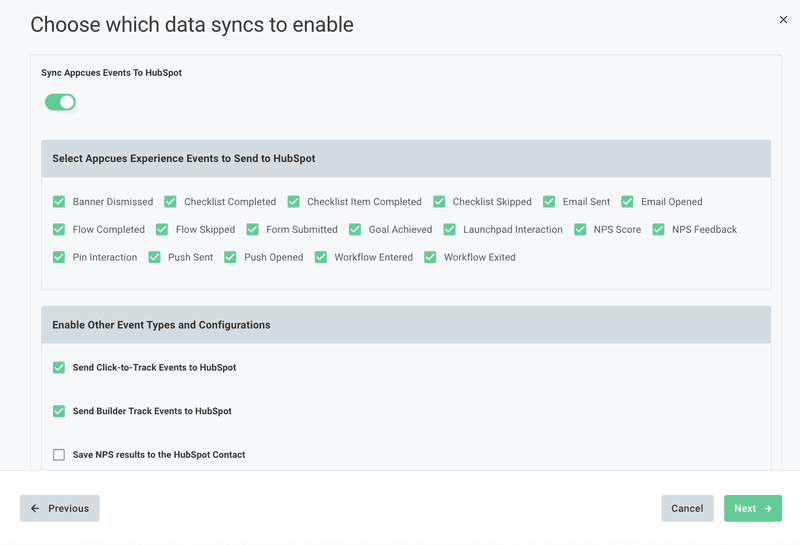
From a setup perspective, Appcues sends events like checklist completion and feature engagement directly to HubSpot contact records. Those signals could then be used to trigger emails, update lifecycle stages, and move users into the right nurture flows based on what they’ve actually done in the product.
16. Marketo
For larger enterprises, Marketo is often the system of record for marketing automation. Pairing it with Appcues helps bring product engagement into lead scoring and campaign decisions, instead of relying only on form fills or email clicks.
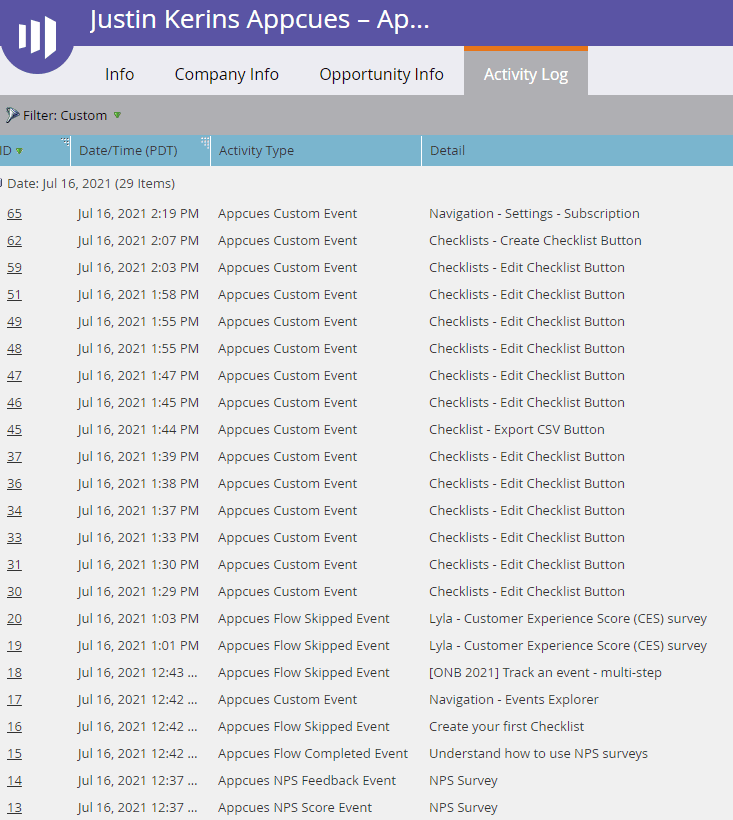
Appcues sends engagement events into Marketo, where they feed into lead scores and automation logic. When prospects interact with high-value features or tours, those signals help surface sales-ready leads and prioritize outreach based on demonstrated product intent.
17. Klaviyo
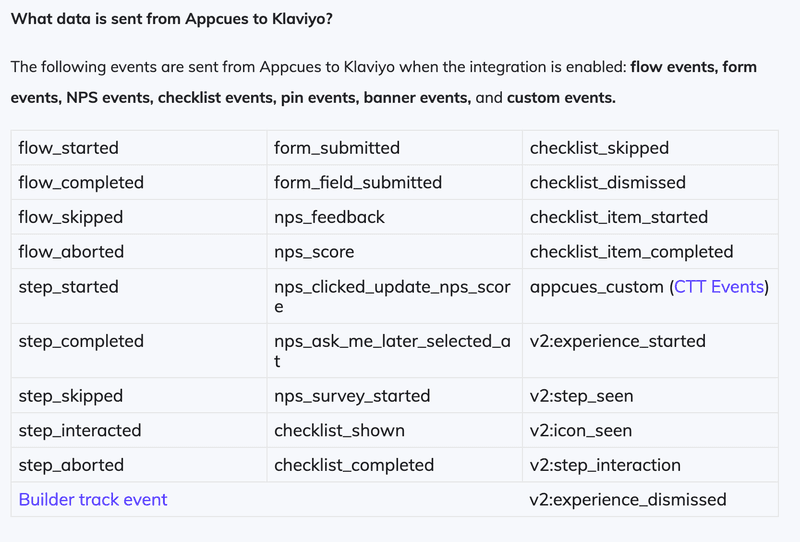
Known for eCommerce, but increasingly used in SaaS. Integrating Appcues allows you to trigger highly visual emails based on in-app behavior. It connects your SaaS email marketing strategy directly to product usage.
Appcues triggers Klaviyo messages based on in-app behavior, such as feature discovery or onboarding milestones. Those signals can then be used to trigger follow-up emails that reflect what users have already seen or done in the product, keeping messaging timely and behavior-driven rather than generic.
18. Customer.io
This is a favorite for message automation. The integration allows you to trigger emails or push notifications based on Appcues events. It is great for re-engaging users who dropped off halfway through an onboarding flow.
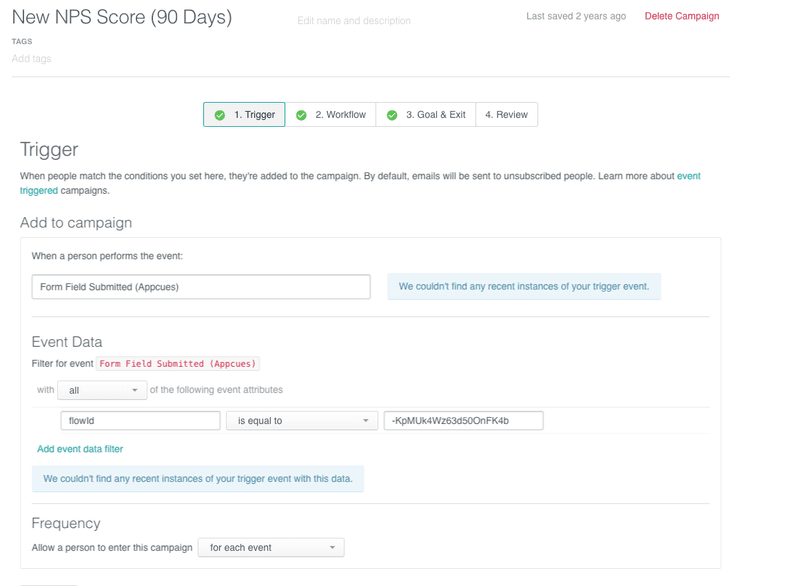
Appcues sends interaction events into Customer.io, which then triggers emails or push notifications. This could be helpful for re-engaging users who started onboarding but dropped off before reaching value.
19. Vero
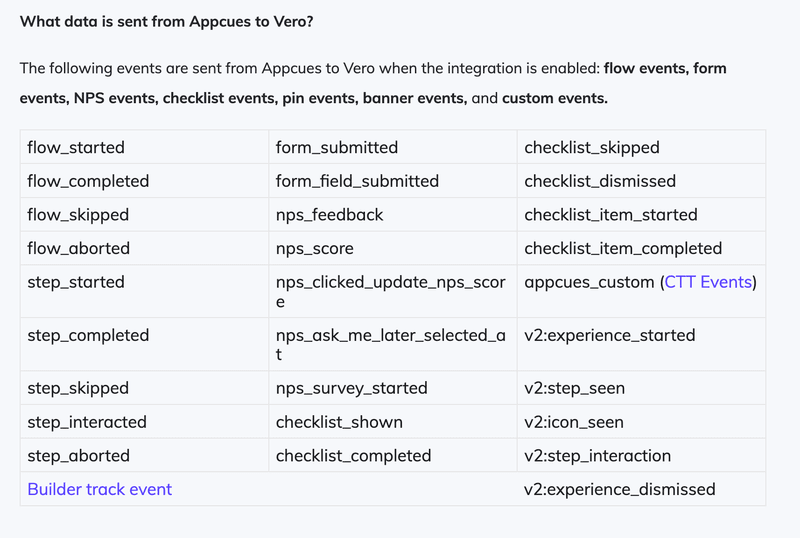
Vero mainly focuses on behavioral email automation. By piping Appcues interaction data into Vero, you can trigger highly contextual messages based on what users did or didn’t do in the app. I think it’s a clean way to keep customer communication aligned with real usage instead of generic campaigns.
Appcues integrations for support and communication
Finally, we have the tools that help you talk directly to your users when they need help. I look at these integrations as context carriers.
They give support, success, and product teams the information they need on what users actually experience in the app. And with that context, conversations get faster, clearer, and far more relevant for both users and teams.
20. Intercom
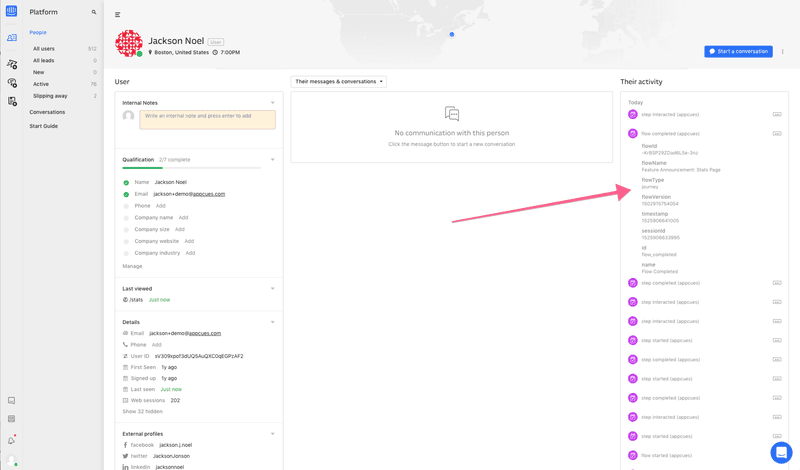
Intercom is one of the most widely used support tools in SaaS, and Appcues integrates with it mainly to add product context to customer conversations. Instead of triggering generic chats or help content, teams can use in-app behavior to decide when support should step in and what kind of help is most relevant.
Appcues sends interaction events into Intercom, which can be used to segment users based on what they’ve seen or completed in the app. That context helps trigger proactive chats, surface the right help articles, or hold back outreach until a user actually needs it.
If you are evaluating support tools, it is worth looking at Intercom alternatives to see which offers the best bang for your buck regarding integration depth.
21. Zendesk
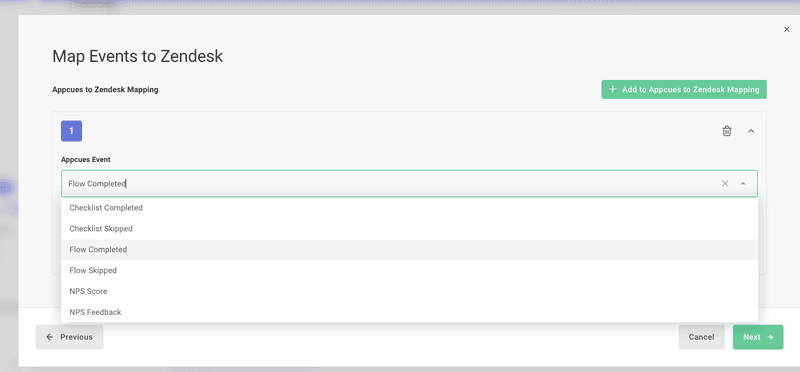
If you use Zendesk for support ticketing, this integration helps give agents context. They can see which flows a user has seen before they submitted a ticket. This reduces the back-and-forth of “Did you try turning it off and on again?”, enabling better customer support specialist efficiency.
Appcues passes onboarding and engagement events into Zendesk, so agents can view recent flows alongside each ticket. I think it could be useful for understanding whether a user missed guidance entirely or followed it and still got stuck, which speeds up diagnosis and response.
22. Slack
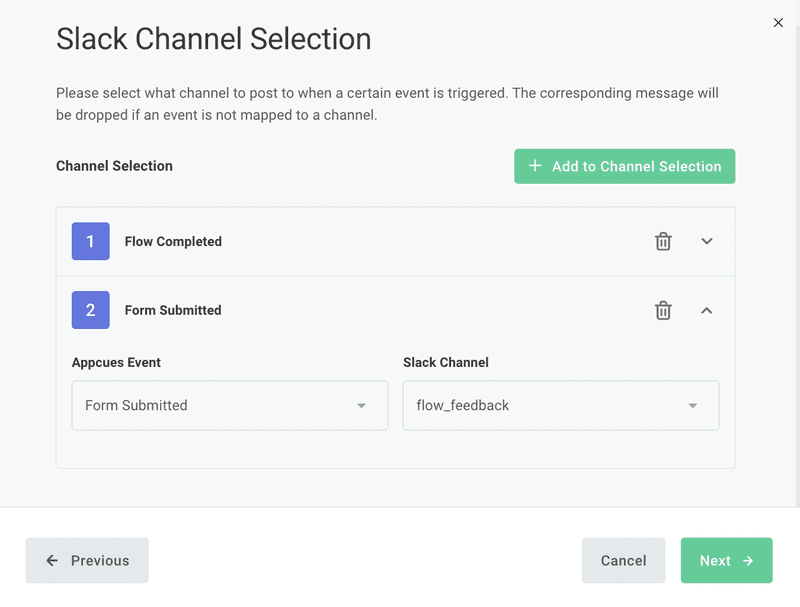
While mostly internal, sending Appcues notifications to Slack channels keeps your team in the loop. Appcues notifications here help turn product activity into shared awareness.
Appcues sends real-time notifications to Slack when key events happen, like feature discovery or upgrade intent. Teams can use this to keep product, sales, and success teams in sync without relying on product dashboards or delayed reports.
When integrations aren’t enough
Integrations are useful, but they aren’t always the right answer. In some cases, adding more tools creates new risks instead of solving problems.
Not secured enough
Every new integration expands your attack surface. Each data sync, API connection, or webhook is another place where something can go wrong.
Recent incidents, like the Mixpanel–OpenAI incident I mentioned before, have proven this risk to be very real. Breaches linked to CRM and analytics tooling have shown how attackers can pivot through connected systems and expose sensitive customer data that was never meant to travel that far.
The problem isn’t integrations by themselves. It’s relying on too many similar integrations for core product insights. When engagement and analytics live in separate tools, data has to move constantly.
An all-in-one platform reduces that exposure by keeping critical behavior data, targeting logic, and reporting in one place. For companies handling sensitive user data, fewer moving parts often means fewer security blind spots.
Not actionable enough
The other issue I see all the time is speed. When insights are fragmented, turning them into action is slow and painful. You export data from one tool, analyze it in another, then come back to your onboarding platform to manually set rules and conditions. By the time everything is configured, the moment has passed.
When insights and engagement live together, that loop collapses. I can spot friction inside a funnel, see exactly where users struggle, and immediately trigger contextual help in the same workflow. No imports, re-mapping, or delays. That tight feedback loop is what makes product-led teams effective, and it’s something you simply don’t get when analytics is bolted on as an afterthought.
Why I prefer native capability over excessive integration
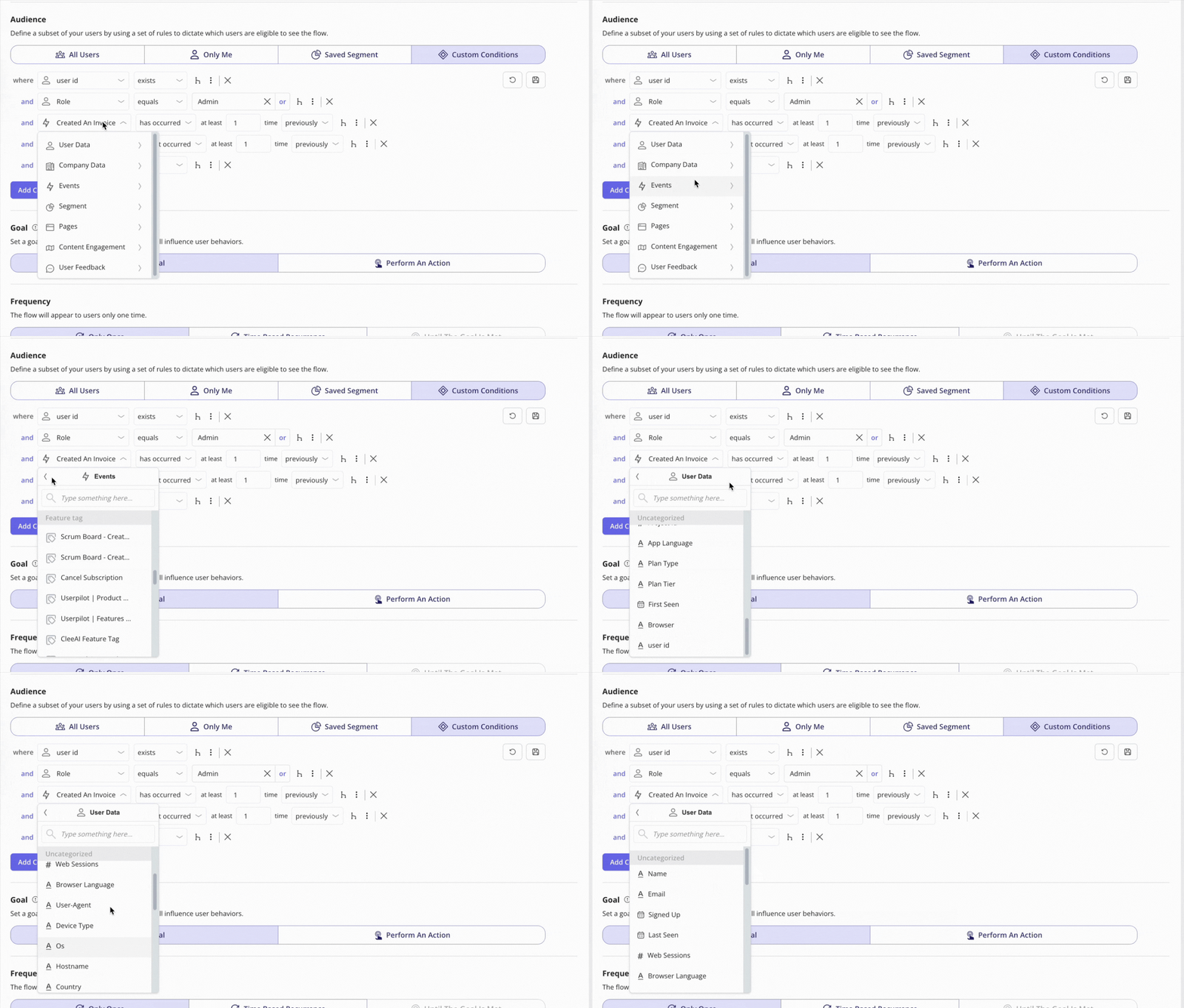
Integrations are necessary, but they shouldn’t be a crutch for a tool’s lack of native power. I want to see the data where I work. If I need to check whether my onboarding flow is working, I’d rather see that in the onboarding tool itself, rather than by logging into Mixpanel.
That’s why Userpilot approaches this very differently. Rather than pushing most analysis into third-party platforms, it brings product analytics directly into the adoption tool itself.
Teams can see how onboarding performs, where users drop off, and what’s driving engagement without constantly exporting data or switching contexts. Integrations are still there when they’re genuinely needed, but they’re no longer a requirement just to get clear, actionable answers.
- Trends and funnels: You can build funnel analysis reports natively to see where users drop off.
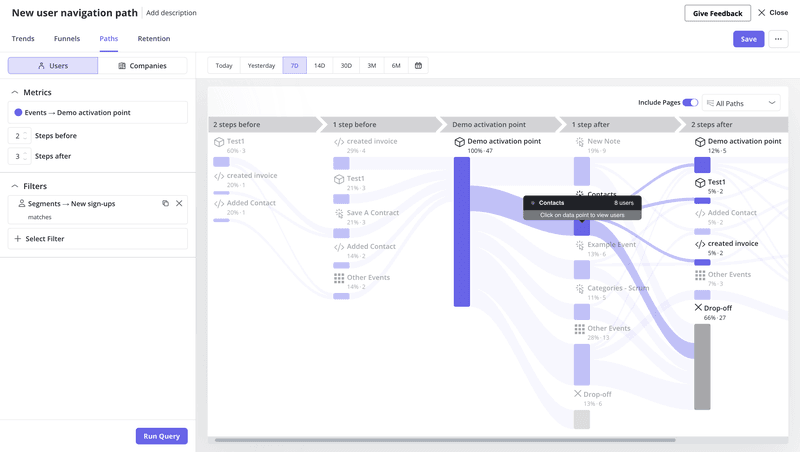
- Path analysis: You can see exactly where users go after they dismiss a flow.
- Cohorts: You can group users by behavior and track their retention over time without needing a separate SQL query.
- Session replays: You can watch user sessions alongside onboarding data to understand not just where users drop off, but also why. This makes it easier to spot friction and fix guidance quickly, without guessing from charts alone.
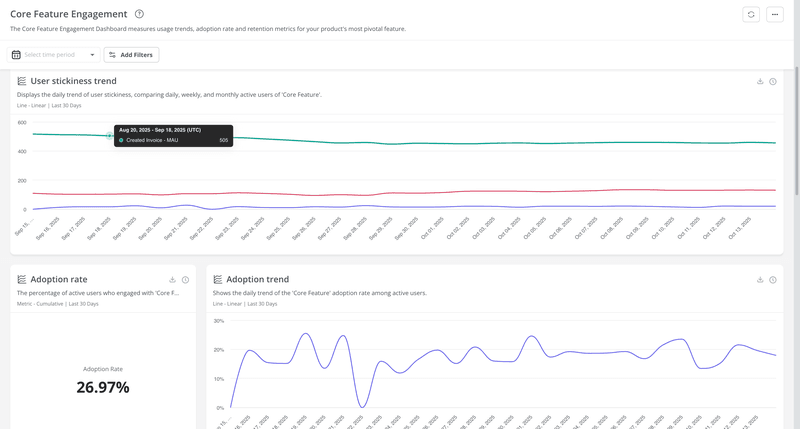
Furthermore, we allow for deep customization in how you visualize this data. You can build a SaaS KPI dashboard that combines flow performance, NPS scores, and feature usage.
We’re also about to take this a step further with an AI-powered analytics layer. Instead of digging through charts, you’ll be able to ask questions in plain language and get insights instantly. If that sounds interesting, you can join the beta here.
Userpilot still integrates with tools like Segment, HubSpot, Salesforce, Amplitude, Mixpanel, and more, because we know sometimes they are essential. But we don’t force you to leave the app to get basic answers.
Ready to simplify your product stack?
Integrations are useful, but they shouldn’t slow you down or fragment your work. If you’re jumping between tools just to understand onboarding or engagement, your stack is probably doing more harm than good.
With stronger native analytics and engagement in one place, you can move from insight to action without extra setup or handoffs. That means fewer tools, clearer answers, and faster iteration.
Userpilot strives to provide accurate information to help businesses determine the best solution for their particular needs. Due to the dynamic nature of the industry, the features offered by Userpilot and others often change over time. The statements made in this article are accurate to the best of Userpilot’s knowledge as of its publication/most recent update on February 2, 2026.
About the author