Chatbot Analytics: How to Improve Your AI Chatbot with Userpilot


Chatbot analytics help you understand what users ask your chatbot, how well it handles their requests, and where it fails.
But measuring AI-powered chatbots is more complicated, especially when they can perform tasks on users’ behalf. You need to know whether the agent completed the task, what went wrong when it didn’t, and what users did in your product afterward.
That’s the approach we took when we built Agent Analytics. So I’ll walk you through the key chatbot analytics metrics and show you how to use Userpilot’s Agent Analytics to identify problems, improve chatbot performance, and help users get more value from your product.
Executive summary
- Chatbot analytics show you how to improve its effectiveness and, more importantly, how to enhance the product experience so users can achieve their goals easily and in less time.
- Measuring AI agent chatbot performance is challenging because we measure their success on task completion, not conversation completion; analyzing conversations is complex and time-consuming at scale, and failures are hard to spot.
- Chatbot analytics platforms let you track and visualize key metrics, such as conversation volume, resolution and failure rate, number of messages exchanged, and user satisfaction score.
- Userpilot’s Agent Analytics help you improve your agent performance by giving you actionable insights into its usage context, topics, failure signals, and impact on activation, adoption, and retention.
How does analytics differ for agent-powered chatbots?
Traditional chatbot analytics focuses on how users interact with the chatbot and how satisfied they are with its responses. For agent-powered chatbots, you also need to measure whether the agent completes the tasks users ask it to perform and what causes those tasks to fail.
The difference comes down to what each chatbot can do.
For example, when a user asks to export a report, a traditional chatbot explains how to do it. The user can give the response a thumbs-up to indicate it was helpful.
An agent-powered chatbot can perform the export itself. So you need to know whether the file was successfully exported and, if not, what went wrong.
Here are the key differences that affect how you measure chatbot performance:
| Traditional chatbot | Agent-powered chatbot |
|---|---|
| Answers how to export a report | Generates or exports the report |
| Measures response helpfulness | Measures task completion and failures |
| Tracks engagement with answers | Tracks whether the workflow achieved the requested result |
Tracking agentic chatbot performance comes with unique challenges:
- Conversations don’t always indicate success: I’ve seen lots of chatbot interactions where the agent claimed it performed a task it never did, and the user left the conversation without what they came for.
- Failures aren’t always obvious: An “I can’t help with that” chatbot response, an answer that contradicts an earlier one, or a hallucinated one all look the same in the chat logs. Nothing marks them as failures. And users don’t type that they’re stuck. They just ask the same question again in different words. Or they close the chat.
- Conversational analytics data is hard to analyze at scale: A conversational AI agent will never respond to a user message in the same way because of how large language models (LLMs) work. So, assessing the quality of the agent’s answers means evaluating multi-turn interactions turn by turn.
- Chatbot performance is disconnected from product outcomes: A customer satisfaction score, which we used to measure chatbot success, tells you how the conversation felt but not whether that user activated, adopted the feature they asked about, or returned next month.
What chatbot analytics metrics should you track?
Here are eight key metrics you need on your chatbot analytics dashboard to optimize its performance for higher product growth.
| Chatbot Performance Metric | What it helps you understand |
|---|---|
| Conversation volume | How frequently users interact with the chatbot |
| Queries per user | How often users turn to the chatbot |
| Conversation drop-off | Where users abandon chat interactions |
| Resolution rate (aka AI resolution rate or containment rate) |
Whether the chatbot resolves user requests without human intervention |
| Failure rate | How frequently conversations are unsuccessful |
| Satisfaction score | How users feel about their experience |
| Top questions and intents | What users need help with |
| Activation and adoption lift | Whether chatbot engagement is associated with meaningful product outcomes |
These metrics are most useful when you look at what’s driving the numbers.
For example, low user engagement and conversation volume might mean users aren’t aware of the chatbot or can’t easily find it. But if people try it once and rarely return, it’s worth reviewing those initial interactions to understand why.
If users are opening the chatbot but abandoning conversations, look at the failure and resolution rates. You might find that the agent repeatedly struggles with certain requests because it lacks the necessary knowledge or capabilities.
You can also examine what users do in the product after interacting with the chatbot. For example, if new users who engage with it have higher activation rates, you can investigate how those conversations may have helped them get started.
How can you improve AI chatbot performance?
To improve an AI chatbot, you need to know how people use it and what they ask it, find where it fails them, and track how its activity improves long-term customer success.
1. Track how users interact with your AI chatbot
Userpilot’s Agent Analytics reports user interactions with your AI agent along with related product analytics data.
The Usage Overview dashboard features a scoreboard with seven key stats: unique users, unique companies, conversations, prompts, satisfaction rate, frustrating conversations, and retention rate.
You can filter them by time period, agents, and custom conditions, and clicking on any stat on the screen shows you the conversations or users behind it.
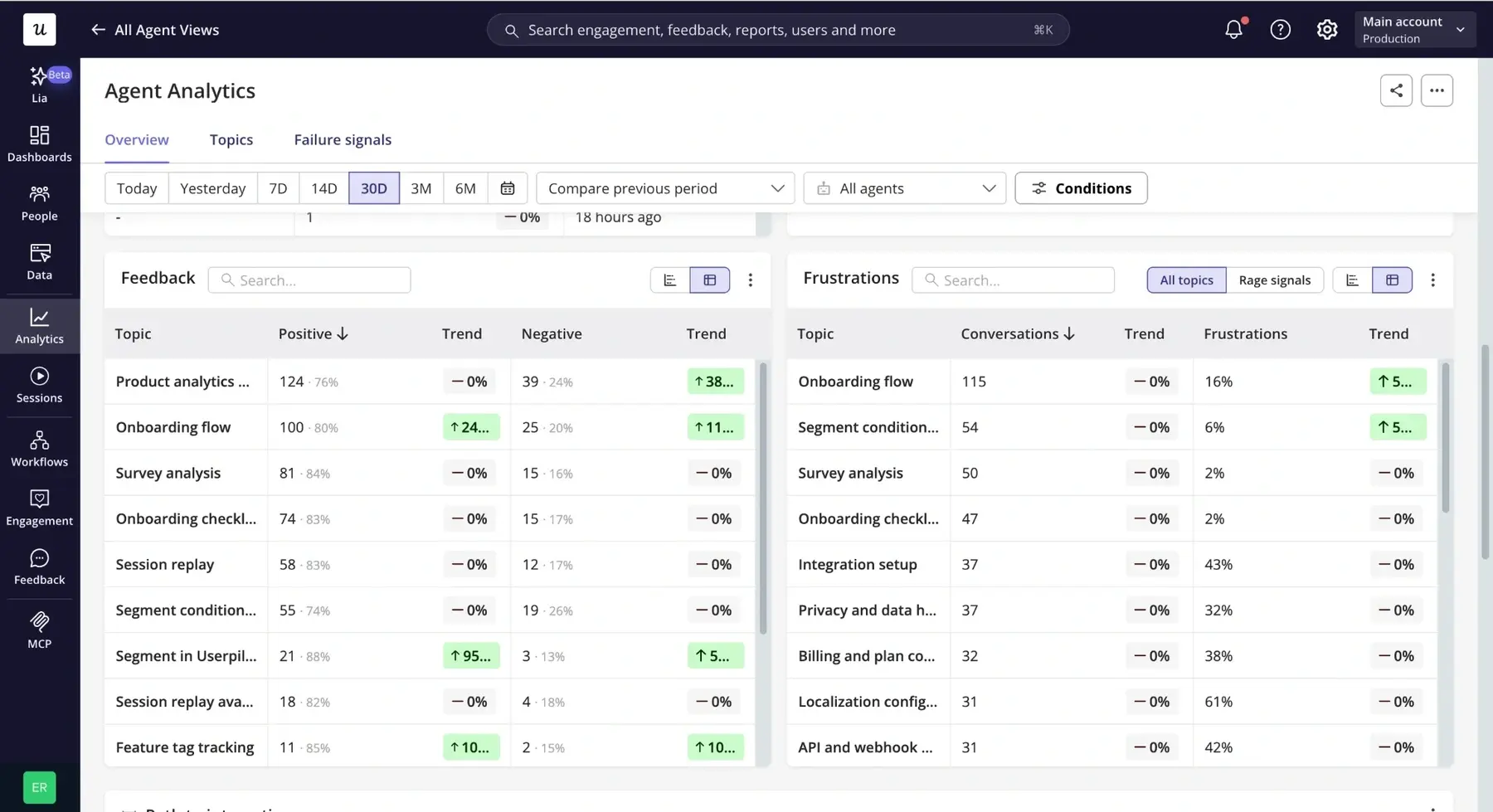
Scrolling past the metrics scoreboard takes you to reports that show you who exactly uses the AI agent, when, and what happens during the conversation. These include:
- Users and companies: Who gets the most value from the agent, be it individual power users or the accounts that use it most.
- Entry points: Which pages or URLs users send their first messages from.
- Path of interaction: What users do right before and right after a conversation, so you know where it sits in the customer journey, what exactly prompts them to use the chatbot, and if it resolves the problem.
- Conversation length: Conversation flows, prompt count, and duration, a signal for overly long or complicated interactions.
These reports give you extra context for understanding the chatbot engagement metrics.
For instance, a rising conversation count can mean more people are getting value from the agent, or that more people are hitting problems in the product and asking the agent to help. Analyzing the entry points and interaction paths will show what triggered the conversation and whether it resolved the issue.
2. Understand what users are asking your chatbot
Userpilot’s Topics tab groups your agent’s conversations by subject or common user intents.
Userpilot’s AI identifies the topics from the conversations, and you can create your own for the use cases you want to track.
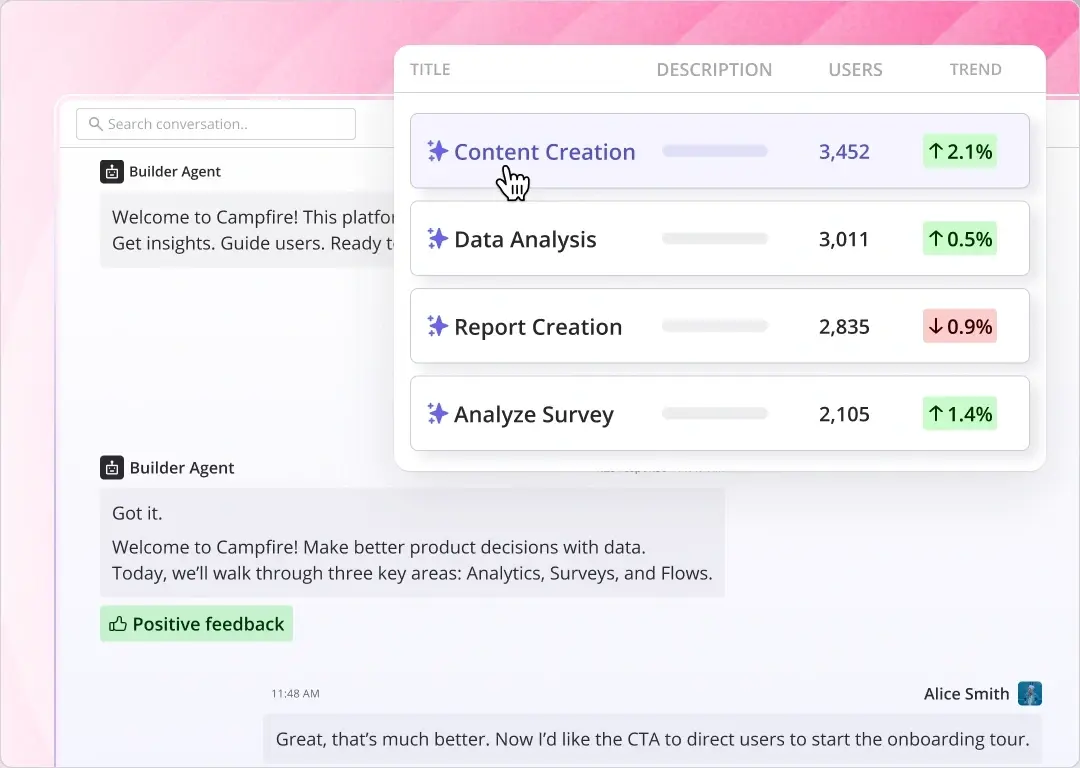
The Topics table lists every topic with its usage and sentiment analysis stats:
- Users and conversations: How many people raise the topic and how often, so you can identify trends in demand.
- Average length and duration: The total messages and time a topic takes, so you can spot complex queries the agent struggles to close.
- Satisfaction rate: Positive ratings as a share of all ratings for that topic.
- Conversation outcomes with frustration signal: How many conversations on the topic contained a frustration signal.
- Last conversation: When the topic last came up.
You can sort the report by any column to find the most common questions, topics with the lowest satisfaction, or growing ones.
Clicking a topic opens every conversation assigned to it, with a switch to session replays where they exist, and clicking a conversation opens its full transcript.
Analyze the topics and attached metrics to spot:
- Gaps in the agent’s knowledge or in the actions it can take (High-volume, long-duration, and low-satisfaction topics).
- Unmet user needs (Requests for features that the product doesn’t provide).
- Product improvements (Complaints or requests for features the product has but might be hard to find or use).
3. Identify failed conversations and frustrated users
Userpilot’s Failure Signals tab shows situations where the agent didn’t do what the user needed, grouped by type, so you can see how often each one happens and where.
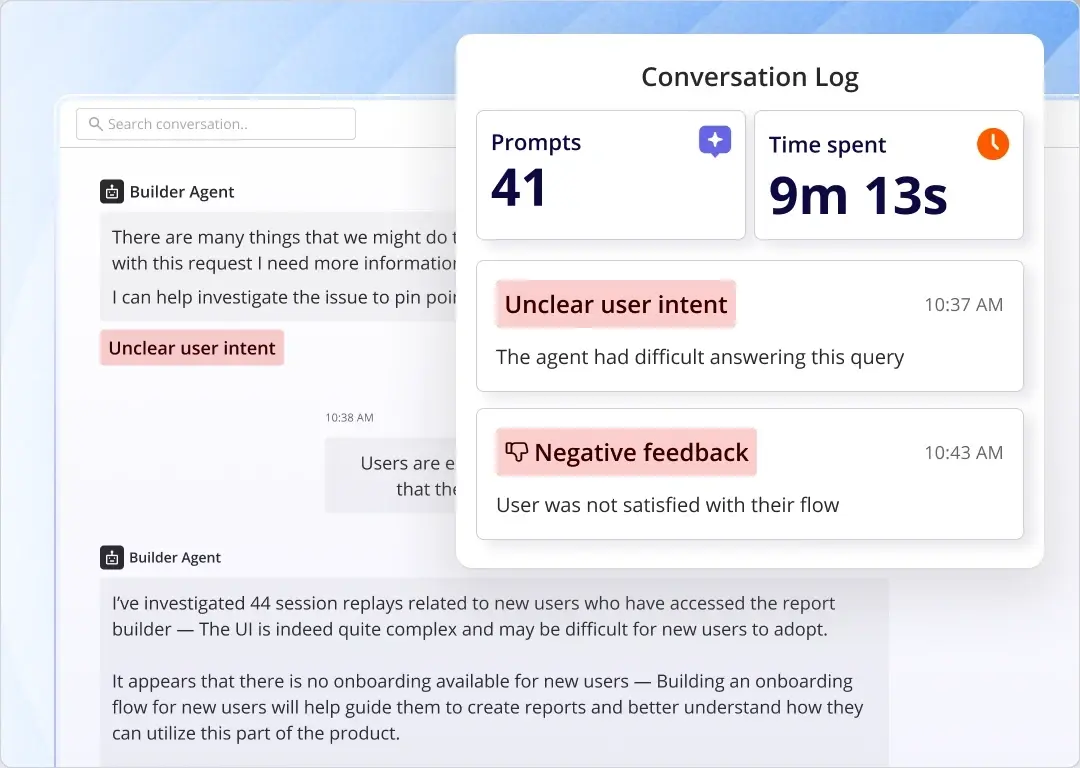
Userpilot uses AI and natural language processing (NLP) to detect five failure patterns automatically:
- Fallback response triggered: The agent gave an “I can’t help with that” answer.
- Task execution failure: The agent failed to complete an action, say, an export.
- Escalation or human handoff: The agent passed the conversation to a human.
- Contradictory agent responses: The agent gave conflicting answers in the same conversation.
- Agent looping or repetition: The agent repeated the same clarifying question without moving the conversation forward.
You can also create custom failure signals specific to your product, and Userpilot will group matching conversations under it.
In addition to failure signals, Userpilot gives you insights into frustration signals in the Frustrations report in the Usage Overview. They include strong negative sentiment or offensive language, ALL-CAPS, rephrasing the same question, or telling the agent it’s wrong.
When looking for areas to improve, look at failures by topic, not the overall failure rate. That’s how you find specific intents where the agent fails despite a low overall rate.
As in the other views, you can filter the failure signals and sort them by user and conversation counts to prioritize those affecting the most people.
Clicking a signal opens a slideout with every conversation where it was detected (and session replays where they exist).
Click again on individual conversations to open the transcript view with all user prompts and replies, the pages the user moved between, and filters that take you directly to the failure, frustration, and slow-response moments. Look for unclear or frustrating answers, unsupported user requests, or failed task executions.
4. Measure how your chatbot impacts product outcomes
Userpilot’s Agent impact on retention report lets you compare retention rates between users who interacted with your chatbot and those who didn’t.
According to our SaaS Product Metrics Benchmark Report at Userpilot, the average one-month retention rate across 83 SaaS companies was 46.9%. If your chatbot helps users overcome problems, it’s helpful to know whether those users are more likely to return.
To analyze the agent impact on activation and adoption, track the Conversation started event.
Userpilot records every conversation as a Conversation started event, with the agent, topic, length, duration, direct feedback, and any frustration or failure signal attached as properties. The event works like any other event in Userpilot, so you can use it in:
- Segmentation: Group users who had at least one conversation or those whose conversations hit a topic or a failure signal, and compare their activation and core feature adoption with users who never opened the agent.
- Trends report: Build custom reports that put conversation data next to activation and feature adoption, so you can see whether agent users hit those milestones at a higher rate.
- Session replays: Filter sessions by the event, so you can watch what a user did in the product before and after the conversation.
- Engagement: Use the event to trigger and target in-app flows and messages.
Arguably, this is the most important part of the analysis. Resolved user queries matter only when they affect other key performance indicators such as activation, adoption, or retention.
I’m using the word impact, but of course, the reports only show correlations between chat interactions and the metrics. More engaged users, who are more likely to use the chatbot, are also more likely to succeed even without the chatbot assistance. So treat these as an indication only.
Turn chatbot analytics into product improvements with Userpilot!
Userpilot’s chatbot analytics runs on the same data as the rest of Userpilot, so you can go from a failed conversation to a fix without switching tools:
- Investigate user behavior: Use product analytics and session recordings to understand what made the user open the agent and how the conversation affected what they did afterward.
- Help users succeed with personalized guidance: Segment users who hit a specific failure signal or topic, or who struggle, and help them overcome the issue with bespoke in-app guides.
- Improve the in-app experience: Design and test contextually relevant in-app messages, walkthroughs, and checklists to help users overcome common blockers, so they don’t have to use the agent in the first place.
- Collect user feedback: Send surveys to affected segments to check if the changes solved their problem.
- Use Lia to accelerate the process: Ask Userpilot’s AI agent, Lia, to investigate related product data, identify potential causes, and build in-app experiences to tackle them.
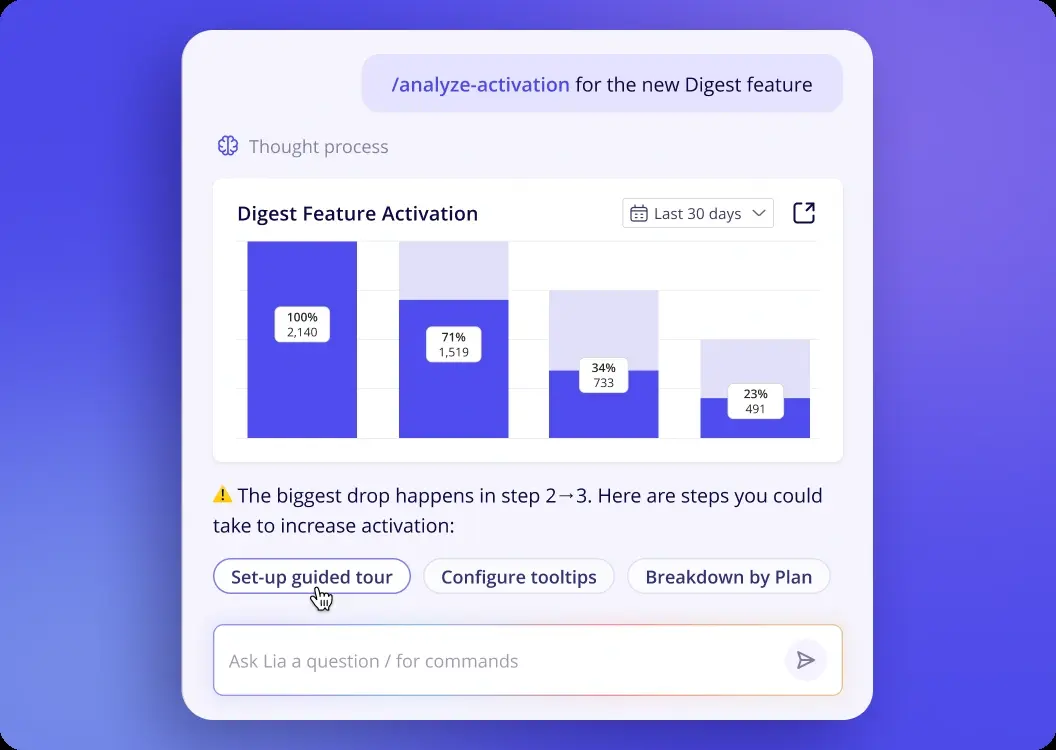
Book a demo to see how Userpilot’s Agent Analytics can help you turn failed conversations into product improvements that enhance the user experience and drive product growth.
About the author