My Digital Adoption Platform Recommendations for 2026


Over the past decade in product management and quality assurance, my work has often centered on the same metrics: activation, feature adoption, and retention. Thanks to Digital Adoption Platforms (DAPs), I consistently hit (and improve) the target.
But besides using several DAPs, I’ve also had the chance to see how one is built and used across teams. Yes, I’m a Product Manager at Userpilot, and before then, I was the Quality Assurance Lead.
Those experiences shaped this article and the DAPs I shortlisted. I also considered insights from other product managers across communities and review sites.
The goal? To help you narrow down on the right digital adoption platform software for your budget, team, and product stage.
Types of digital adoption platforms
At first glance, most digital adoption platforms (DAPs) feel interchangeable. They all promise tooltips, onboarding checklists, and in-app guides. But trust me, having evaluated dozens of these platforms firsthand, the real difference emerges when you put them into practice, especially for enterprise applications.
From what I’ve seen, there are two main use cases:
1. Platforms for employee training
When I worked with ops teams rolling out CRMs and HR systems, the issue was never the software— it was getting people to use it right. That’s hard when 49% of employees get less than 5 hours of training annually, and most still don’t fully understand the tools they rely on daily. Employee-focused DAPs fix that. They guide end users step by step, enforce critical workflows, integrate with your learning management system, and prevent data errors before they happen.
2. Platforms for user onboarding
For product-led growth teams (where my heart lies), it’s about building long-term habits, enabling feature discovery, driving product adoption, and user activation. The wrong digital adoption platform won’t just slow down your user onboarding; it might actively sabotage user adoption. These platforms are key to executing a solid digital adoption strategy, from seamless onboarding to long-term engagement.
Best digital adoption platforms for user adoption
If you’re like most Product Managers I’ve collaborated with, you care deeply about user activation, habit formation, and genuine product adoption, not just vanity metrics. Picking the right DAP directly impacts whether new users truly discover and stick with your key features.
Here’s the mental checklist I use whenever I’m helping a team evaluate their digital adoption needs:
- UI flexibility: Can I build different types of in-app support, such as onboarding, feature announcements, prompts, and more?
- Targeting controls: Can I show the right message to the right user, based on who they are and what they’ve done? Does it support robust user segmentation?
- Native analytics: Can I track user behavior, see completions, drop-offs, and task performance without cobbling together other tools?
- In-app surveys: Can I collect feedback while the guidance is still fresh in the user’s mind?
- Deeper behavioral insights: Can I dig into user behavior patterns or session replays to find what’s holding users back?
I always start with these questions. If your tool cannot confidently answer them, it’s probably not the right DAP for adoption.
| Tool | Why Choose It | Main Features | Pricing (Starting From) |
|---|---|---|---|
| Userpilot | For product growth and cross-platform adoption | No-code builder, precise targeting, flow analytics, mobile support, session replays | $299/month (2,000 MAUs) |
| Userflow | For user onboarding on web applications | Drag-and-drop builder, in-app surveys, AI assistant, Resource Center | $240/month (3,000 MAUs) |
| Hopscotch | Simple and affordable no-code adoption solution for startups | Tooltips, banners, custom styling, Segment integration, basic analytics | $99/month (3,000 MAUs) |
| Pendo | For data-driven adoption and informed product decisions | Retroactive analytics, segmentation, roadmap tools, session replays | Custom (Free for up to 500 MAUs; but you’ll quickly grow out of this.) but can get as expensive as $146,626 per year |
| ProductFruits | For AI-powered onboarding | Checklists, tooltips, Life Ring (mini Resource Center), feedback widget, AI Assistant | $149/month (1,500 MAUs) |
| HelpHero | The most budget-friendly tool with all essentials for digital adoption | Tours, checklists, tooltips, A/B testing, full feature access at all tiers | $55/month (1,000 MAUs) |
#1 Choose Userpilot for driving digital adoption on web applications and mobile products
If you’re a mid-market or enterprise team looking for a digital adoption solution that scales, Userpilot checks all the boxes, without the enterprise price tag. Starting at $299/month, you get all the basic tools for building flows that boost user adoption.
Here are our main features:
- Create in-app guidance for web apps using tooltips, modals, checklists, and more, no code needed. You can build flows consisting of sequential steps, each of which can be a different UI pattern (modal dialog, slideout, tooltip, etc.) with customized text, media, and buttons.
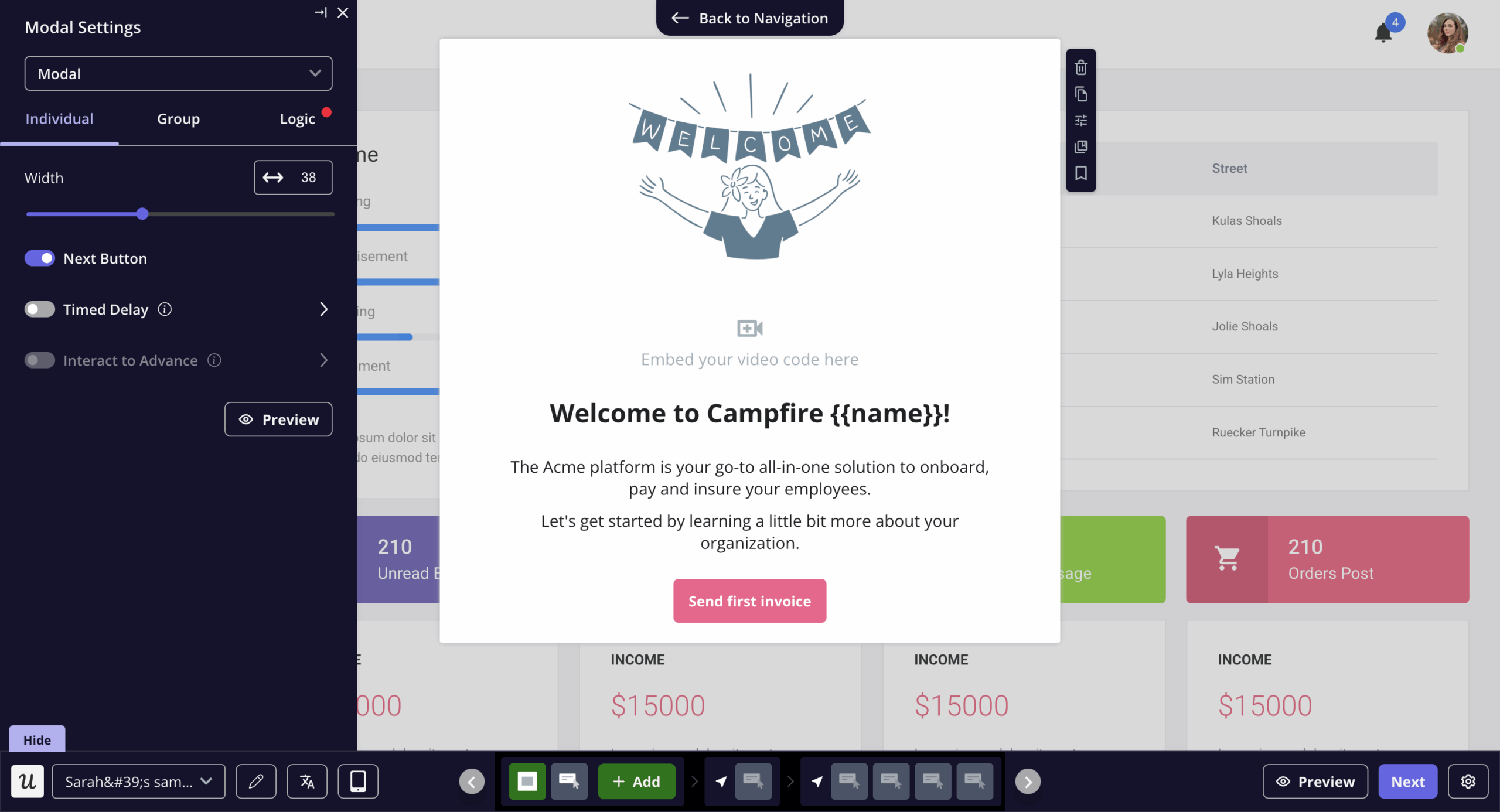
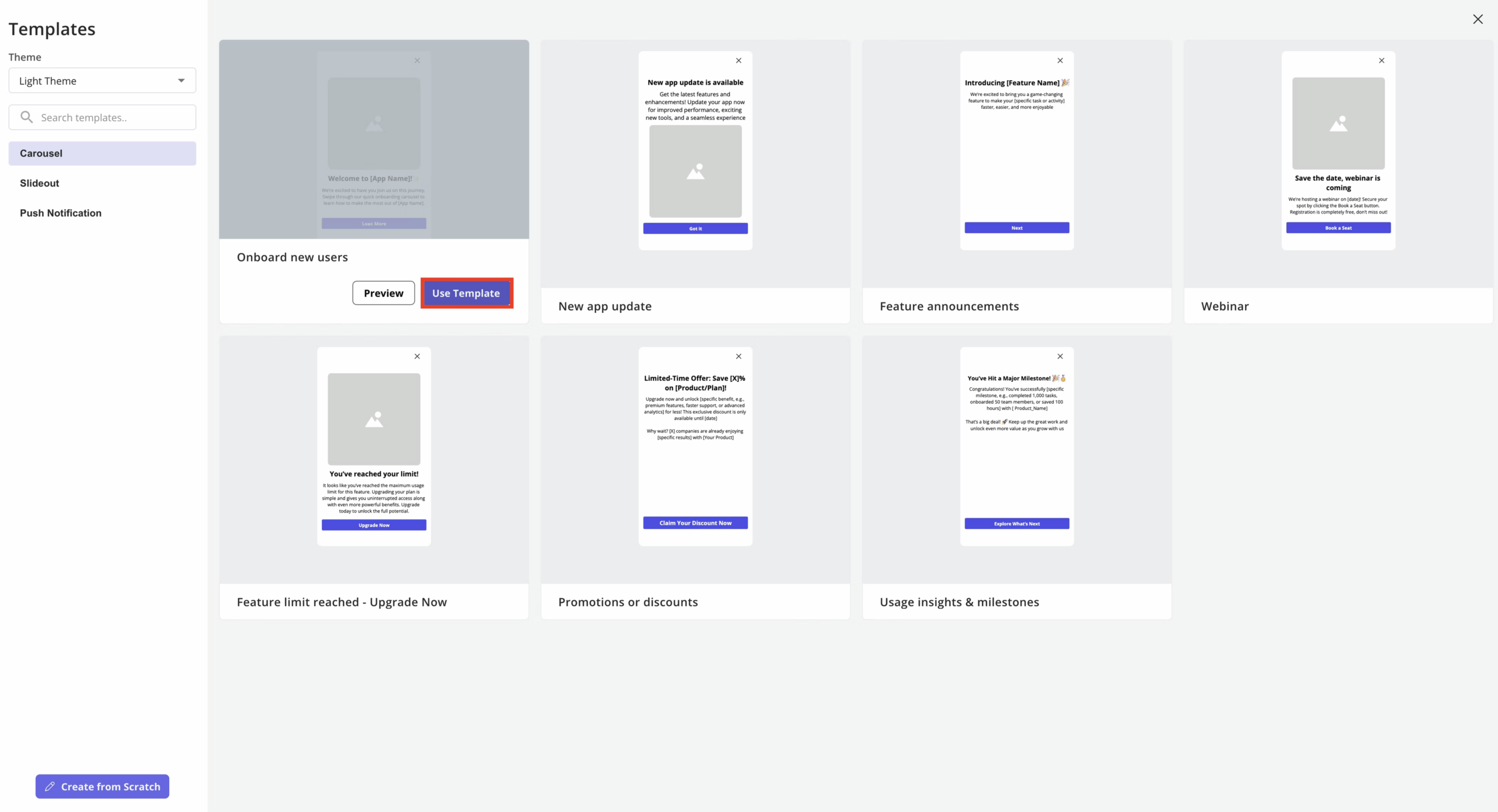
- Mobile UX patterns designed for small screens: Carousels guide users through multi-step onboarding or feature tours, slideouts deliver quick contextual tips or announcements, and push notifications re-engage users outside the app. Also, you don’t have to build the flows from scratch; there are ready-made templates.
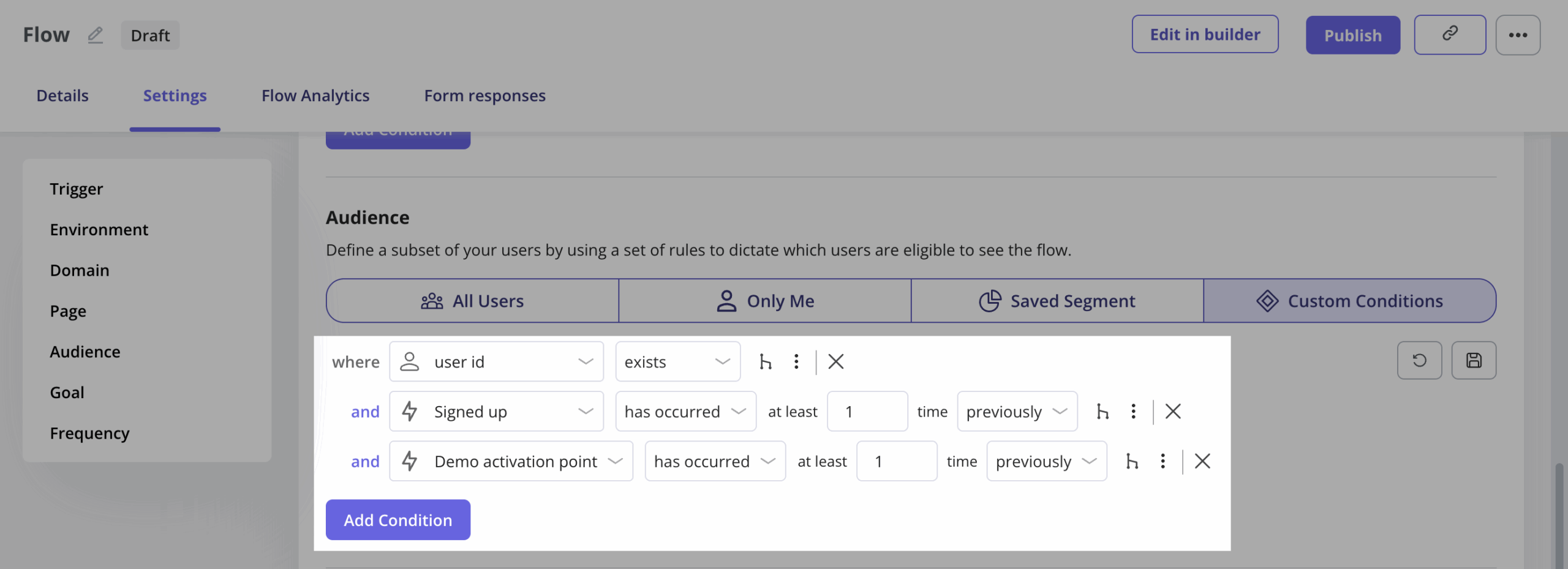
- Target users with precision by page, URL path, behavior, user properties, or custom segments. You can define audience segments based on user properties, behavior, or lifecycle stage, and then trigger flows or tooltips conditionally for those segments.
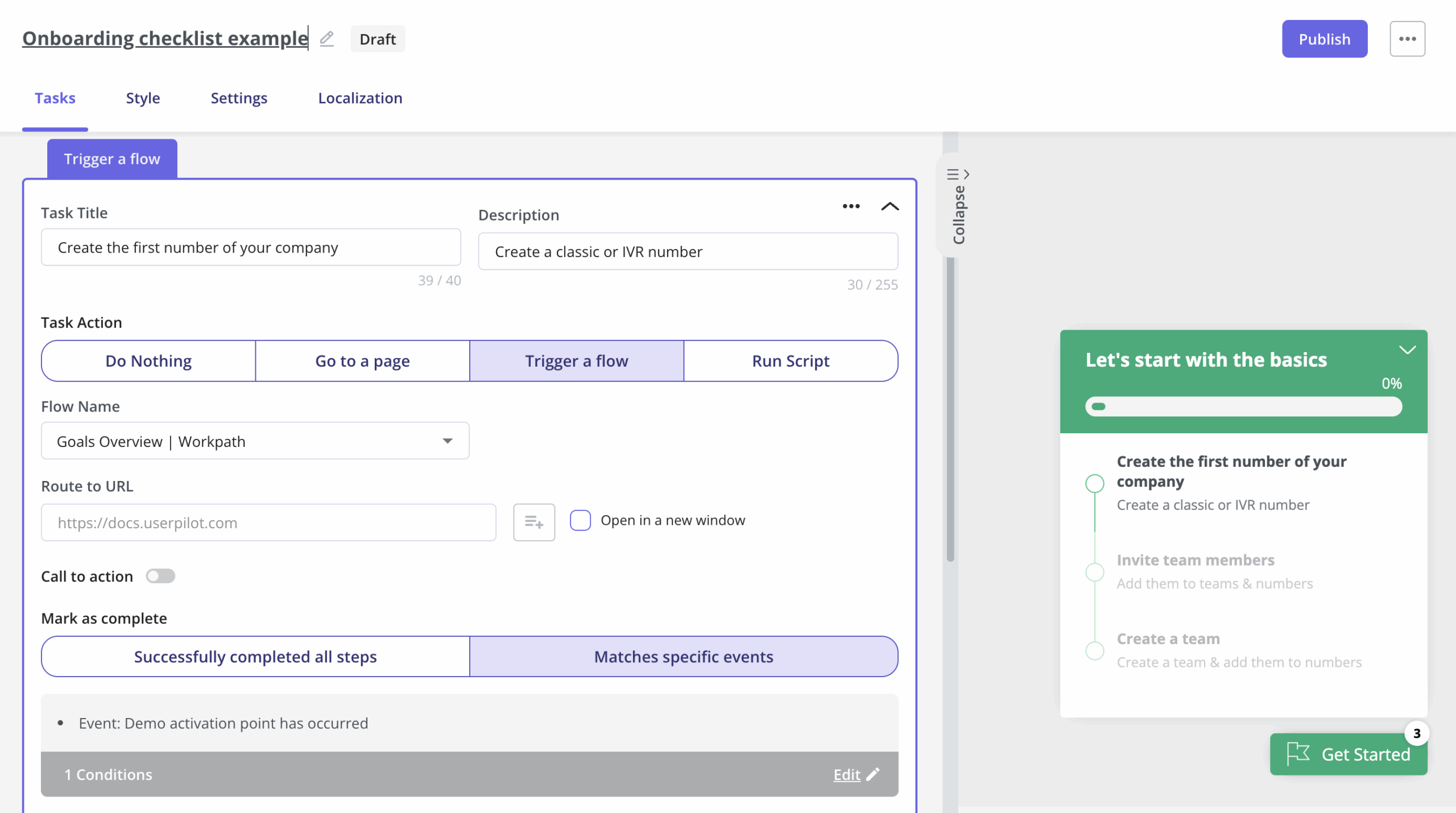
- Checklists: We offer interactive to-do lists that group multiple tasks or tours into a structured list for the user. You can use checklists to help users navigate key steps (e.g., completing the profile, using a feature) in a guided sequence, improving activation and retention. They can be customized in appearance (pop-up, widget, etc.), task completion rules, and even segmented by audience for personalization.
- Monitor performance in real time with native flow analytics showing step completions, drop-offs, and time to finish.
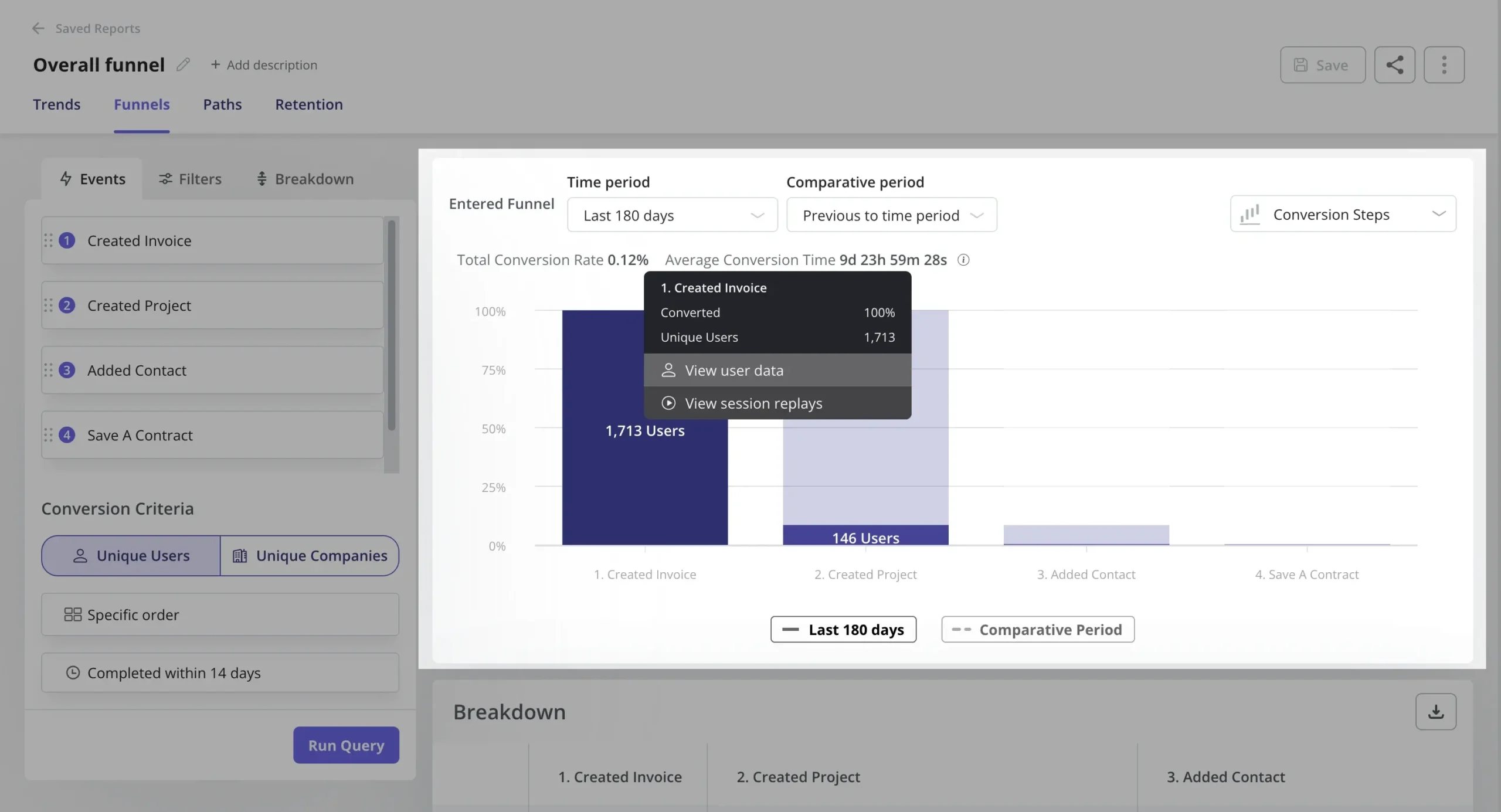
- Analytics capabilities: We also have analytics features that bring you extra insight on user adoption i.e. analytics reports like funnel to spot user drop off, or product usage dashboard to track all adoption-related metrics, session replays to understand friction, etc.
- Support onboarding across platforms with mobile UI patterns and analytics for iOS and Android apps.
- Deliver self-serve support in-app through a customizable Resource Center that hosts flows, videos, and FAQs (available on the Growth plan and up) – reducing support tickets.
- Integrate with your existing tools, such as Segment, Amplitude, HubSpot, Salesforce, Zendesk, and more.
Why choose Userpilot
Full disclosure, I’m a PMM at Userpilot. But beyond my bias, here’s why you should choose Userpilot:
✅ All-in-one for in-app experiences: Userpilot lets you design onboarding flows, tooltips, checklists, banners, and announcements, all without code.
✅ Built-in analytics to track adoption: Unlike lighter tools, Userpilot includes native analytics: activation funnels, feature usage tracking, retention reports, and A/B tests. You don’t need to plug in a separate product analytics tool just to measure impact, it’s already part of the platform.
✅ Solid tech stack coverage: With integrations for Segment, Amplitude, HubSpot, Slack, and more, Userpilot fits right into your stack. Plus, its JS API and webhooks give you flexibility to scale your workflows and data flows.
✅ More cost-effective: You get flows, segmentation, targeting, analytics, NPS, even session replays (add-on), etc., at a more affordable price than tools with similar features (i.e., Pendo).
Our customer, Smoobu, says:
I’d definitely recommend Userpilot. It allows us the flexibility to move fast, experiment, and really understand what users need. It’s helped us speed up processes and create a smoother user experience.
– Dasha Frantz, Product Designer at Smoobu
#2 Choose Userflow if you only want to improve digital adoption on web applications
This digital adoption platform works for small-to-mid-sized SaaS businesses that want a fast, code-free onboarding solution for web applications. It offers a solid feature set, without the heavy footprint (or cost) of enterprise platforms.
It may lack some advanced capabilities. For example, there’s no native NPS in Startup beyond 2 questions. No built-in NPS benchmarks. No dedicated mobile support.
Users have also complained about limitations around gated knowledge content. Marcus shares:
We can only point Userflow at our public-facing HubSpot knowledge base articles, but we do have articles behind the login, and so that is something that’s not working too good for us at the moment.
Starting at $240/month, Userflow covers core user adoption needs like onboarding flows, checklists, product tours, and 2-question surveys (up to 3,000 MAUs).
Key features
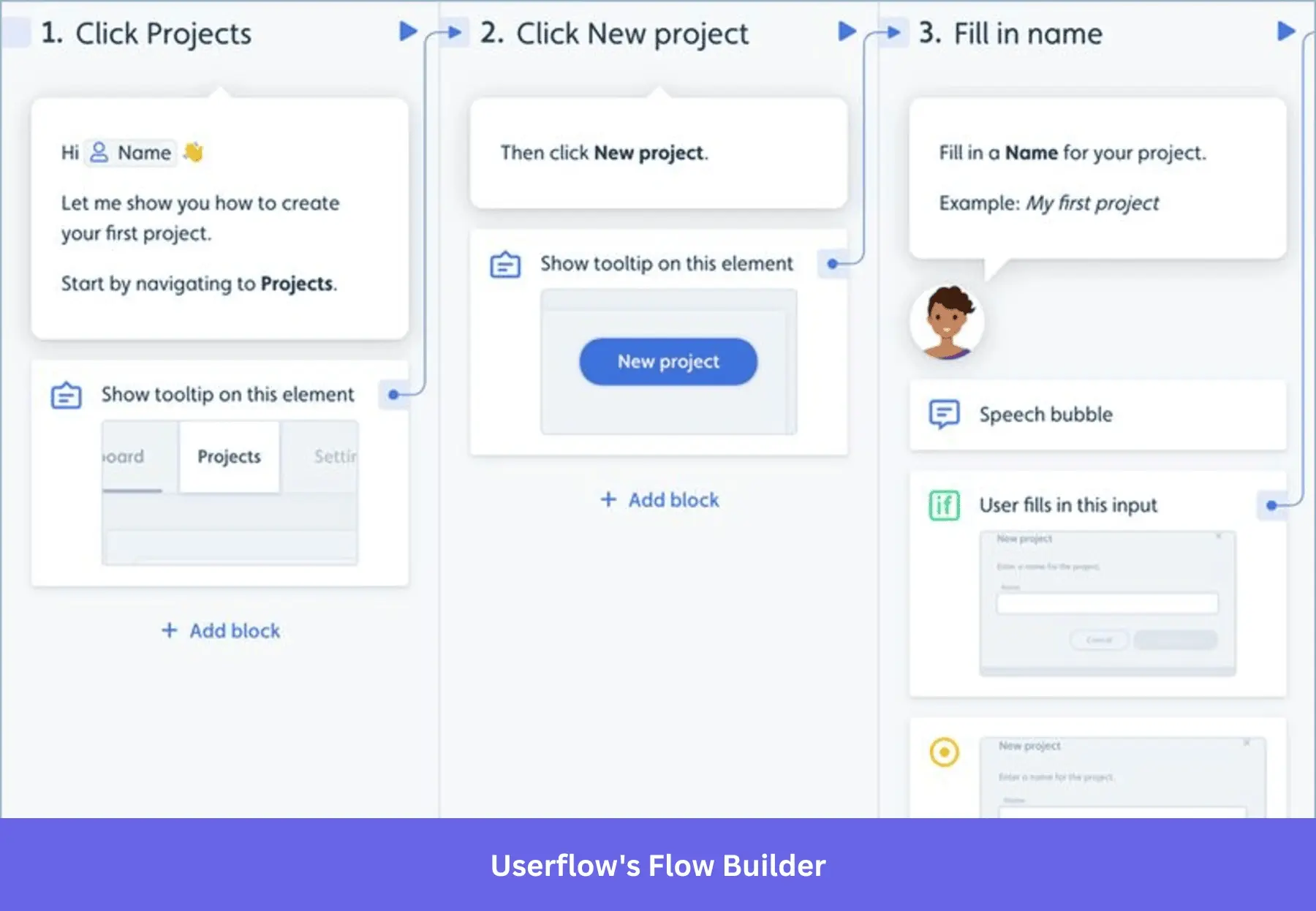
- It provides a visual flow builder (kanban style) that lets you create in-app tours and guides with drag-and-drop. This has a steeper learning curve than common Chrome builders in most onboarding tools like Userpilot, Pendo, or Appcues. Users have also raised issues about efficiency. James provides more context, “making flows with AI proved to be a little too automated and lost some specificity that we required…”
- Segmentation is a strong point: Userflow lets you define audience segments using user properties or custom events (e.g., plan type, last login, actions taken) and target guides to those. You can also trigger flows by behavior in real-time (“if they click X or ignore Y, then show Z”) using behavior-triggered rules.
- Built-in analytics dashboards to measure guide performance: You can see for each tour or tooltip how many users viewed it, completed it, and where they dropped off. However, it’s not a full product analytics suite, and customers have noticed. Karine says, “We can’t report on Analytics. It would be very nice to have more reporting capability.” In other words, for deeper analysis (feature usage, long-term retention), you’d integrate with a dedicated analytics tool.
#3 Choose Hopscotch if you need an affordable digital adoption platform
If you want a budget-friendly platform to build onboarding flows without a steep learning curve, Hopscotch gets the job done. Starting at $99/month for up to 3K MAU, it’s a good starting point for startups that need core in-app guidance like tooltips and walkthroughs.
Hopscotch also goes beyond onboarding. It includes product roadmap features and tools for collecting user feedback, making it better suited for teams managing the broader product experience. So, if your only goal is digital adoption, this added scope may feel like more than you need, both in features and cost.
Key features
- Hopscotch supports tooltips and guided tours that highlight UI elements and let users click through real steps (the guides can respond to button clicks or form inputs). It does not have as many UI patterns as DAPs; notably, it lacks onboarding checklists and built-in surveys. And users have raised concerns about performance: Matt said, “Sometimes the tour editor slows down when working on long flows. More detailed analytics would make it even better;” Alina echoed the same sentiments: “…the analytics could offer more insights, and sometimes the editor feels a bit slow when working with longer or complex processes.“
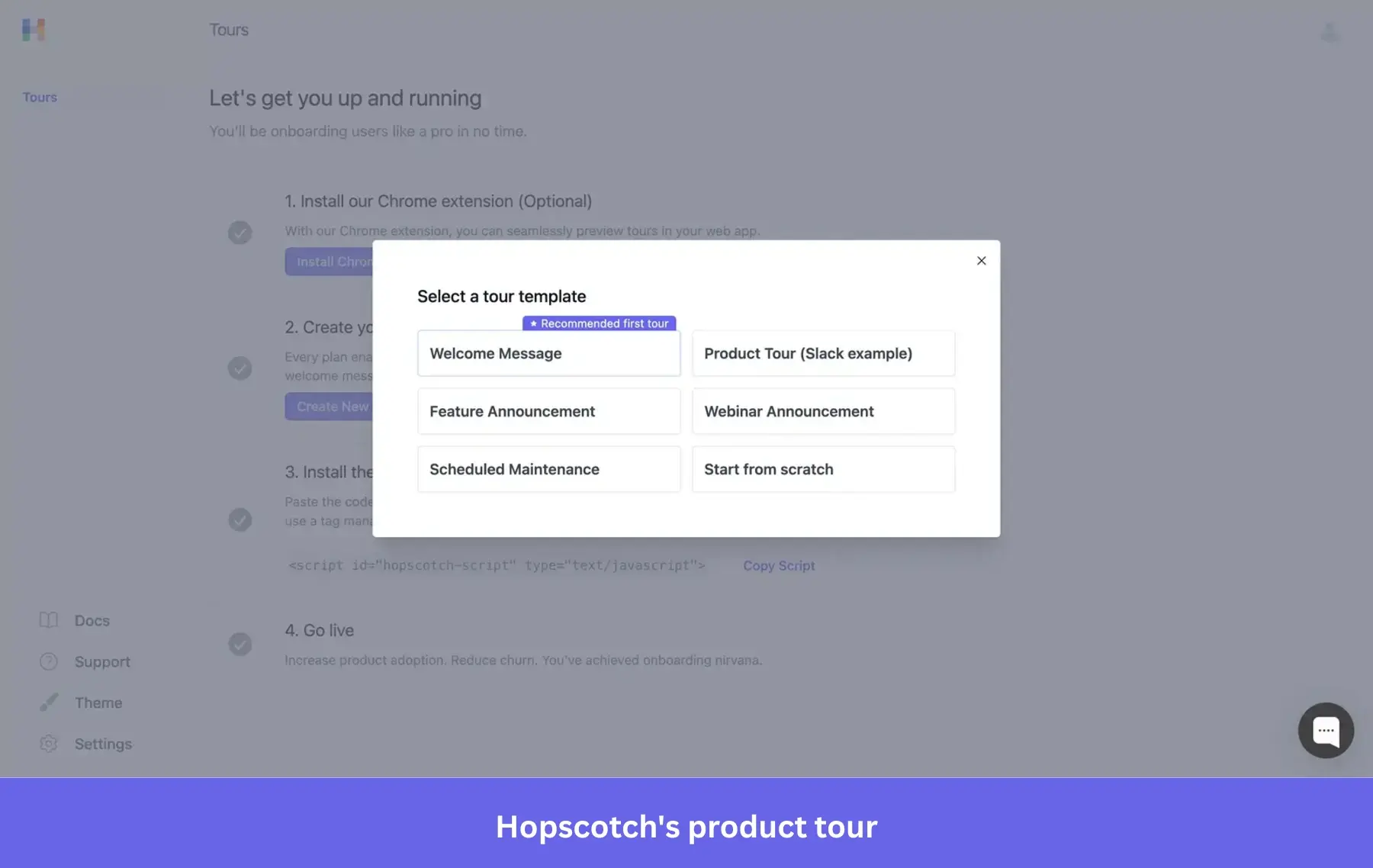
- “Campaigns” feature for announcements: It allows scheduling in-app messages or banners for specific times (useful for feature launches or maintenance notices). The messaging capabilities cover things like welcome messages for new users, feature announcement pop-ups, or contextual tips, essentially in-app notifications that you can target and time.
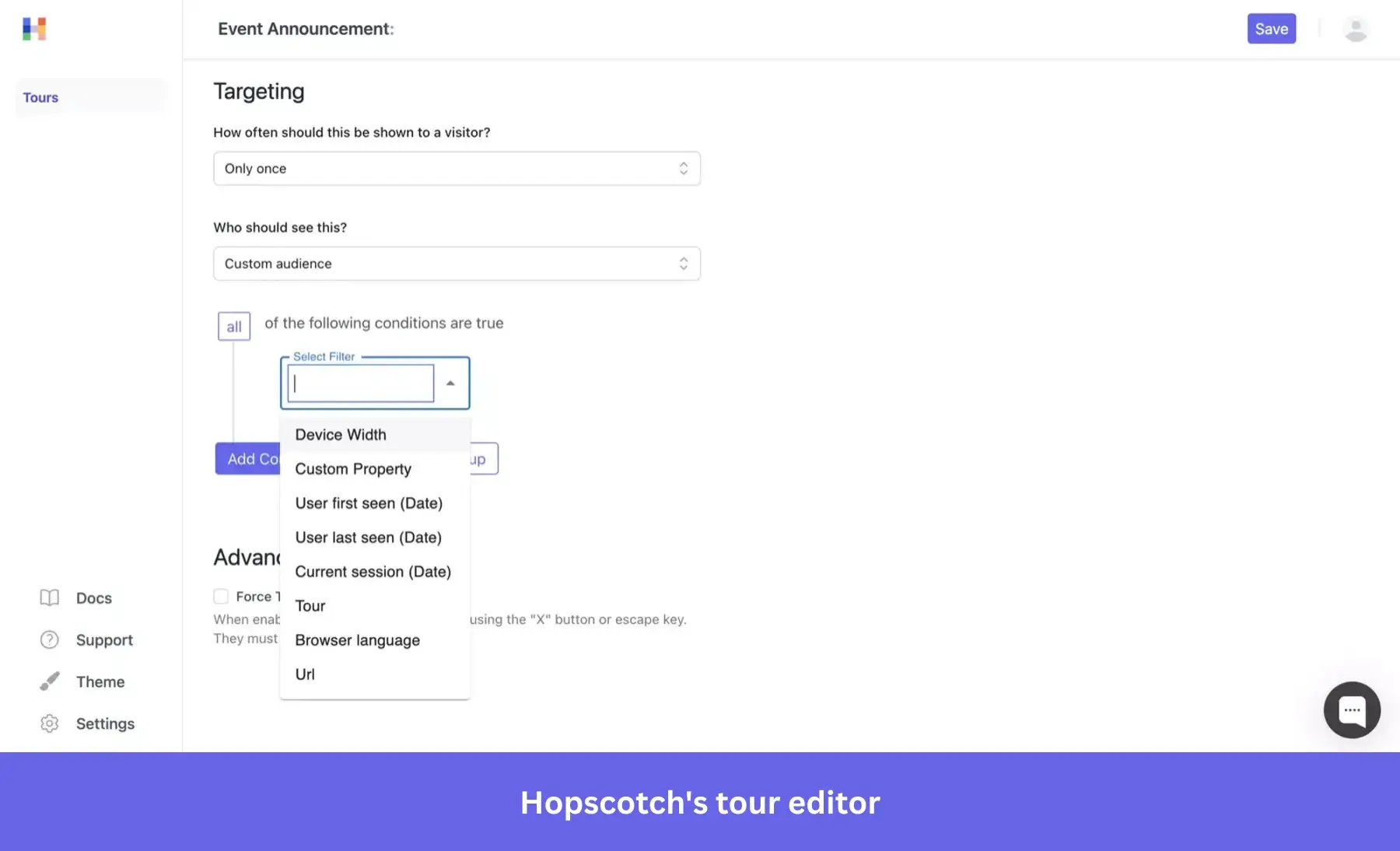
- Only comes with basic targeting, i.e., user active date, browser language, URL, etc. For more advanced targeting, like user properties, you’ll need engineering help.
#4 Choose Pendo for data-driven digital adoption
Pendo is best suited for organizations that want a single solution for analytics + adoption and are willing to invest to get deep insights and robust support. It is generally on the higher end price-wise, ranging from $17,070 to $145,466.
Key features
- Pendo allows you to create a variety of in-app experiences, like tooltips (inline help bubbles), lightbox modals, banners, and multi-step walkthroughs. These can be built with a visual designer and triggered contextually.

[Build step-by-step in-app guidance using Pendo’s visual guide editor with live preview and step flow control.]
- It also offers onboarding checklists (as a module in their “Resource Center” or as a separate checklist if you’re on a Guide Pro subscription) to help new users complete key steps.
- Pendo has conditional branching (skip-ineligible steps, metadata-based flows) via Guide Logic in Guides Pro (in the Ultimate plan or as an add-on). Unfortunately, getting value from such advanced features takes time and steep learning, despite being expensive. Darshan puts it plainly, “Some reports can feel a bit complex to set up, and some deeper analysis takes time to learn. More flexibility and simpler reporting would make it easier to use day to day. The initial setup was fairly straightforward, but getting most value out of advanced features took some time and learning.”
- There are built-in reports on guide engagement, and your customer success teams can even tie guides to product goals (for example, see if users who took the onboarding tour reach activation milestones faster).
- Pendo also includes feedback and sentiment tools: it has a built-in NPS survey module (and in higher plans, other survey types and a feedback voting board). These allow you to measure user sentiment in-app and prioritize feature requests (called “Product Discovery” in Pendo’s plans).
Overall, with 4.4 rating from 1500+ reviews on G2, Pendo feels safe. However, it’ll cost you a lot. Yes, you’ll have the features you need to get your job done, but you’ll have to pay for add-ons or purchase an expensive plan among the available pricing tiers. Bharath added some context, “The pricing is a bit expensive. Also, the interface and initial setup process overwhelming at first, with a steeper learning curve compared with simpler alternatives.”
#5 Choose ProductFruits for an AI-powered digital adoption solution
If you want to speed up onboarding and reduce manual work with AI-assisted in-app guidance, ProductFruits is worth considering. It helps startups and SMBs guide users, answer questions, and drive activation without building everything from scratch.
The platform combines onboarding flows with AI-powered support elements (like contextual help and knowledge surfacing), making it easier to scale user guidance as your product grows.
All plans include the full feature set, so you’re not gated by functionality. The main differences come down to usage limits and advanced capabilities. The Starter plan (from $149/month) covers core onboarding tools and standard integrations like Google Analytics or a single chat tool.
Key features
- Create product tours, guides, tooltips, and banners using a simple browser-based editor. While the editor is straightforward, it’s not flexible. Sven shared that “Tours and Hints are sometimes hard to create and to position in a way that it works for both, desktop and mobile. Mulitlanguage-capability could be better“.
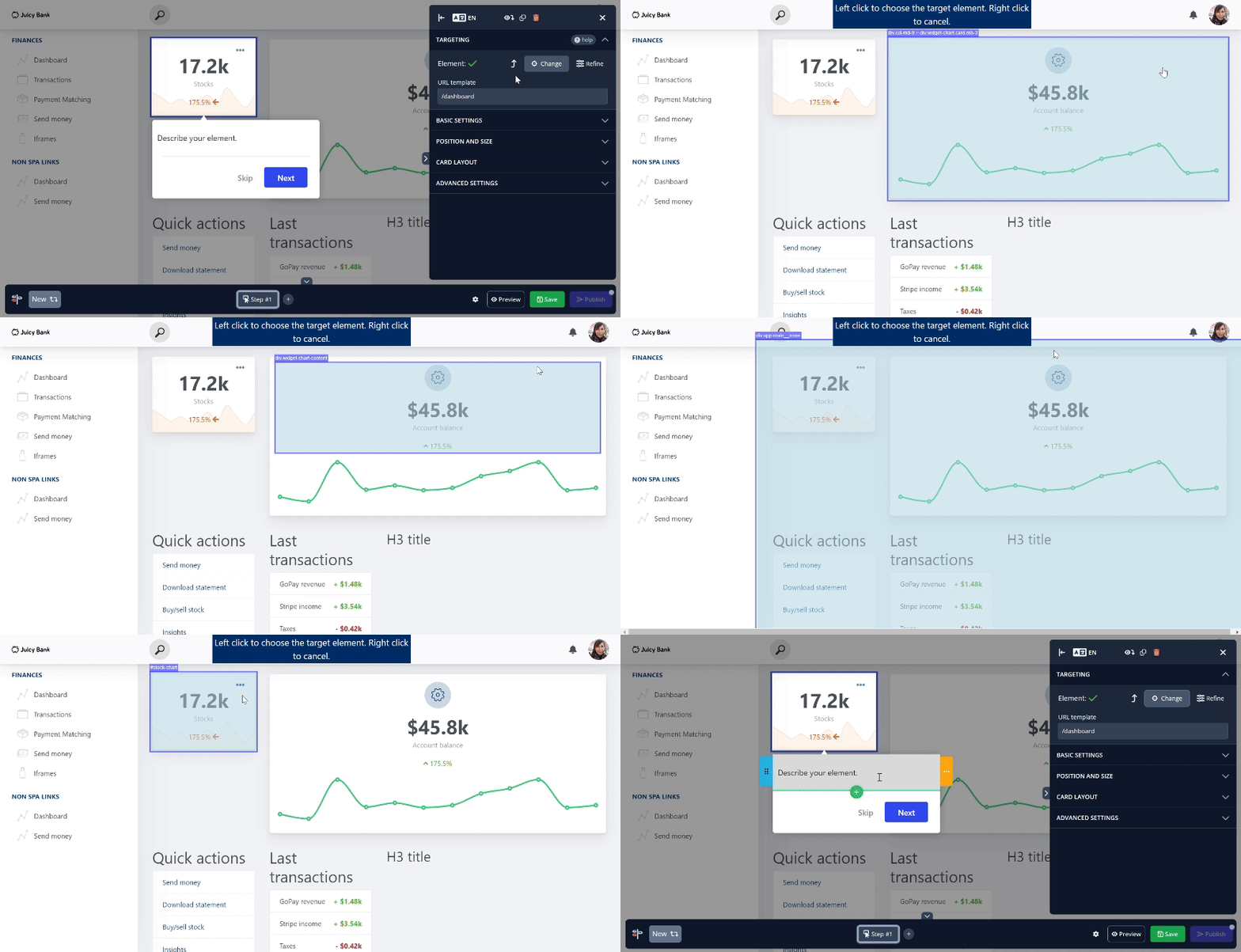
- Launch onboarding checklists that track task completion and guide users to activation.
- You can segment who sees what: the app provides a segmentation rule builder (by user properties, behaviors, or even by URL). You can also set conditions inside tours (like only show a step if the user has done Y). Localization is supported for multi-language users.
- Product Fruits uniquely offers an in-app help center widget (the icon is a life ring) that centralizes help. When opened, it can contain tabs for knowledge base search, links, the feedback form, your live chat, and more, all in one place. Users can also replay tours from here or contact the support team. This serves as an on-demand Resource Center for users to self-serve answers.
#6 Choose HelpHero for a budget‑friendly in-app onboarding solution
HelpHero is especially popular with startups and small teams that want all the essentials, priced transparently with minimal reliance on your support team for setup or scaling. It covers the basics extremely well: unlimited tours, checklists, hotspots, and targeting on all plans. Plus, their team is known for providing solid customer support.
The pricing is startup-friendly, and plans scale by MAU, starting at $55/month for 1,000 MAU, $179/month for 5K MAU, and $299/month for 20K MAU, with all features included on every plan.
Key features
- With HelpHero’s visual editor, you can build multi-step guides that include step types such as: Modal, Highlight (Helphero’s tooltips), Toast (Helphero’s slideouts), and Funnels for targeted guidance. However, the UI is off. Daniel says, “Tours’ window styling isn’t the coolest, although you can use your own CSS styles to improve it.“
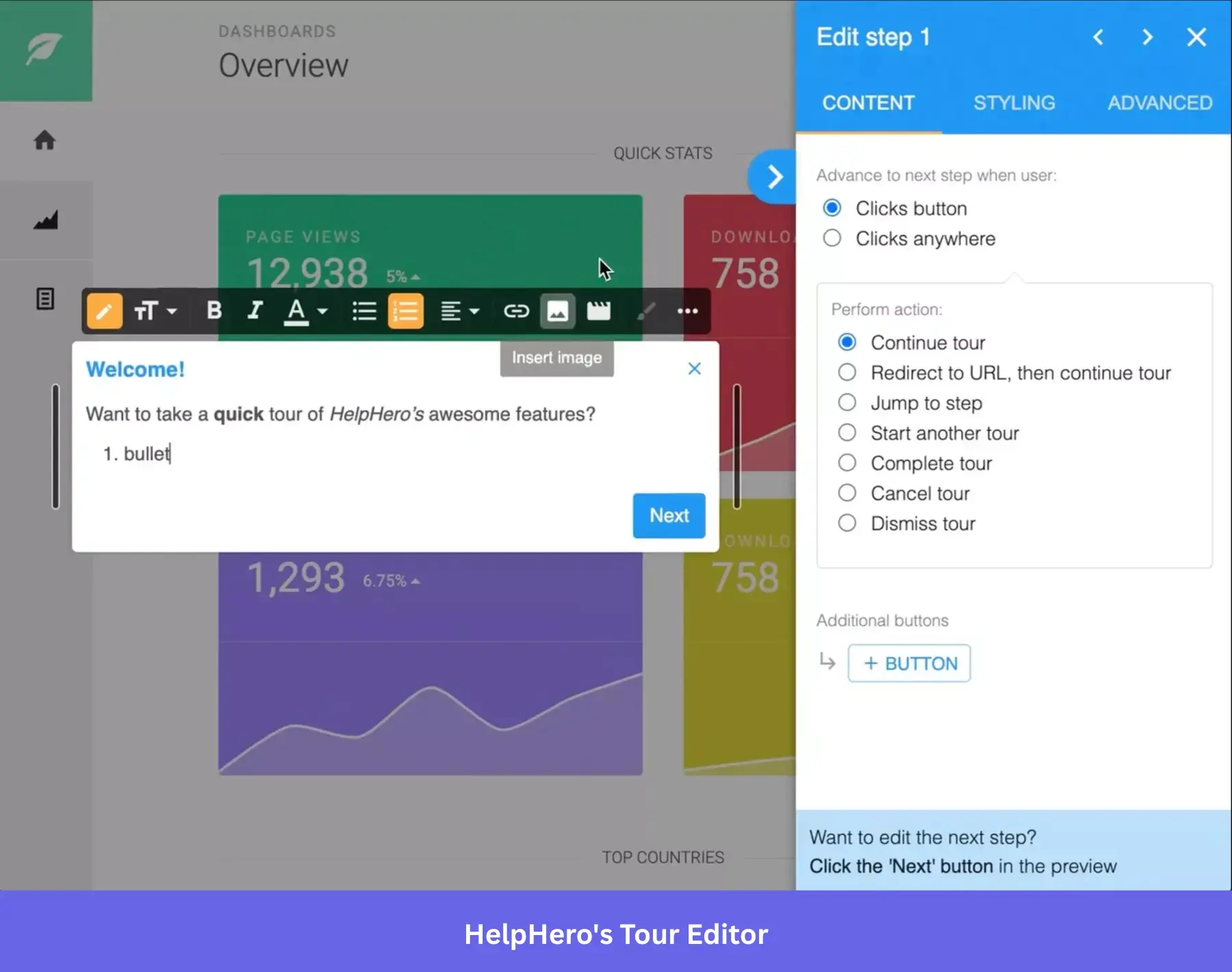
- Like the bigger platforms, HelpHero offers checklists to onboard users in a self-paced manner. You can list key tasks (with links to launch a tour or go to a page), and users can check them off.
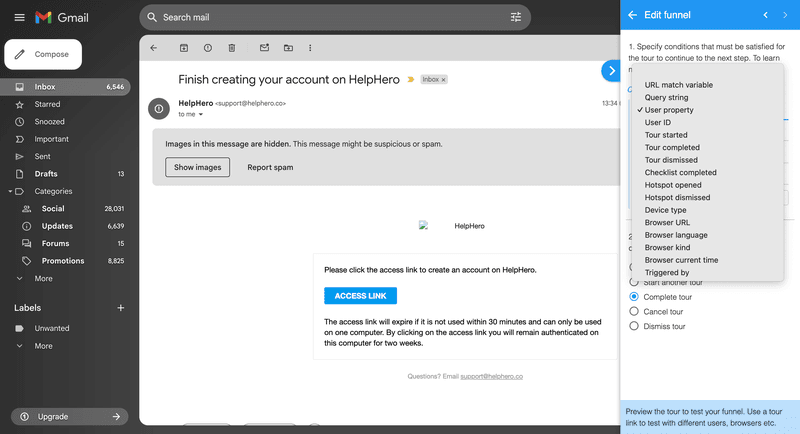
- Targeting in HelpHero is fairly limited, but it can be enough for early-stage startups. To apply segmentation, you need to add a “Funnel” step before creating the actual guide content. This acts as a condition layer. Available conditions include basic criteria like URL match, user properties, device type, tour progress (started, completed, dismissed), checklist or hotspot actions, and browser metadata (e.g., language, kind, current time). It’s functional, but lacks the behavioral depth and event-based targeting offered by more advanced tools.
- Works across modern web applications and frameworks (React, Vue, mobile web, etc.).
Best digital adoption platforms for employee training and digital transformation
Why is choosing the right digital adoption platform important to your organization?
For employee onboarding, the tech itself was rarely the headache. The real struggle lies in getting employees to change their habits.
In terms of internal training, digital adoption platforms require deep integration with your workflows and LMS, as well as the ability to support compliance needs across teams.
That’s why the best digital adoption tool for employee training focuses on things like:
- Workflow enforcement: Some steps just can’t be skipped. Platforms like WalkMe let you lock down Smart Walk-Thrus so employees follow the business processes exactly.
- LMS and compliance integration: If your HR or L&D team needs to export flows into your LMS, make sure the digital adoption platform can handle it.
- HR system support: Some tools come with built-in templates for common HR platforms, saving you setup time. This helps ensure user productivity across all digital technologies.
- System compatibility: Internal apps aren’t always sleek. You’ll want something that works across desktop, web, and even inside Microsoft Teams.
Next, I’ll walk you through the best options I’ve seen for supporting technology adoption and driving digital transformation across your tech stack.
| Tool | Best For | Main Features | Pricing (Starting From) |
|---|---|---|---|
| WalkMe (SAP) | Enterprise-wide internal training with strict compliance needs | Smart WalkThrus™, role-based guidance, enterprise-grade analytics | Custom, enterprise-level pricing with long-term contracts |
| Whatfix | Scalable employee enablement and change management | AI-driven field validations, multilingual support, embedded Self-Help widget | Quote-based; more flexible than traditional legacy tools |
| Apty | Process compliance and AI-powered internal adoption | GenAI support assistant, deep process analytics, cross-platform enforcement | Starts at $9500 per app, billed annually |
| ClickLearn | Content automation and documentation for complex systems | Record once publish in 7 formats, simulation and SCORM-ready outputs | Custom pricing |
#7 Choose WalkMe (SAP) if you need an enterprise software for digital adoption
WalkMe is the most enterprise-ready digital adoption platform on the market, especially after its acquisition by SAP. It’s built for large organizations rolling out complex internal tools like CRMs, ERPs, HR systems, and custom enterprise software. The platform combines AI-driven in-app guidance, automation, and analytics across web, desktop, and mobile to help end users stay compliant, complete critical business processes, and reduce training gaps at scale.
Pricing is custom and positioned at the enterprise level, typically requiring multi-year contracts and significant upfront investment.
Key features
- Launch contextual, step-by-step flows (Smart WalkThrus™) across any software application.
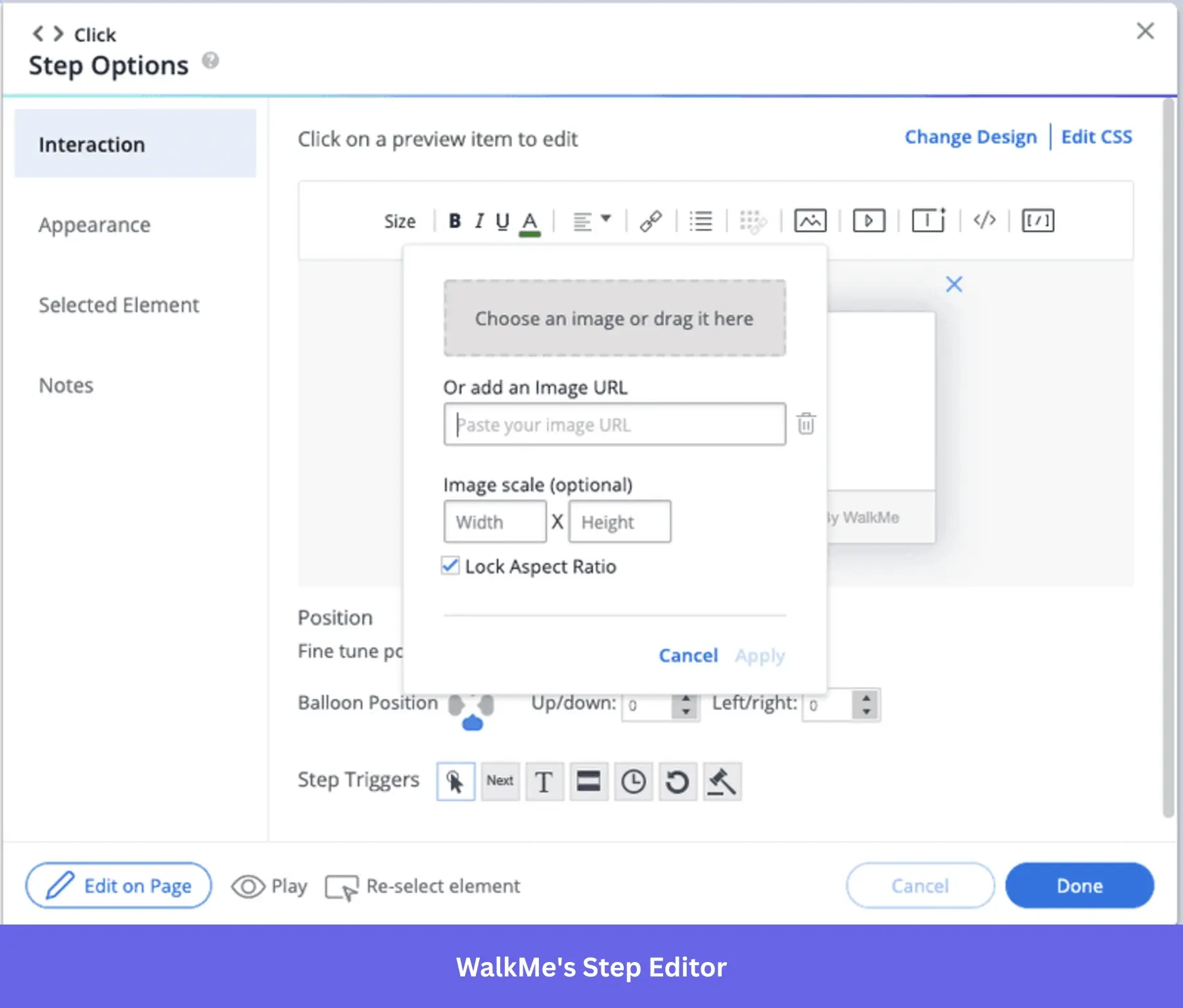
- Guide users across web, desktop, and mobile with omnichannel support.
- Automate repetitive tasks and enforce process compliance with WalkMeX AI.
- Track workflow performance with analytics dashboards, funnels, and path analysis.
- Use segmentation and user roles to personalize guidance across departments.
- Provide self-service help via a customizable WalkMe Menu (Resource Center).
- Link users to exact actions or pages with Shuttles™ for faster task completion.
- Ensure governance with audit logs, roles, permissions, and full enterprise compliance.
- Integrate with platforms like SAP, Salesforce, Workday, and ServiceNow. However, setup takes awhile. Harshul says, “…setups takes longer then expected and especially for advanced workflows and some customizations require more technical knowledge then then nirmal user might be having and support is a great help but responce time needs to be quicker for urgent issues“
#8 Choose Whatfix if you need a more implementation-friendly solution than WalkMe
Whatfix is purpose-built for large enterprises rolling out internal tools like CRMs, ERPs, or HR platforms across departments. It helps employees navigate software, complete processes correctly, and reduce dependency on IT, all through contextual, in-app guidance and automation. For organizations managing change, training at scale, or digital transformation, Whatfix delivers both power and flexibility.
Its pricing is quote-based, and while it’s still premium, many teams find it more implementation-friendly and flexible than a legacy enterprise tool. However, there are lingering issues about user experience. Kate says, “Role Tag behavior and troubleshooting could also be better defined in the Content. The functionality is outlined, but there isn’t much guidance around real-world use cases…”
Key features
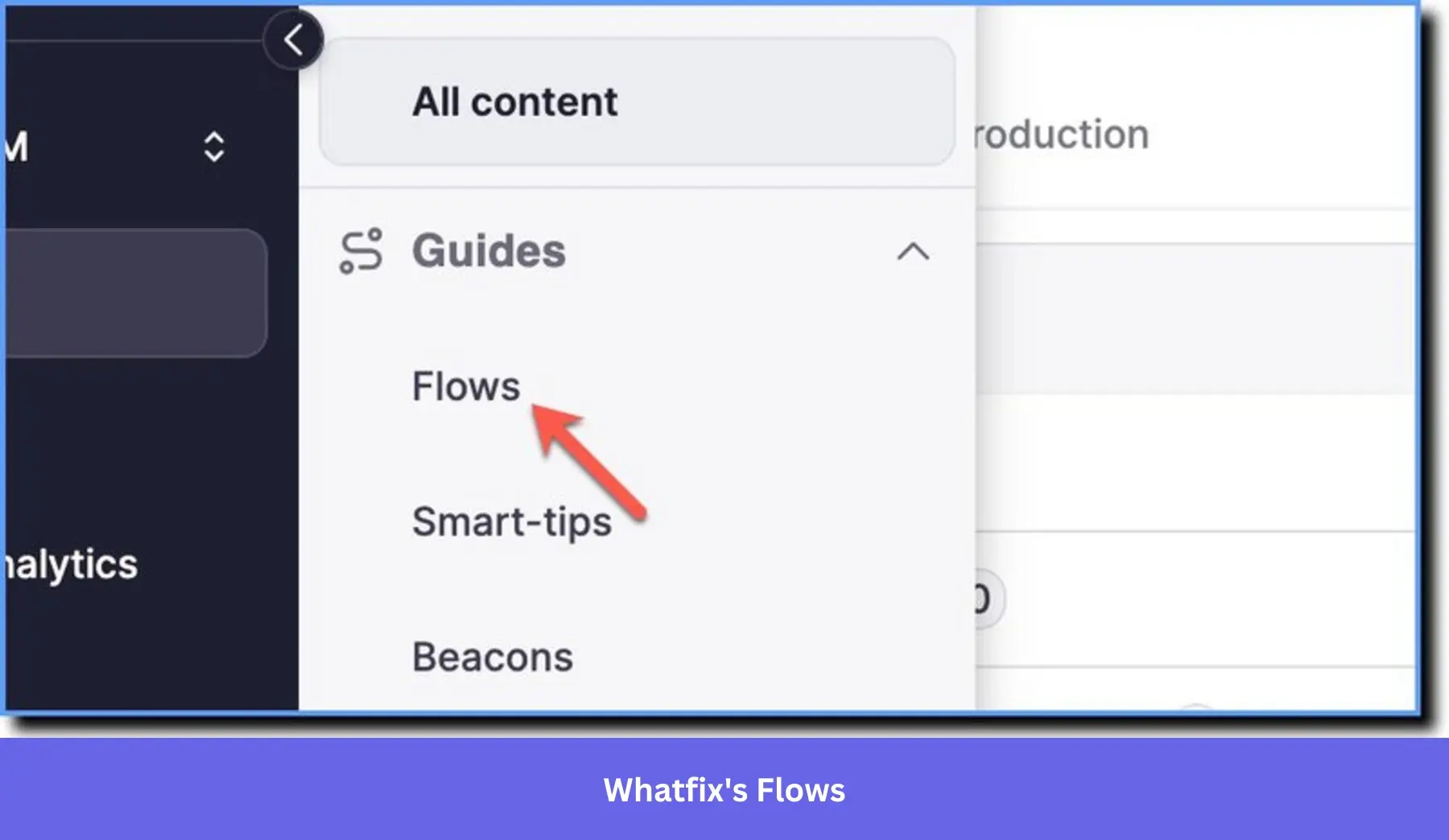
- Build in-app flows, tooltips, pop-ups, and checklists to help users navigate complex workflows with contextual, step-by-step support.
- Deliver personalized training using AI-driven field validations, Smart Tips, and a dynamic task list.
- Launch a Self-Help widget with searchable guides, FAQs, and knowledge base links.
- Use ScreenSense AI to identify UI elements and automate repetitive tasks across apps.
- Analyze employee behavior with deep usage insights and process adherence tracking.
- Repurpose content into PDFs, videos, SCORM packages, and LMS-friendly formats.
- Collect user feedback and usage data within the flow of work to close training gaps.
- Support 50+ languages for global rollouts.
- Guide end users across connected platforms like Salesforce, SAP, Workday, and Dynamics.
- Train safely in simulated environments with Whatfix Mirror.
#9 Choose Apty if you need an AI-powered digital adoption platform for employee onboarding
Apty focuses on what enterprise teams care about most: ROI. It’s built for complex environments where internal tools like Salesforce, SAP, or Workday need high adoption, clean data, and compliant processes. What sets it apart is how deeply AI is woven into everything from proactive guidance to automation and analytics.
It follows a custom pricing model, aimed at large-scale deployments. Teams should expect to invest both budget and internal resources to unlock the full value.
Key features
- Guide users across web and desktop apps with contextual tooltips, workflows, and validations.
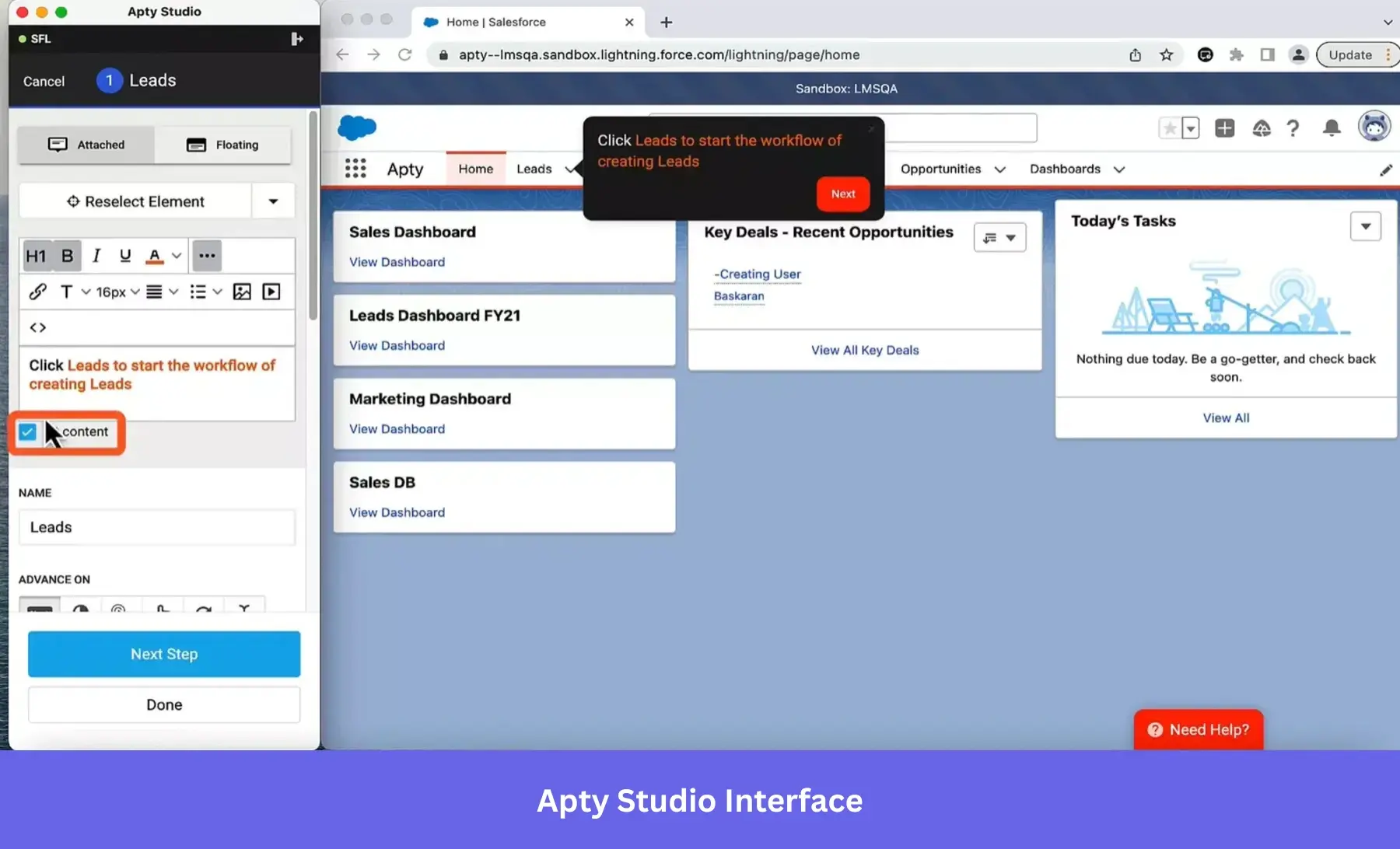
- Build custom flows using a no-code editor with visual step-by-step configuration.
- Analyze friction, drop-offs, and usage trends via Apty Monitor and Pulse.
- Use Apty OneX, a GenAI-powered assistant, to deliver dynamic, real-time support.
- Automate repetitive tasks with AI and RPA to reduce manual effort and errors.
- Trigger data validations and enforce process rules to improve data quality.
- Provide a centralized Resource Center for help content, guides, and announcements.
- Track process compliance and behavior across multiple apps from one dashboard.
- Communicate changes with in-app banners and contextual information tailored to specific roles or apps.
- Support global teams with multilingual content and real-time translations. However, there are limitations once you scale. Dylan shares that “it sometimes is also a bit challenging to use for larger processes, both from the administration/maintenance perspective and initial implementation.“
#10 Choose Clicklearn if you need a digital adoption platform for enterprise software
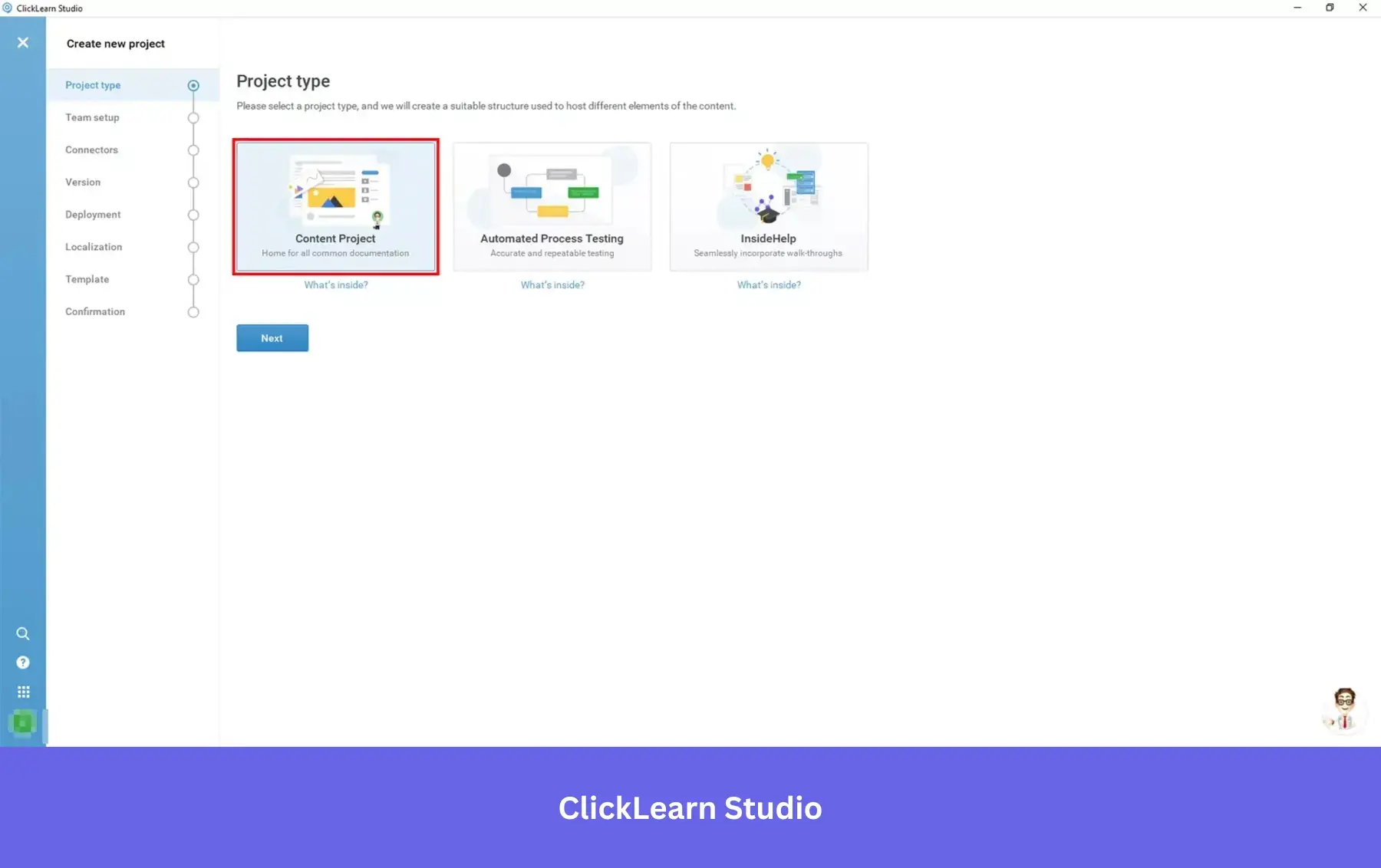
ClickLearn is purpose-built for enterprise organizations rolling out complex software like SAP, Oracle, or Microsoft Dynamics. It stands out for one reason: content automation at scale. You can instantly generate interactive in-app guidance, documentation, simulations, and even videos, translated into 45+ languages with a single recording. It’s ideal for global teams training users on deeply integrated systems.
Key features
- Record once and publish in seven formats: In-app guides, simulations, Word/PDF docs, videos, PowerPoint, and test scripts.
- Automate updates with Replay: No need to redo content after system changes.
- Create sandbox-style simulations so users can safely practice workflows.
- Host all training materials in a customizable, branded learning portal. Even then, it could be better for self-service. Penny explained better, “the only thing I would say here is that it would be great if there were more support videos available, as we prefer to self-service where possible.”
- Output SCORM-compliant files for LMS/LXP integration.
- Track user engagement and progress with built-in analytics.
- Deep connectors for Dynamics 365, SAP, Oracle, Salesforce, and more.
- Maintain compliance with audit-ready documentation for regulated industries.
Boost user adoption with Userpilot!
Curious how Userpilot can make your onboarding simpler, adoption stronger, and your engineering team happier? Try it yourself. Grab a 14-day free trial (no CC required) and experience the difference firsthand. Book your demo today!
Userpilot strives to provide accurate information to help businesses determine the best solution
for their particular needs. Due to the dynamic nature of the industry, the features offered by
Userpilot and others often change over time. The statements made in this article are accurate
to the best of Userpilot’s knowledge as of its publication/most recent update on April 3, 2026.
FAQ
What are the top digital adoption platforms?
If top means popular with lots of reviews across G2, Capterra, and Reddit, these are my pick:
- Userpilot: Popular with SaaS teams for in-app onboarding, product analytics, and behavior-triggered guidance.
- WalkMe: Enterprise-focused platform used for large internal software rollouts.
- Whatfix: Common in enterprise digital transformation projects and employee training.
- Appcues: Known for onboarding flows and product announcements.
- Pendo: Combines product analytics with in-app guidance.
Beyond popularity and reviews, the right platform depends on your goal. My two cents? Prioritize the platform that connects analytics (to track user engagement), feedback, and onboarding so your product team can improve activation and retention without heavy engineering work.
What is an example of digital adoption?
Digital adoption (or software adoption) happens when users successfully learn and use a product’s key features as part of their normal workflow. A simple example is onboarding in a SaaS product.
Imagine a new user signs up for a project management tool. Instead of leaving them to explore on their own, the product guides them with a checklist, tooltips, and short walkthroughs that show how to create a project, invite teammates, and track tasks.
Platforms like Userpilot make that possible. They trigger contextual guidance based on user behavior. If a user opens the dashboard for the first time, a tooltip might highlight the “Create project” button. After they complete that step, the system may suggest inviting a teammate.
The result is faster time-to-value. Users reach their “Aha!” moment sooner, feel more confident using the product, and are more likely to continue using it long-term.
What are examples of digital platforms?
Digital tools/platforms are software environments that support users and connect them to services or data to deliver value online. They often act as ecosystems where people interact or collaborate.
Examples include:
- Salesforce: A cloud platform that helps customer success teams manage relationships and sales pipelines.
- Shopify: Allows businesses to build online stores and manage payments, inventory, and orders.
- Slack: Connects teams through messaging, integrations, and shared workspaces.
- Airbnb: Connects travelers with hosts offering accommodations.
So, what’s the connection with DAPs and the digital adoption process?
Digital platforms provide the foundation for workflows. Digital adoption platforms help users learn and navigate those systems effectively, saving steep training costs.
About the author