How I Build a Solid SaaS Onboarding Strategy at Userpilot


A solid SaaS onboarding strategy gives new users the shortest sensible route from signup to a result that proves your product can help them.
That result should shape every decision that follows. Before I think about welcome screens, product tours, checklists, emails, or support content, I want to know why the user signed up and which action will make them feel that doing so was worthwhile.
For a social media platform, that may be scheduling the first post. For an analytics product, it could be generating a report from live data. For a collaboration tool, value may require creating a project and bringing another person into it.
I lead Customer Success at Userpilot, and my view is that onboarding works best when it stays focused on that first meaningful outcome. The product should guide users where it can, the team should step in where context matters, and every interaction should respond to what the user has actually done.
I’ll show you how I build a SaaS user onboarding strategy around those principles and how our customers have applied them inside their own products.

TL;DR
A SaaS onboarding strategy should define:
- The user segment you are onboarding.
- The first meaningful result that defines activation.
- The shortest practical path to that result.
- The balance between self-service guidance and human support.
- The response when users progress, stall, or encounter friction.
- The next valuable behavior after activation.
- The metrics you will use to assess and improve the journey.
My main rule is simple: design onboarding around the product outcome, then choose the survey, walkthrough, checklist, email, resource, or human interaction that helps users reach it.
What is a SaaS onboarding strategy?
A SaaS onboarding strategy is a plan for moving a defined group of new users from signup to a meaningful product outcome.
It should govern the whole journey rather than one product tour or email sequence. That includes how you identify user intent, which actions you prioritize, how you support different customer types, what triggers each interaction, and how you know the experience is working.
Before building anything, I recommend completing a short strategy brief:
Without these decisions, teams tend to build what is easy to ship. A modal appears because the product has a modal builder. A checklist appears because other SaaS products use checklists. The journey accumulates content, but no one can explain which behavior each component is supposed to change.
A more disciplined approach is to start with the result and work backward. That is the basis of minimum viable onboarding: give users enough guidance to reach first value, then add more only when the evidence shows that it is needed.
How I build a SaaS onboarding strategy at Userpilot
I build the strategy in seven steps. Each step answers one operating question and produces something your team can use when designing, launching, or reviewing the onboarding journey.
1. Define activation as a specific product outcome
Activation should be an observable action that shows the user has received enough value to continue. Logging in, completing a profile, viewing a dashboard, or finishing a product tour may be necessary steps, but I would not treat them as activation unless they deliver the result the user came for.
A stronger activation event could be:
- A social media manager links an account and schedules the first post.
- An analyst connects live data and generates the first report.
- A recruiter publishes a role and adds the first candidate.
- A project manager creates a project and assigns work to a teammate.
- A survey user publishes a survey and collects the first response.
To identify yours, start with the users who drive your user retention. Look at what they did during their first sessions, then speak with them about when the product first became useful. Compare those patterns with users who signed up but never continued.
The interviews give you the user’s interpretation of value. The behavioral data tells you whether the action happens consistently among successful users.
It also helps to distinguish the moment users understand the product’s potential from the event you can measure. Someone may experience an aha moment when they see a sample report, but activation may happen only when they generate that report from their own data. Treating the ‘Aha!’ moment and activation point as the same thing often leaves teams measuring a vague feeling instead of a product outcome.
Kontentino is an example I use when teams are tempted to make activation too broad. For their social media management product, the two actions that mattered were linking a social account and scheduling the first post. That clarity made the onboarding experience easier to design. The team did not need to introduce every feature. It used an interactive walkthrough and checklist to move users through those two actions, and both activation metrics increased by almost 10% during the first month.
The useful part of the Kontentino case study’s 10% activation lift is not the choice of a walkthrough or checklist by itself. It is that the team knew exactly what those components were meant to accomplish.
Once you define activation, document it precisely:
That level of definition gives Product, Growth, and Customer Success the same target. It also makes the journey measurable before you start changing it.
2. Reduce the path before adding more guidance
Map the steps between signup and activation, then remove any work that does not need to happen yet.
This matters because onboarding problems are not always communication problems. If users must complete seven configuration steps before they can do anything useful, another tooltip will not solve the underlying issue.
Review the current path using five questions:
- Must this step happen before the user receives value?
- Can the product complete or prefill part of it?
- Can we use sample data until the user is ready to add their own?
- Are we asking for information we already have?
- Can this decision wait until after activation?
You may find that the best onboarding improvement is a shorter signup process, a template, clearer field validation, single sign-on, deferred account setup, or a better empty state.
I would make those changes before building a longer flow. Guidance should explain unavoidable complexity, not compensate for unnecessary complexity.
The same rule applies to the first product experience. New users rarely need a tour of the navigation, settings, and every major feature. They need to understand how to complete the task that brought them into the product.
Whale shows what this looks like in practice. Creating and sharing content are central to the value of their documentation platform, but a new user first has to begin creating something. The team narrowed one onboarding Flow around starting a screen recording and restricted the available clicks so the next action was obvious. First-session content creation increased, and Whale reported Flow completion rates of around 80%. What I take from Whale’s focused first-run flow is that the team improved activation by reducing ambiguity, not by explaining more of the interface.
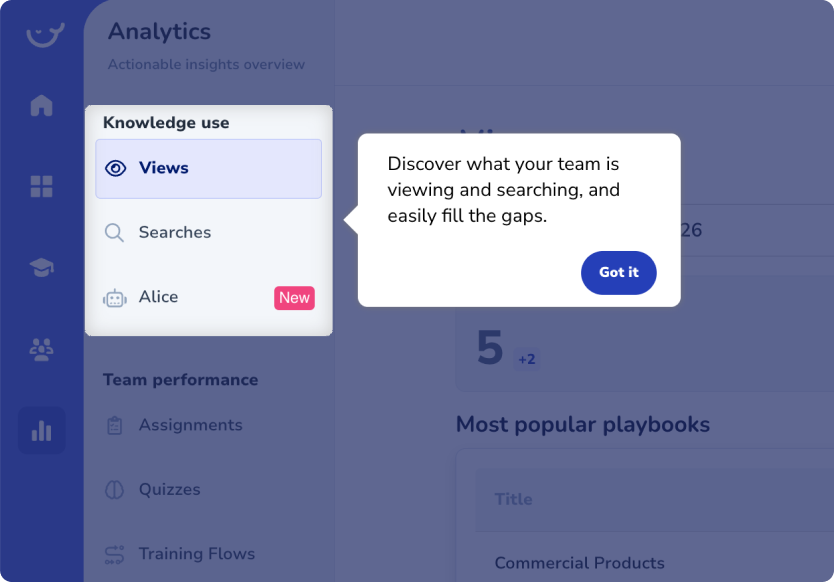
When users do need guidance, I prefer interactive experiences that help them perform the task. A passive tour asks people to remember what each feature does and apply that knowledge later. An interactive walkthrough teaches them inside the real workflow.
A SaaS onboarding checklist can provide additional structure when the activation path spans several pages or sessions. Keep it short and write each item as an outcome:
- Better: Connect your first data source.
- Weaker: Explore integrations.
- Better: Invite a teammate to your project.
- Weaker: Visit team settings.
The wording should remind users what they are working toward, not simply name the part of the interface they need to visit.
3. Segment users only when they need different routes
Create separate onboarding paths when users have different goals, required workflows, or support needs.
Segmentation becomes performative when the team asks several questions but sends everyone into the same tour. If an answer does not change the experience or your analysis, I would remove the question.
A useful onboarding question might capture:
- The user’s main goal.
- Their role in the account.
- Whether they are creating or joining a workspace.
- The workflow they want to complete first.
- Their experience with similar products.
In many cases, one question is enough. You may also already know the user’s plan, company size, use case, or lifecycle stage through your signup form and CRM.
A short welcome survey should therefore act as a routing mechanism. For example, a user who selects “analyze user behavior” might be guided toward installing tracking and creating a report, while someone who selects “improve onboarding” might start by identifying an activation event and building a Flow.
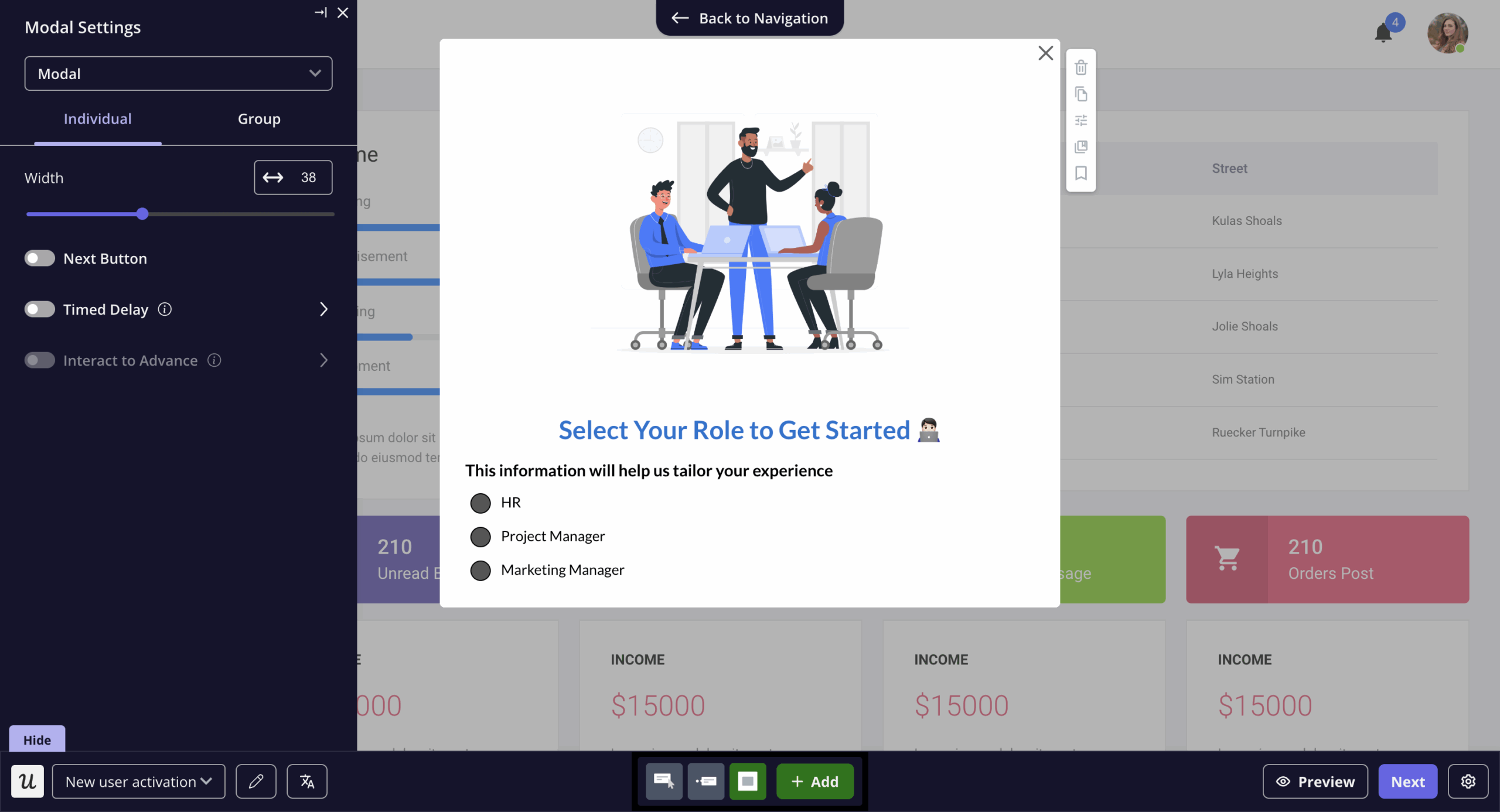
Relitix is the customer example that best illustrates this decision. Its real-estate analytics platform supports recruiting, market-share analysis, and office-performance reporting. Those users do not need the same first workflow, so the team uses a signup wizard to capture their goal and route them accordingly.
It then supports each journey with checklists, spotlights, self-service resources, analytics, and session replay. Relitix later launched its first self-service trial and reported product stickiness of 30%.
What makes Relitix’s segmented onboarding effective is that the initial answer changes the experience. The survey is not there to create the appearance of personalization.
The segmentation should continue after signup because user behavior often becomes more useful than the original answer. Consider creating dynamic groups for users who:
- Have not started the activation workflow.
- Started the workflow but stopped at a particular step.
- Activated once but did not return.
- Reached individual value but have not invited teammates.
- Reported a setup problem through a survey.
In Userpilot, you can combine profile data, company properties, events, page activity, survey responses, and earlier content engagement. The segment can then be used both to analyze the problem and target the next experience.
That connection matters. You should be able to identify a stalled group, understand how its behavior differs, and act on the same audience definition rather than recreating it across several tools.
4. Choose the delivery model based on onboarding complexity
Decide how much of the journey users can complete independently and where human involvement improves the outcome.
I would not base this decision on account value alone. Contract size affects how much support you can afford to provide, but product and implementation complexity determine how much help the customer actually needs.
Many SaaS companies need more than one model. A standard trial can be self-service, while customers with complex data or governance requirements receive direct implementation support.
The practical question is where the boundary should sit. I automate repeatable education and preserve human time for work that requires judgment.
The product can usually handle:
- Standard setup instructions.
- Navigation and feature education.
- Common troubleshooting.
- Progress reminders.
- On-demand access to in-app support.
A person is more valuable when the customer needs:
- Data or integration planning.
- Stakeholder alignment.
- Process redesign.
- Security or governance coordination.
- Help connecting product use to a business outcome.
That is also how I evaluate whether self-service onboarding is realistic. It works when the standard route can get most users to value and there is a clear recovery path when they get stuck.
The RecruitNow case study is one of the strongest examples of using that boundary well. As their customer base expanded into Germany and Austria, delivering the same training repeatedly was consuming hundreds of hours every month. The team moved repeatable education into Userpilot Flows, videos, localized content, surveys, and a Resource Center. However, it kept two two-hour live sessions each month so customers could ask questions about their own circumstances.
That hybrid model reduced live training from hundreds of hours per month to four. It also gave users consistent guidance without removing access to the Customer Success team.
When I discuss how RecruitNow cut live training with teams, the point is not that every onboarding call should be replaced. The product should absorb the repeated explanation so customer-facing teams can focus on the conversations where their experience makes a difference.
5. Let behavior determine the next interaction
Build the next onboarding interaction around what the user has completed, missed, or struggled with.
A fixed sequence might say:
- Send the welcome email immediately.
- Send a reminder on day three.
- Send a feature email on day seven.
That is easy to automate, but it ignores the user’s actual progress. By day three, one user may have activated, another may have abandoned the first step, and a third may be repeatedly failing an integration.
They should not receive the same message.
For each milestone, define a simple response matrix:
Userpilot Workflows can coordinate these responses across Flows, checklists, emails, surveys, delays, and branching conditions. A workflow might wait for an activation event, send a reminder only when it remains incomplete, and move successful users into a different journey.
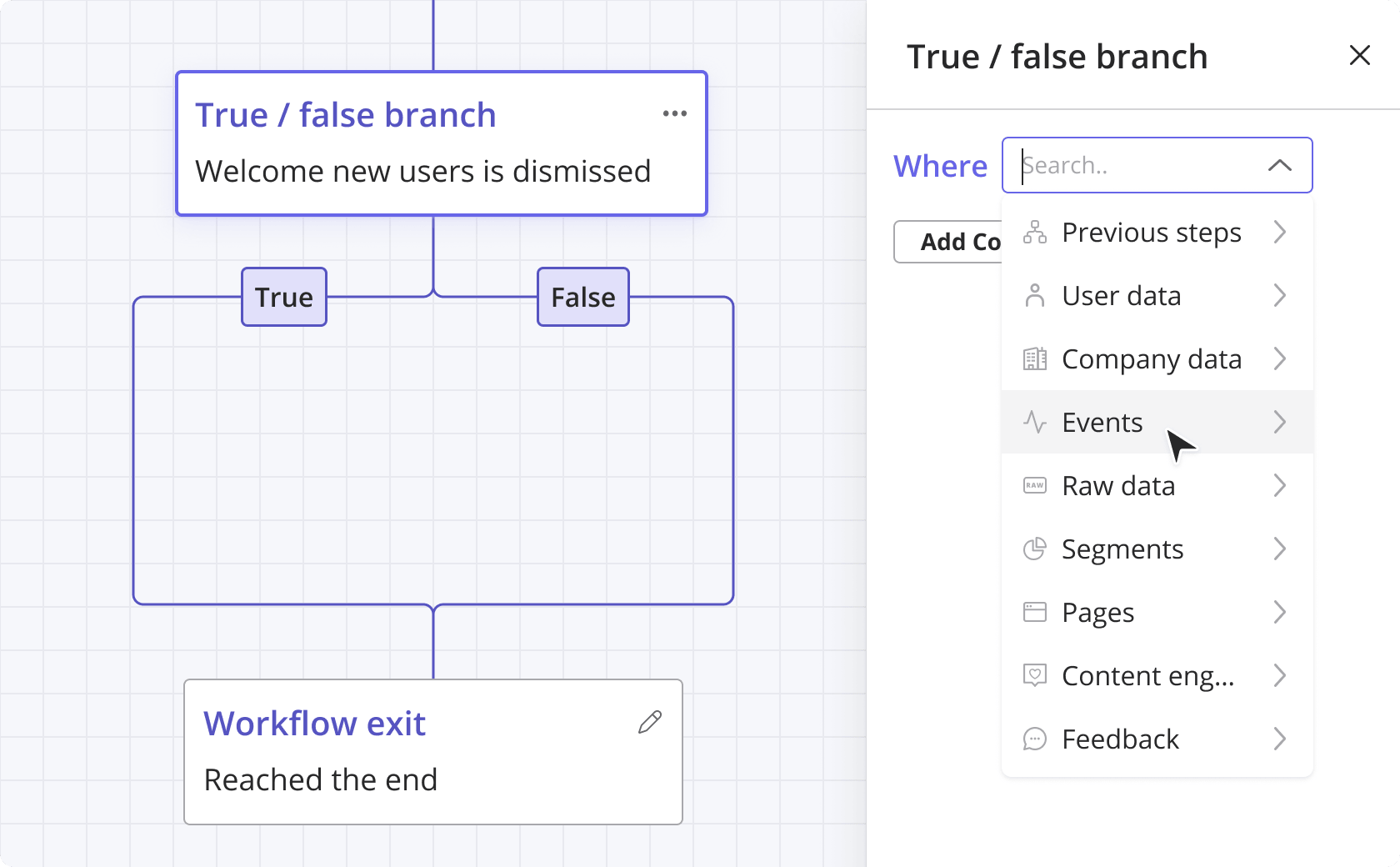
When email is part of that sequence, keep the message tied to the missing product action. For example, if a user creates an account but has not connected their data source, the email should bring them back to that exact step and explain what they will unlock by completing it.
Instead of sending a generic “Need help getting started?” message, write something like: “Your workspace is ready. Connect your data source to generate your first report, and we’ll guide you through the rest.”
That is a more useful way to approach SaaS onboarding emails than sending the same educational series to every signup.
6. Continue onboarding after activation
Use the first success as the starting point for the next relevant behavior.
Primary onboarding should remain narrow because the user has not yet experienced enough value to care about the full product. After activation, you have more context and more permission to introduce adjacent capabilities.
The next action should reinforce, repeat, or expand the result:
- After creating a project, invite a teammate.
- After generating a report, schedule or share it.
- After publishing a campaign, review its performance.
- After completing an individual workflow, roll it out to the wider account.
- After using a core feature repeatedly, introduce a related automation.
I would trigger these journeys from product readiness rather than an arbitrary signup date. A user who activated in one session should not wait two weeks to learn the next useful capability. A user who is still working through setup does not need an email about advanced automation.
This is the role of secondary or progressive onboarding: deepen value without overloading the first-run experience.
For B2B products, you may also need to separate user activation from account activation. One champion can reach value while the wider organization remains unprepared to adopt the product.
Your strategy may therefore include additional milestones such as:
- The administrator finishes workspace configuration.
- The champion invites the intended users.
- End users complete the role-specific workflow.
- A manager receives the expected output or report.
- The account repeats the workflow without implementation support.
That broader view prevents teams from marking an account as successfully onboarded simply because one active user completed the initial journey.
7. Measure the outcome, speed, friction, and recovery
Use user onboarding metrics to answer four questions:
- Are more users reaching value?
- Are they reaching it faster?
- Where does progress break down?
- Do our interventions help users recover?
That keeps the scorecard focused:
Checklist completion, Flow engagement, email clicks, and survey response rates still matter, but I treat them as diagnostic measures. They tell me how users interacted with the onboarding component.
Activation and time to value tell me whether the overall journey delivered the result.
The Attention Insight case study provides a good measurement example. Its trial users needed to create a heatmap analysis and engage with Areas of Interest. The team supported those behaviors through an interactive walkthrough, checklist, feature-specific Flows, hotspots, slideouts, and an on-demand Resource Center. Over six months, the percentage of trial users creating a heatmap increased from 47% to 69%. Engagement with Areas of Interest increased from 12% to 22%.
I would not interpret Attention Insight’s activation lift as proof that more onboarding components are always better. Each component had a specific role in helping users complete one of the target behaviors. That is very different from adding patterns simply because they are available.
When performance is weak, investigate in this order:
- Find where progress stops: Build a funnel around the required milestones.
- See what users do instead: Review the paths before and after the drop-off.
- Observe the experience: Watch sessions from the affected segment.
- Ask for context: Ask for context: Trigger microsurveys at the friction point.
- Test one change: Compare the revised experience against the current version.
Funnel analysis tells you where the problem appears, but not necessarily what caused it. A user may be confused by the interface, missing required permissions, encountering an error, or deciding the step is not worth the effort.
That is where session replay becomes useful. Watching the affected sessions can reveal repeated clicks, failed form submissions, unexpected navigation, or long pauses that aggregated reports cannot explain.
Combine that observation with a short survey or user conversation before deciding on the fix. Sometimes the answer is clearer guidance. Sometimes the workflow itself needs to change.
What does a SaaS onboarding strategy look like in practice?
A practical strategy connects each stage to one user objective, trigger, experience, and measure.
Here is an example for a self-service analytics product:
A simple product may move a user through the first four stages in one session. A complex B2B product may need several weeks, with technical setup and stakeholder work happening outside the interface.
In that situation, pair the in-product experience with a customer success onboarding playbook that defines owners, customer dependencies, timelines, and escalation rules.
Which onboarding decisions usually create friction?
Most avoidable friction comes from a few strategy choices:
- Teaching the whole product immediately: Keep the first journey focused on activation and introduce more value later.
- Collecting information without using it: Remove welcome questions that do not change the route, support, or analysis.
- Using a calendar as the main trigger: Combine timing with product behavior so every message has a relevant reason.
- Adding guidance before simplifying the workflow: Fix unnecessary steps before covering them with tooltips.
- Measuring content instead of outcomes: Use completion metrics to diagnose the experience, not as a replacement for activation.
- Stopping after first value: Guide users toward repeat use, collaboration, or the next relevant capability.
Build your SaaS onboarding strategy around value!
A solid SaaS onboarding strategy gives each priority user a focused route to a meaningful result.
Define activation first. Remove unnecessary work from the path. Segment only when users need different routes, and choose the delivery model based on the complexity of reaching value. From there, let product behavior determine the next interaction and continue the journey only when the user is ready for more.
Userpilot supports that operating loop in one product growth platform. You can analyze onboarding behavior, create dynamic segments, build contextual Flows and checklists, coordinate in-app and email journeys, collect feedback, and investigate friction through session replay.
Book a Userpilot demo to see how you can build and improve the complete journey.
FAQ
What is a SaaS onboarding strategy?
A SaaS onboarding strategy is a plan for moving new users from signup to their first meaningful product outcome. It defines the target user, activation event, required path, delivery model, response rules, and success metrics.
How long should SaaS onboarding take?
SaaS onboarding should take only as long as users need to reach first value. That may happen in one session for a simple self-service product or take several weeks for a complex implementation.
Which SaaS onboarding metrics should you track?
Track activation rate, median time to value, conversion between activation milestones, and the percentage of stalled users who progress after an intervention. Use checklist completion, Flow engagement, and email clicks as supporting diagnostics.
Should SaaS onboarding be self-service or high touch?
Use self-service onboarding when the path to value is short, repeatable, and easy to recover. Add human support when customers need technical implementation, stakeholder alignment, process changes, or account-specific guidance.
Does SaaS onboarding end after activation?
No. Primary onboarding ends at the first meaningful result, but later onboarding should help users repeat that result, invite teammates, adopt related features, and make the product part of their normal workflow.
About the author