Product Launch Plan Template: How to Launch Your Product Chaos-Free

Gartner found that 45% of product launches are delayed by at least a month due to coordination issues.
This friction typically stems from a “launch date” mindset where teams fixate on a single deadline. Marketing, sales, and support race to meet the date, clear their checklists, and ship the feature. Everyone assumes the job is done, and the team leaves the launched product without the attention it needs to grow.
A product launch plan template fixes this issue. Effective product management teams can turn the launch into a repeatable process rather than a one-time event. In this guide, I will share a tiered launch framework that matches effort to impact, plus a copy-paste template you can drop into Notion or Confluence today.
What is a product launch plan template?
A product launch plan template is a central document that outlines the strategy, roles, timeline, and success metrics for bringing a new feature to market. To be successful, it must operate as a living document that coordinates execution and adaptation, rather than a static file forgotten after the kickoff meeting.
The template exists to prevent two common problems: launches that happen without informing users, and launches that lack coordination.
A good template creates accountability by assigning a clear owner and due date, preventing the “bystander effect” where teams assume someone else is handling the launch.
Product launch plan template
A product launch plan template covers Strategy, Execution, Timeline, and Post-Launch across all teams. Here’s the structure you can paste into Notion, Google Docs, or Confluence. Customize the sections based on your team size and launch complexity.
Product Launch Plan
[Product Name]
1. Overview
- Launch Date: [Date] (Pro tip: Avoid launching on a Friday unless you enjoy working weekends.)
- Owner: [Name – one person, not a team] (Must be one person. If two people own it, nobody owns it.)
- Tier: [Tier 1 (Major), Tier 2 (Mid), Tier 3 (Minor)]
- Status: [Planning / In Progress / Complete]
2. Product launch strategy
- Primary goals: (What specific business problem does this solve? Define your North Star metric early on to measure your product’s success.)
- Success metrics: (Set SMART goals and KPIs that are measurable targets like revenue, user acquisition, and engagement rates.)
- Primary: (e.g., 30% adoption within 60 days)
- Secondary: (e.g., 15-point NPS increase)
- Revenue impact: (e.g., $50K expansion MRR within quarter)
3. Target audience
- Primary persona: (Describe specific user – not “all users”)
- Segments: (e.g., Enterprise accounts active in the last 30 days, Admin role)
- Customer pain points: (What problem does this solve for them specifically?)
4. Messaging
- Value proposition: (One sentence that passes the “so what” test)
- Key benefits: (List 3 benefits, not features)
- Competitive differentiator: (How is this different from alternatives?)
5. Launch deliverables
Track every asset needed for launch with clear ownership. Avoid vague assignments like “Marketing team handles this,” and instead pick a specific name.
You can recreate the table below in your tracking dashboard so everyone knows who is responsible for what part of the launch.
| Deliverable | Team | Owner | Due Date | Status |
|---|---|---|---|---|
| In-app announcement modal | Product | Sarah Chen | Jan 10 | Complete |
| Feature walkthrough flow | Product | Sarah Chen | Jan 12 | In Progress |
| Marketing plan | Marketing | David Park | Jan 16 | Not Started |
| … |
6. Go-to-market checklist
A go-to-market checklist prevents steps like legal compliance or server load testing from being forgotten in the rush to launch.
- Product: (e.g., QA completed, product deployed behind a feature flag, and rollback plan documented.)
- Marketing: (e.g., Blog post scheduled, email campaign loaded, influencer marketing approved.)
- Success/Sales: (e.g., Team training complete, help docs published, objection handling guide ready.)
- In-app: (e.g., Onboarding flows created, potential customers validated, and analytics tracking confirmed. Add legal checks to ensure compliance with government regulations.)
7. Post-launch activities
Define what you’ll review and when. Vague expectations like “track progress” could result in no one realizing what to actually monitor. Instead, you need to compare actual results against initial SMART goals to measure ROI. For example:
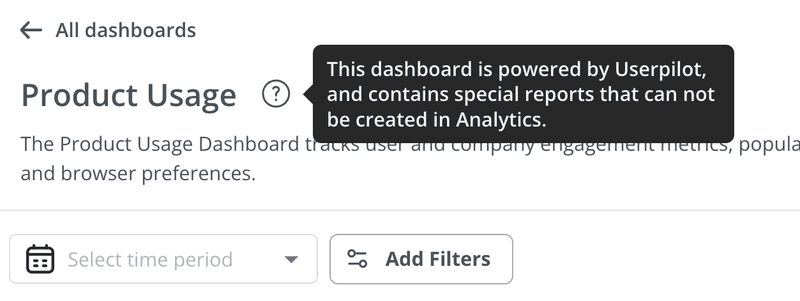
- Review the product usage dashboard 24 hours post-launch. (Owner: Product)
- Analyze support tickets for blockers 48 hours post-launch. (Owner: Success)
- Run a customer feedback survey after 14 days. (Owner: Product)
- Conduct a win/loss analysis at 30 days. (Owner: Sales)
- Present valuable insights to leadership at 45 days. (Owner: Launch Lead)
How to run a product launch? 3-Phase process
A good launch plan follows a clear, chronological structure. I generally organize launches into three distinct phases: Pre-Launch (strategy and prep), Launch (execution), and Post-Launch (optimization).
Phase 1: The initial planning
Before you write a single line of copy or configure a single in-app message, you need to define “why” you’re launching a product and the “who.”
Define your clear objectives
Are you trying to drive revenue, increase retention, or simply get users to try a new tool? Know this before you start. Instead of vague items like “get users to like it,” I always begin by defining specific product success metrics:
- Adoption rate: What percentage of eligible users should use this within 30/60/90 days? Set realistic benchmarks based on feature complexity and user segment.
- Brand loyalty: Do users who activate this feature show higher retention than those who don’t? Track 30-day and 90-day retention cohorts.
- Customer lifetime: Does this drive expansion revenue through upsells or reduce churn? Calculate the expected expansion MRR impact.
Identify your target audience
The biggest mistake I’ve noticed in my career is marketing teams launching to everyone.
For instance, if you market an advanced API feature to a marketing persona who finds it irrelevant, it creates disinterest at best and confusion at worst. You’re also wasting your resources without driving adoption, distorting your adoption metrics.
Your launch needs to be specific to the relevant audience. Start with market research to slice your audience. Look at:
- User role: Is this feature for admins, editors, or viewers? Don’t show admin features to viewers.
- Plan type: Is this feature gated for Growth or Enterprise plans? Don’t tease features that users can’t access.
- Behavior: Have they used related features before? Users who’ve never created a dashboard won’t suddenly use advanced cohort analysis.

Nail your product positioning
You know what your feature does and how it works. But your customers only care about what they can do with it. Product positioning bridges this gap by translating product features into benefits.
I usually draft a simple positioning statement:
“For [Target Audience] who [Statement of Need], [Product Name] is a [Product Category] that [Key Benefit]. Unlike [Alternative Approach], our solution [Primary Differentiator].”
For example, a positioning statement for the session replays feature could be:
“For product managers who struggle to understand why users abandon flows, session replay is a behavior analytics tool that shows you exactly where users get stuck. Unlike generic screen recorders, we automatically link replays to specific events and user properties, so you see the full context.”
This statement becomes the foundation for all marketing materials, from the new features announcement emails to the in-app tooltips.
Phase 2: The product launch process
Once the strategy is set, you move into the tactical preparation. This is where you build the assets and prime the market.
Conduct beta testing
Start with a low-risk experiment when sending new launch communication. I do this with a beta testing phase.
Here, I invite specific segments like early adopters (top 10% by usage), users who requested the feature in feedback surveys, and accounts that match your ideal customer profile.

Then, I set up a beta feedback form to capture structured responses: Are they using it as expected? Where are they getting stuck? Would they recommend it?
This helps me identify bugs, obviously, but more importantly, it helps me validate the value proposition.
Prepare in-app messaging
You cannot rely on email alone to drive adoption. Email has a low 20% open rate, and people’s inboxes are crowded enough without your announcement.
The best place to educate a user about a new feature is inside the product, right when they are using it, through personalized in-app flows. Let me show you how I do it with Userpilot.
I start with a visual labeler to tag the new product in the UI. This feature lets me track clicks and usage, and use behavioral triggers, without asking developers to write tracking code.

Then I create a segment for users who need to see the launch messaging. In the segments dashboard, I can pick the criteria. For an advanced analytics feature, I might target:
“[Feature Tag] has NOT occurred” AND “Plan = Growth or Enterprise” AND “Role = Product Manager or Analyst” AND “Active in last 7 days.”

Then I apply this segment to my flow settings to ensure contextual engagement. This delivers the right message to the right person at the right time.
Finally, I’ll build the new feature onboarding experience with multiple UI patterns:
- A “feature announcement” modal: A visually rich slideout that announces the feature to the right segment on login. I simply follow the modal UX design best practices: one clear CTA, a benefit-focused headline, visual showing the feature in action.
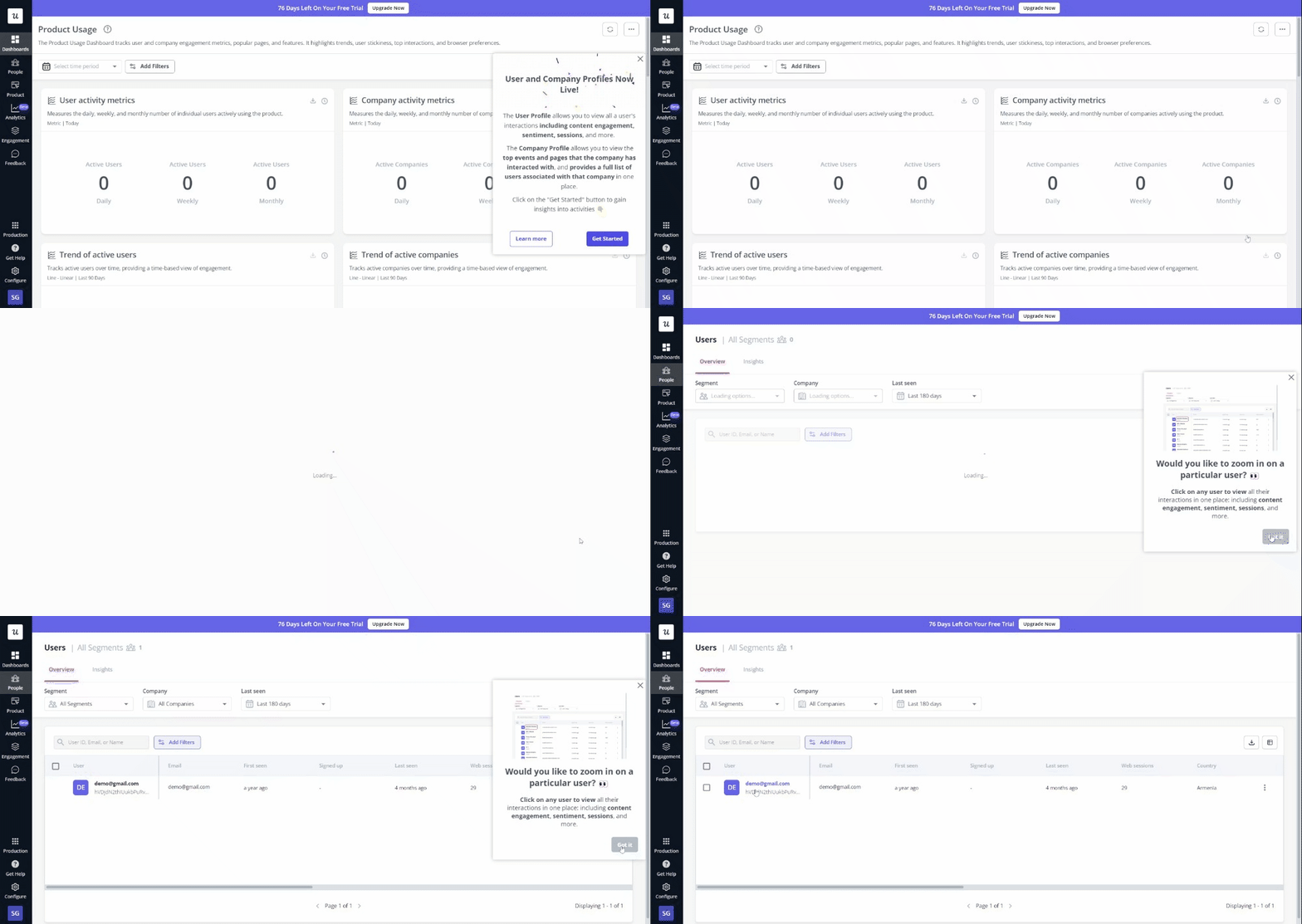
- Interactive walkthroughs: I show users how to use the feature rather than just telling them it exists. I also like to build interactive walkthroughs that guide the user step-by-step through the first use. For a dashboard builder, walk them through adding their first widget, not through every possible configuration option.
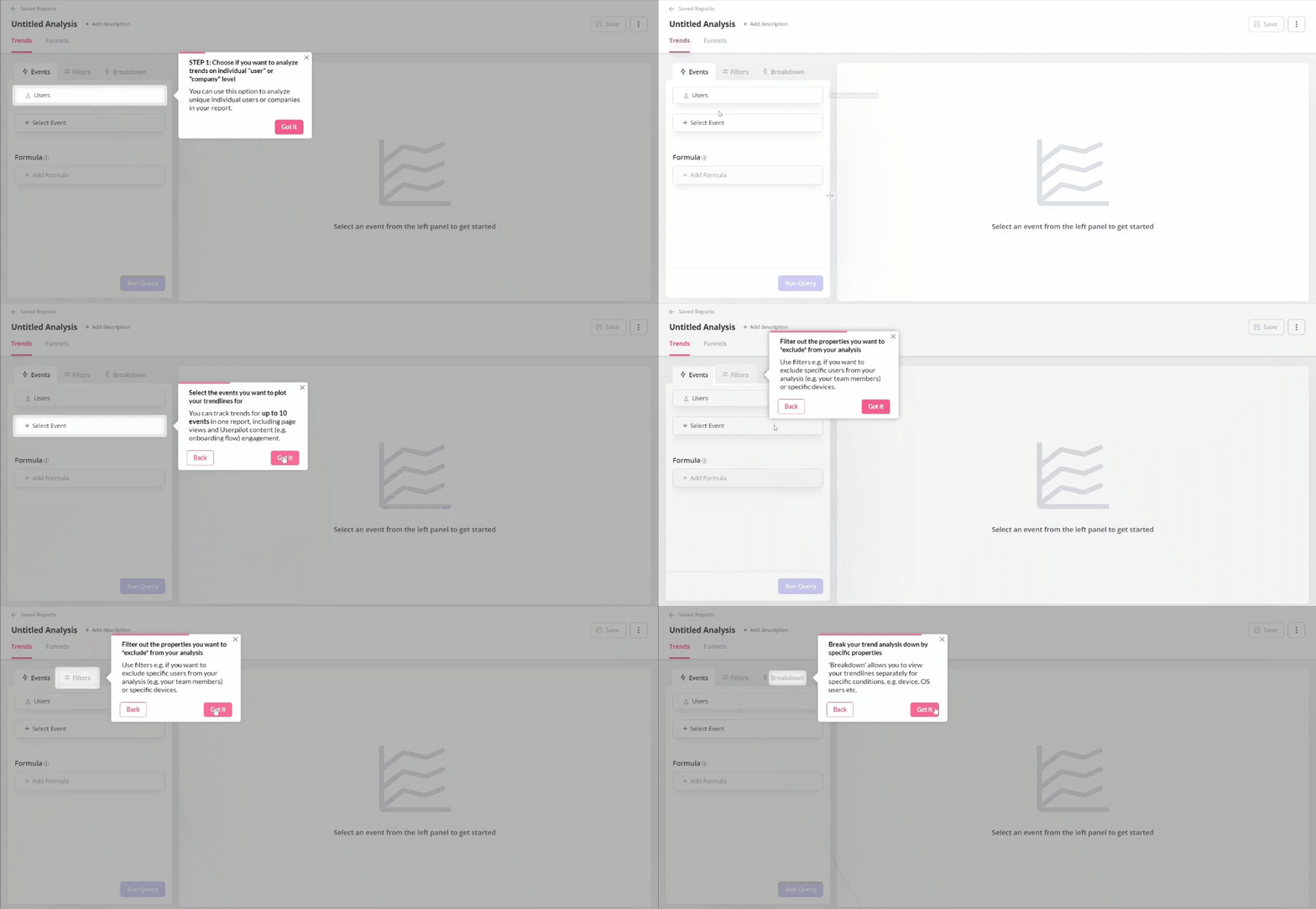
- Tooltips: For smaller features or UI changes, I place contextual tooltips that draw attention without blocking workflow. Show them when users hover over or approach the new element.
Update documentation
Confused users don’t adopt features. They submit support tickets or ignore the feature entirely. Before launch day, update your knowledge base with comprehensive articles covering common questions and use cases.
I also create a software user guide specifically for each major feature: what problem it solves, how to get started, common workflows, and troubleshooting. Then I integrate these articles into our in-app resource center, so users find help without leaving the product.
Phase 3: Launch day execution
If you did the prep work right, launch day should feel like flipping a switch. It should be a coordinated execution.
Align internally
I run training sessions for customer success and sales so they understand the features, advantages, and benefits we’re launching.
For example, during our mobile SDK launch, I ran three sessions: a technical deep-dive for customer success engineers, use case and positioning for account executives, and FAQ review for front-line support.
Coordinate marketing channels
Once you turn on the noise across different channels, make sure it is synchronized. Here’s what my typical checklist includes:
- In-app: Trigger the product announcement flows you built earlier. Schedule them for specific times (typically trigger on next login after 9 am local time) so users see them during active sessions.
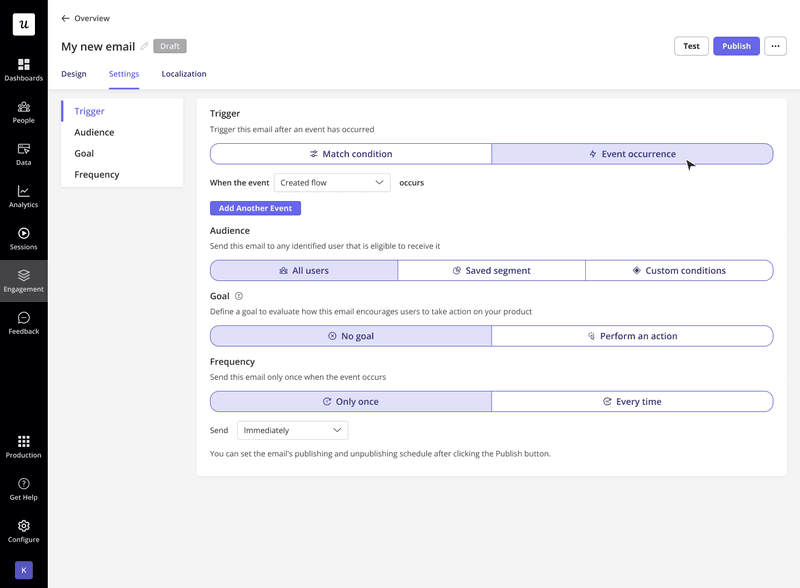
- Email: Send segmented campaigns to the same audience receiving in-app messages. Use product launch email examples that focus on value and specific use cases, not just feature lists.
If you set up all channels in one platform, you can send both to the same user segment, and include a CTA in your email that takes users directly to the app and triggers the in-app walkthrough experience.
- Social and blog: Publish supporting content that tells the broader story. Typically, schedule blog posts to go live 2-3 hours before launch so they’re indexed and shareable when in-app experiences activate.
- Product Hunt: For major launches targeting the broader market, execute a Product Hunt launch strategy to generate external buzz and backlinks.

Phase 4: Post-launch analysis and iteration
The launch doesn’t end on launch day. You must analyze what actually happened during the launch versus what you’d planned.
Monitor feature adoption
I start tracking feature adoption metrics immediately. That includes looking at who’s using the feature and, more importantly, who isn’t.
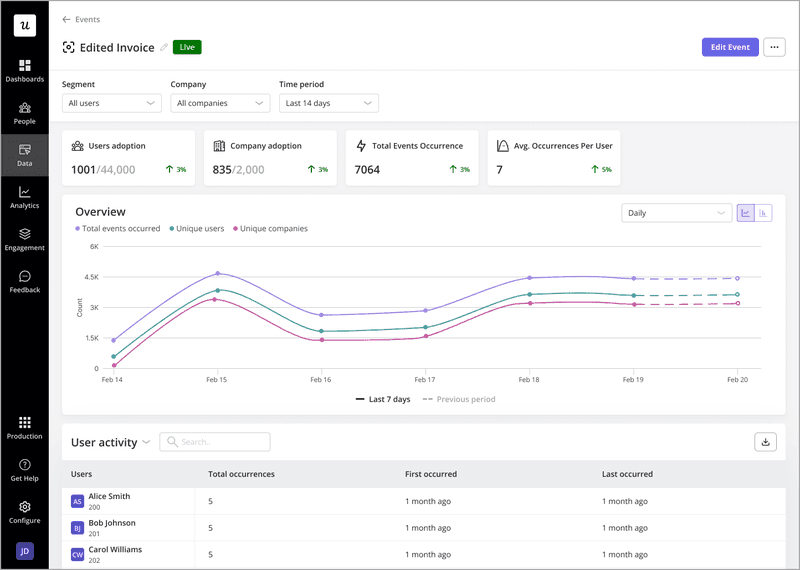
If I notice that adoption is lower than expected, investigate using multiple lenses. Is the platform hard to discover? I’ll go check the click rates on the announcement modal and tooltip engagement. Is the onboarding confusing? Use session replays to watch how users interact with the new UI.
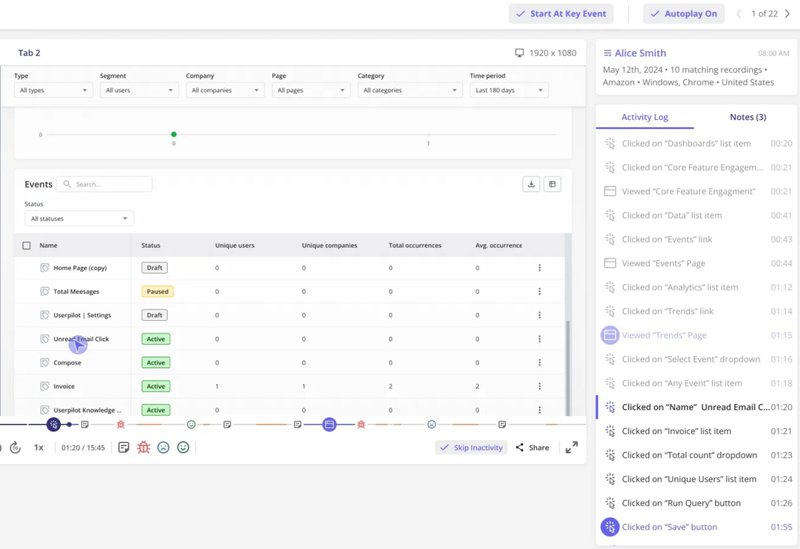
Watching someone struggle to find a button or misunderstand the workflow can feel painful, but it clarifies exactly what needs fixing.
Gather qualitative feedback
Numbers tell you what is happening. Feedback tells you why. A few days post-launch, trigger in-app surveys to users who’ve activated the new feature.
I may use a Customer Effort Score survey asking “How easy was it to use [New Feature]?” with a follow-up open text field for elaboration.

Also, ask non-activated users why they haven’t tried the feature. The customer feedback analysis helps you prioritize immediate fixes versus longer-term improvements.
Optimize the onboarding
You rarely get onboarding perfect on the first attempt. The modal might be too aggressive, the checklist too long, or the value proposition unclear.
So, beyond just looking at analytics dashboards and session replays, run A/B tests on feature walkthroughs, testing different messaging approaches, or UI patterns.

Based on the data, tweak in-app experiences. When users drop off at step 3 of a tour, shorten it or split it into two separate flows. If they ignore the feature entirely despite seeing announcements, try a different UI pattern like a hotspot that draws the eye more naturally. Continuous product optimization is essential for long-term adoption.
How to use the product launch plan template effectively? Best practices
I’ve handed you the product launch plan template and the exact plan that I follow. But to use them effectively, you need clear principles. Here are a few rules I always follow:
1. Assign clear owners
Every row in your launch plan needs a column for “Owner.” The owner must be a specific person, not a team.
As I mentioned earlier, when a task is assigned generally to “marketing,” it effectively belongs to no one. But when you assign it to “Sarah,” it gets done. That’s why I use names, set end dates, and review status weekly during pre-launch.
2. Create a “single source of truth”
Don’t scatter the launch plan discussions across Slack threads, Jira tickets, and Excel spreadsheets. Pick one tool and make it the only source for all. I prefer a shared Notion doc for the most part, but the platform you choose matters less than ease of access for everyone involved. Your team should be able to reference it during standup calls.
3. Differentiate between “hard” and “soft” launches
You don’t always need fireworks. Sometimes a dark launch works better. This launch means releasing the feature to the backend but keeping it hidden from the UI, or releasing it to 5% of users to test performance. Once you’ve validated stability and usability, expand to broader audiences.
4. Tier your launches based on scope
Not every launch deserves a three-month campaign. Here’s a three-tier system that works well for me:
- Tier 1 (Major): New products, major features that fundamentally change workflows. Requires a full marketing campaign and new sales enablement materials, and full-scope educational resources for the users.
- Tier 2 (Mid): Significant feature additions or improvements. This demands in-app announcement, blog posts, email campaign, and documentation.
- Tier 3 (Minor): Bug fixes, small improvements, minor feature additions. For this level of launch, a simple in-app tooltip, changelog entry, and documentation update are enough.
5. Review and iterate on your template
After every launch, run a retrospective with your cross-functional team. What worked? What created bottlenecks? And what sections of the template were useless? Update the template based on learnings, so each launch gets smoother than the last.
Get a successful new product launch with Userpilot
A product launch is complex, but it doesn’t have to be chaotic. Structure your launch into Pre-Launch, Launch, and Post-Launch phases, and use tools like Userpilot to automate in-app experiences that drive adoption without developer dependencies.
Start with the template I’ve shared, customize it for your product and team size, and iterate after each release.
FAQ
What is a product launch plan?
A product launch plan is a structured document that defines objectives, target audience, messaging, deliverables, timelines, and success for bringing a new product or feature to market. The plan coordinates cross-functional teams around shared goals and prevents the chaos that typically surrounds releases.
What are the benefits of using a product launch plan template?
A template provides consistency across launches, reduces planning time by 40-60%, prevents critical tasks from falling through cracks, creates accountability through clear ownership, and establishes a knowledge base that improves with each iteration. Teams using templates consistently report fewer last-minute delays and higher stakeholder satisfaction compared to ad-hoc planning.
What are the key elements of a product launch template?
- Overview section defining launch tier, owner, and target date.
- Strategy section with clear objectives and success metrics.
- Target audience definition with specific segments.
- Positioning statement that translates features into benefits.
- Deliverables tracker with owners and deadlines.
- Go-to-market checklist covering Product, Marketing, Sales, and Support.
- Post-launch analysis plan defining what you’ll measure and when.
About the author