Top 8 Chameleon Alternatives Compared: Pricing, Features, and Reviews



Most teams start hunting for Chameleon alternatives when they hit the same three walls: analytics that only track Chameleon’s own experiences, surveys with limited branching logic, and pricing that turns opaque as you scale. Those limits are reasonable for a design-first web onboarding tool, and they still push growing teams to look for something broader.
This guide compares 8 alternatives across price points and use cases, from budget-friendly tools to enterprise platforms, each with current pricing and the feature details that change a buying decision.
I chose these eight by weighing the criteria that matter in a real evaluation: onboarding and engagement depth, built-in product analytics, web and native mobile coverage, AI capabilities, pricing transparency, and verified user reviews on G2.

Overview of Chameleon
Chameleon is a no-code platform that helps SaaS teams create in-app experiences to onboard users, announce features, collect feedback, and drive product adoption. You can build multi-step tours, launch targeted experiences for different user segments, and customize them with features like Smart Delay, snooze-and-dismiss controls, and JavaScript-based triggers. HelpBar, Chameleon’s in-app search widget that surfaces your knowledge base and documentation, remains free to use.
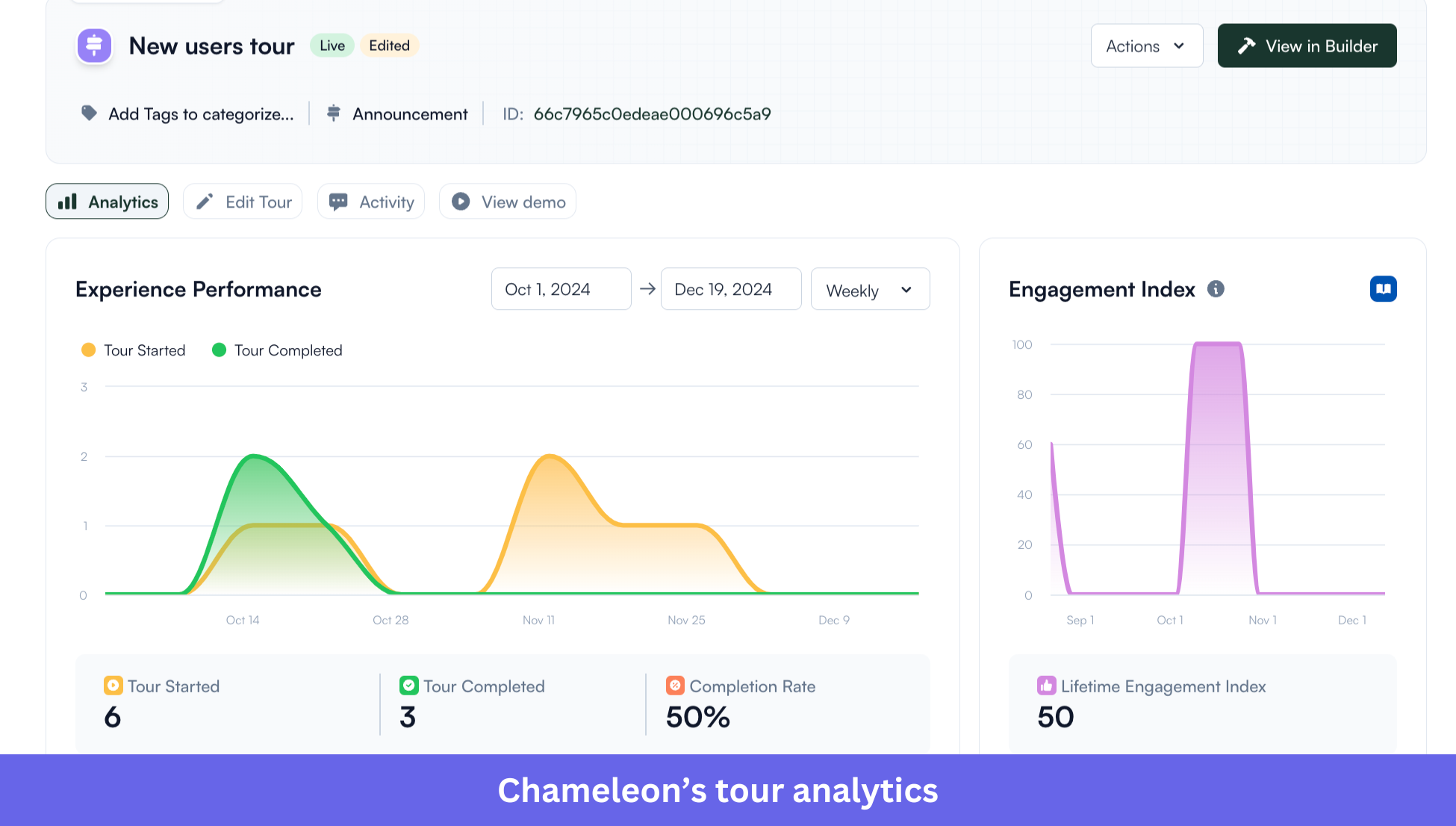
One of Chameleon’s biggest product updates is its expanded AI platform. Instead of a single assistant, Chameleon now offers four purpose-built AI agents that support different parts of the onboarding workflow. C
opilot helps teams build in-app experiences faster, Compass (Beta) helps analyze user behavior and uncover opportunities, Prism (Beta) personalizes experiences for different users, and Ranger monitors live experiences to identify outdated or broken content. Together, these agents are designed to help teams build, understand, personalize, and optimize product adoption.
Updated pricing
Chameleon’s current structure runs from free to fully custom. Here’s how the plans break down on the official pricing page:
- HelpBar: Free.
- Startup: Starts at $279/month for up to 2,000 Monthly Tracked Users (MTUs).
- Pro: Starts at $750/month, with pricing shown publicly.
- Growth: Starts at $1,750/month, with pricing shown publicly.
- Enterprise: Custom pricing.
Unlike its older pricing model, Chameleon now publishes pricing for both the Pro and Growth plans. As organizations grow, however, costs can still increase quickly because advanced governance, enterprise integrations, and several AI capabilities are reserved for higher-tier plans, with Enterprise continuing as a custom quote.
Why teams look for Chameleon alternatives
Chameleon is one of the most polished platforms for building in-app onboarding, and it isn’t the right fit for every team. As products grow, organizations start evaluating tools that offer broader analytics, native mobile support, more predictable pricing, or additional engagement channels. Five patterns come up again and again.
Costs can climb sharply with usage: Startup begins at $279/month for up to 2,000 MTUs, Pro and Growth rise to $750 and $1,750/month, and Enterprise moves to custom pricing. According to procurement platform Vendr, the median annual Chameleon contract lands near $30,700, though real pricing varies by organization.
It’s built primarily for the web: Chameleon supports web experiences, including some hybrid environments, but it doesn’t ship native SDKs for iOS or Android. Teams building native mobile products usually need a platform with dedicated mobile support.
Product analytics are intentionally light: Chameleon helps you understand how users interact with their own experiences, and it isn’t a full product analytics platform. Organizations that need automatic event capture, session replay, funnels, or retention analysis typically bolt a dedicated analytics tool alongside it.
Some enterprise capabilities sit behind higher tiers: Advanced integrations, governance, and enterprise security become available on Growth or Enterprise, which shapes buying decisions for larger organizations. If those features are non-negotiable, the entry price stops being the relevant number.
Some teams want broader engagement: Chameleon focuses on in-app experiences, so organizations that also run email campaigns, mobile messaging, employee training, or digital adoption across multiple apps often look at platforms built for those jobs. That’s exactly where the eight tools below start to separate.
The 8 best Chameleon alternatives compared
Before the deep dives, here’s the landscape at a glance, with verified pricing and the single tradeoff that matters most for each tool.
| Tool | Starting price | Best for | Key strength | Biggest limitation |
|---|---|---|---|---|
| Userpilot | $299/mo (billed annually) | All-in-one product adoption | Autocapture, session replay, AI, multi-channel journeys | Some advanced capabilities need Growth or Enterprise |
| Chameleon | $279/mo (Startup) | Design-heavy web onboarding | Highly customizable in-app experiences | Web-focused, with limited built-in analytics |
| Appcues | Custom pricing (or “Contact sales”) | Cross-channel customer engagement | In-app, email, push, and native mobile in one platform | Analytics aren’t as deep as dedicated tools |
| Pendo | Free to 500 MAUs; paid custom | Enterprise product analytics | Best-in-class analytics combined with in-app guidance | Enterprise pricing and modular licensing add cost |
| UserGuiding | Free plan; paid from $174/mo | Budget-friendly product adoption | Strong feature set plus a free support plan | Limited analytics, no native mobile |
| Product Fruits | $111/mo (billed annually) | Affordable onboarding with built-in support | AI-powered onboarding, knowledge base, self-service support | Advanced features reserved for higher plans |
| Userflow | $240/mo (billed annually) | Adaptive onboarding journeys | Conditional logic and AI-assisted flow creation | Web-only, relies on external analytics tools |
| WalkMe | Custom (Vendr median ~$39,000/yr) | Enterprise digital adoption | Workflow automation across enterprise apps | Complex implementation and custom pricing |
| Whatfix | Custom (Vendr median ~$32,000/yr) | Hands-on enterprise software training | Mirror sandbox, AI guidance, LMS integrations | Separate licensing per product raises cost |
Userpilot: Best for an all-in-one Chameleon replacement with built-in analytics
Userpilot is a product adoption platform that helps SaaS teams onboard users, drive feature adoption, and improve retention through in-app experiences, product analytics, user feedback, and AI. Unlike Chameleon, which centers on creating in-app experiences, it pairs user engagement with behavioral insight in one place. That combination suits teams that want to build, measure, and refine onboarding without stitching multiple products together.
G2 rating: 4.6/5.
I’ll be direct about why I’d point a Chameleon evaluator here, since I build with this platform every day.
Why choose Userpilot?
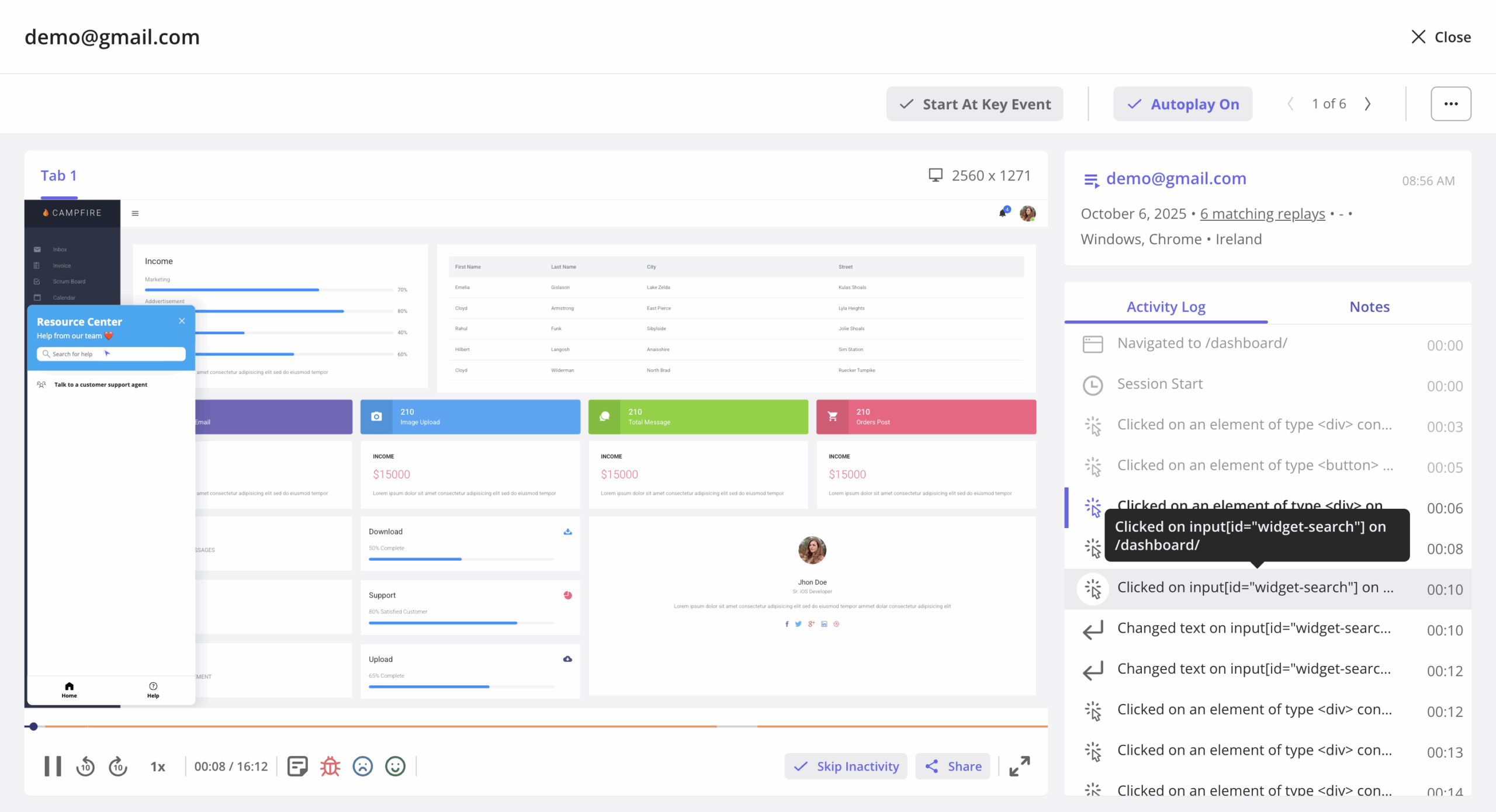
- Analyze product usage without manual event tracking: Userpilot automatically captures user interactions, so you can build funnels, trends, paths, and retention reports without defining every event upfront. Chameleon’s analytics mainly focus on engagement with its own experiences rather than full product analytics.
- Understand friction with session replay: Teams can watch real user sessions alongside analytics to identify friction, validate hypotheses, and debug onboarding without adding another tool.
- Run multi-channel journeys from one platform: Workflows combine in-app experiences with email, enabling onboarding, feature announcements, and re-engagement campaigns based on user behavior.
- Use AI across onboarding, analytics, and product adoption: Userpilot’s AI capabilities now extend beyond generating onboarding content. Alongside Lia, which helps create and optimize in-app experiences, Userpilot also offers agentic analytics, allowing teams to explore product data using natural language, surface behavioral insights faster, and answer product questions without manually building reports. Together, these AI capabilities help teams launch experiences more quickly while making product analytics easier to access across the organization.
One reason I trust this workflow is a fix I shipped myself. When we launched Userpilot’s email feature, the funnel showed a sharp drop at domain verification, and rather than queue an engineering ticket, I built a targeting tooltip inside Userpilot in a few hours.
Within a few hours, I just created a targeting tooltip and showed it to users and highlighted the correct steps for them to make it clear what to do next. That helped a lot on reducing friction and supporting users in real time without involving our dev team.
The drop-off closed within days, which is the kind of loop that gets slower when analytics and engagement live in different tools.
Where it falls short
- Several advanced capabilities, including more sophisticated analytics, session replay limits, and enterprise governance, sit on higher-tier plans.
- Some reviewers on G2 note that the breadth of functionality creates a learning curve before new users feel comfortable across every capability.
Pricing
The Starter plan begins at $299/month, billed annually, and covers core onboarding for up to 2,000 monthly active users (MAUs). Growth and Enterprise are custom-priced and add advanced analytics, governance, AI, and extra enterprise features. Full details sit on the Userpilot pricing page.
Should you choose Chameleon or Userpilot?
Choose Chameleon if your top priority is highly customized, design-first in-app experiences for a web app. Userpilot fits better if you also want built-in product analytics, session replay, user feedback, and AI user onboarding in the same platform, which reduces how many products you have to integrate.
Appcues: Best for cross-channel orchestration
If your onboarding reaches beyond in-app experiences, Appcues is one of the strongest Chameleon alternatives. It helps product teams coordinate onboarding, feature announcements, and lifecycle engagement across web, mobile, email, and push from a single platform. That makes it a good fit for SaaS companies that want to engage users across the whole journey instead of running separate engagement tools.
G2 rating: 4.6/5.
Why choose Appcues?
- It supports web, native iOS, Android, React Native, Flutter, and Ionic, so teams can build onboarding across both web and mobile products.
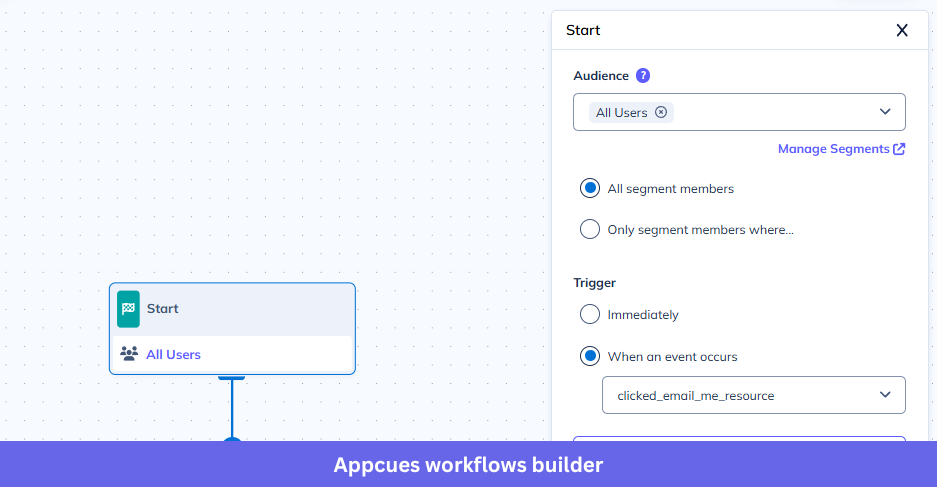
- Workflows coordinate in-app messages, behavioral email, and push notifications based on user actions or inactivity, keeping engagement in one place.
- Appcues AI assists with creating experiences, generating copy, audience targeting, and optimization recommendations to speed up onboarding work.
- UI Embeds let teams add onboarding content such as banners and cards directly into the product interface instead of relying only on overlays.
Where it falls short
- Reporting focuses on Appcues experiences rather than full product analytics, so teams that need deep behavioral analysis may still want a dedicated platform.
- Session replay and automatic product-usage analytics aren’t part of the core offering.
- Pricing also becomes less predictable as organizations grow because costs depend on factors such as monthly active users, installations, and plan selection rather than a simple flat subscription.
Pricing
Appcues pricing is no longer published as fixed subscription rates on its official pricing page. Instead, the platform offers three plans:
- Start (supports up to 3,000 MAUs).
- Grow (supports up to 50,000 MAUs).
- Enterprise (custom).
Pricing is provided through sales based on your monthly active users, deployment requirements, and feature needs. According to Vendr’s marketplace data, Appcues contracts for mid-market companies commonly fall in the $30,000 to $50,000 per year range, although actual pricing varies significantly depending on usage, contract terms, and negotiated discounts.
Should you choose Chameleon or Appcues?
Choose Chameleon if your onboarding is focused on a web app and you value highly customizable in-app experiences. Appcues is stronger when your product spans web and mobile, or when you want in-app messaging, email, and push coordinated without adding separate lifecycle tools.
Pendo: Best for enterprise analytics depth with in-app guides
If your team leans on product data to improve onboarding, Pendo is one of the strongest options to weigh. Rather than focusing only on in-app guidance, it brings product analytics, user guidance, session replay, feedback, roadmapping, and AI into one platform. That suits organizations that want to understand behavior before deciding how to improve activation and adoption.
G2 rating: 4.4/5.
Why choose Pendo?
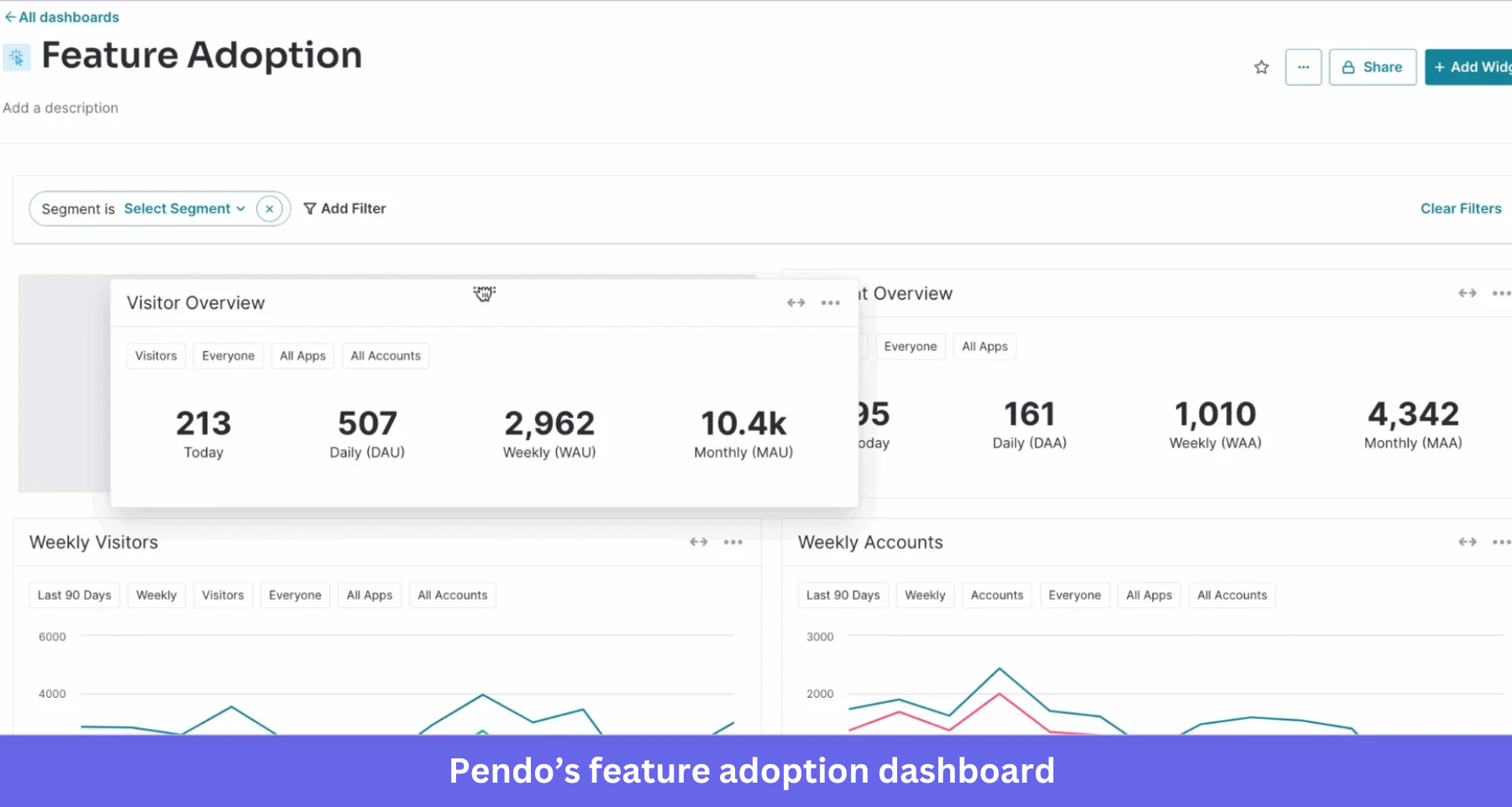
- Analyze usage without heavy instrumentation: Pendo captures interactions automatically and measures feature adoption, journeys, funnels, retention, and engagement, with retroactive analytics available from the day it’s installed.
- Pair analytics with in-app guidance: Teams can spot friction points with analytics, then launch targeted guides from the same platform instead of switching tools.
- Support web and mobile products: Pendo provides SDKs for native iOS and Android, plus frameworks including React Native, Flutter, Xamarin, .NET MAUI, Expo, and SwiftUI.
- Extend insight with AI: Pendo Listen analyzes customer feedback at scale, and Agent Analytics measures adoption and business impact for AI-powered features and agents.
Where it falls short
- Several capabilities, including Listen, Orchestrate, and Predict, are licensed separately or gated to higher tiers, so total cost depends on the modules you pick.
- The breadth of the platform usually needs more planning and administration than tools focused purely on onboarding.
- Session Replay is also packaged separately depending on your subscription, so not every customer receives it by default.
Pricing
Pendo offers a Free plan for up to 500 monthly active users (MAUs). Pendo pricing for paid plans includes Base, Core, and Ultimate tiers, with custom rates based on your deployment and the products you purchase. According to Vendr Marketplace, the median buyer pays about $49,000 per year, although actual pricing varies depending on contract size and negotiated terms.
Should you choose Chameleon or Pendo?
Choose Chameleon if your priority is highly customized in-app onboarding and you already run a dedicated analytics stack. Pendo is the better choice when product analytics, behavioral insight, and feature-adoption reporting sit at the center of how your team improves onboarding.
UserGuiding: Best for combining onboarding with in-app self-service support
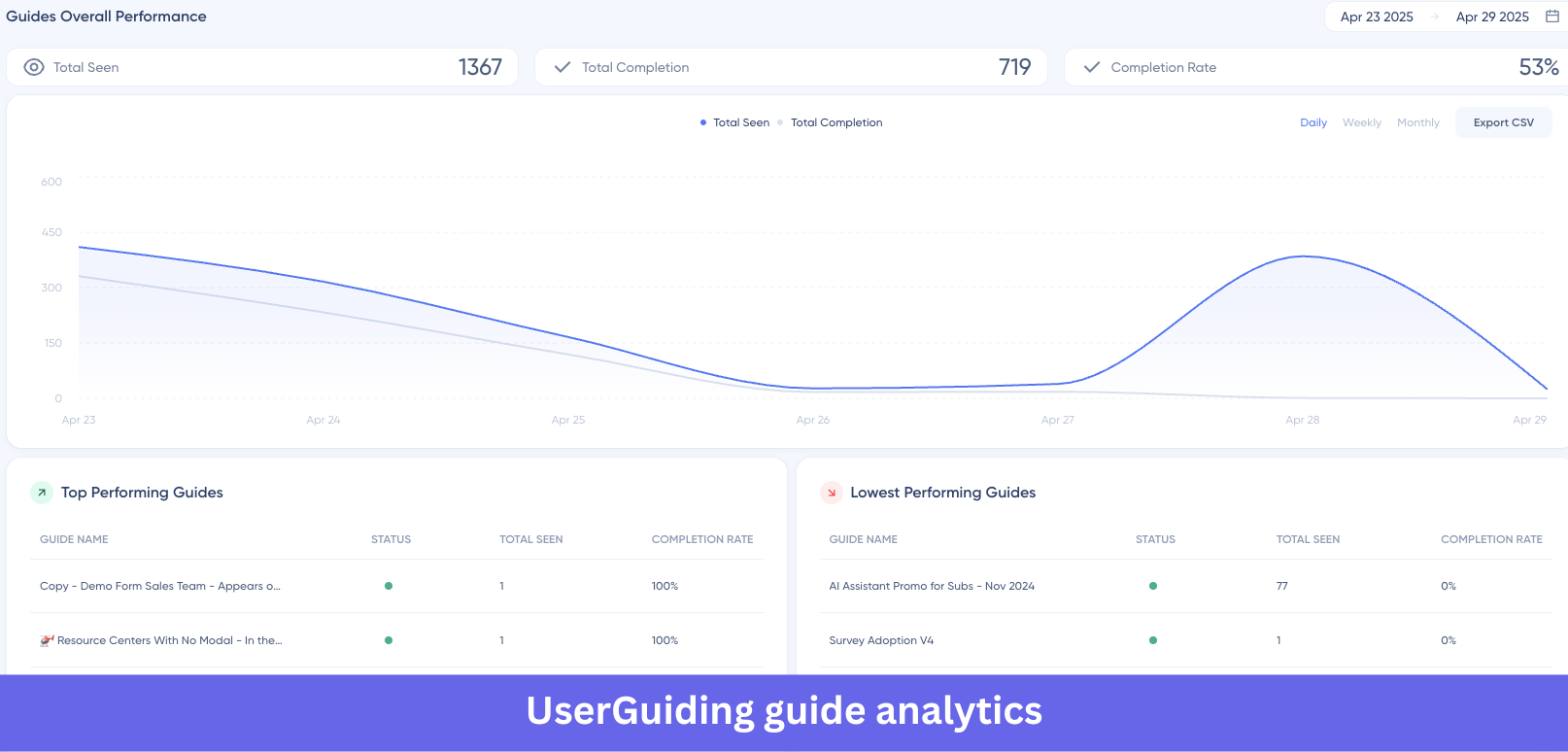
UserGuiding is a good alternative if you want users to both learn your product and answer their own questions. Beyond interactive onboarding, it includes a resource center, knowledge base, product updates page, and AI Assistant, so users can find features and documentation without leaving your product. That makes it well-suited to SaaS teams, reducing friction across the whole journey rather than only at onboarding.
G2 rating: 4.7/5.
Why choose UserGuiding?
- Start with a free support solution: UserGuiding offers a Support Essentials plan at no cost, including a knowledge base, Resource Center, Product Updates page, and AI Assistant with a limited number of monthly resolutions. This allows teams to improve self-service before investing in a paid onboarding platform.
- Know your costs upfront: UserGuiding pricing is published by monthly active users, which makes budgeting easier as you grow instead of negotiating a custom quote.
- Build a full onboarding experience from one platform: Every paid plan bundles product tours, checklists, hotspots, surveys, announcements, resource centers, segmentation, and localization.
- Answer questions with AI: The built-in AI Assistant uses your knowledge base to give contextual answers inside the product, so users find information without leaving the app.
Where it falls short
- UserGuiding centers on onboarding and engagement rather than deep analytics, with no automatic event capture, session replay, or advanced behavioral analysis.
- Native iOS and Android support isn’t currently available, so it suits web-based products best.
- Capabilities like A/B testing, custom CSS, and some advanced customization are reserved for higher tiers.
Pricing
UserGuiding offers a free Support Essentials plan for teams focused on self-service support. Paid plans start with Starter at $174/month (billed annually), followed by Growth at $349/month, while Enterprise pricing is available on request for larger organizations with advanced security and support requirements.
Should you choose Chameleon or UserGuiding?
Choose Chameleon if you want highly customized experiences and have the technical resources to fine-tune styling and behavior. UserGuiding is the better pick if you value transparent pricing and want all of onboarding, surveys, announcements, a knowledge base, and an AI Assistant in one place, without extra tools.
Product Fruits: Best for affordable onboarding with built-in self-service tools
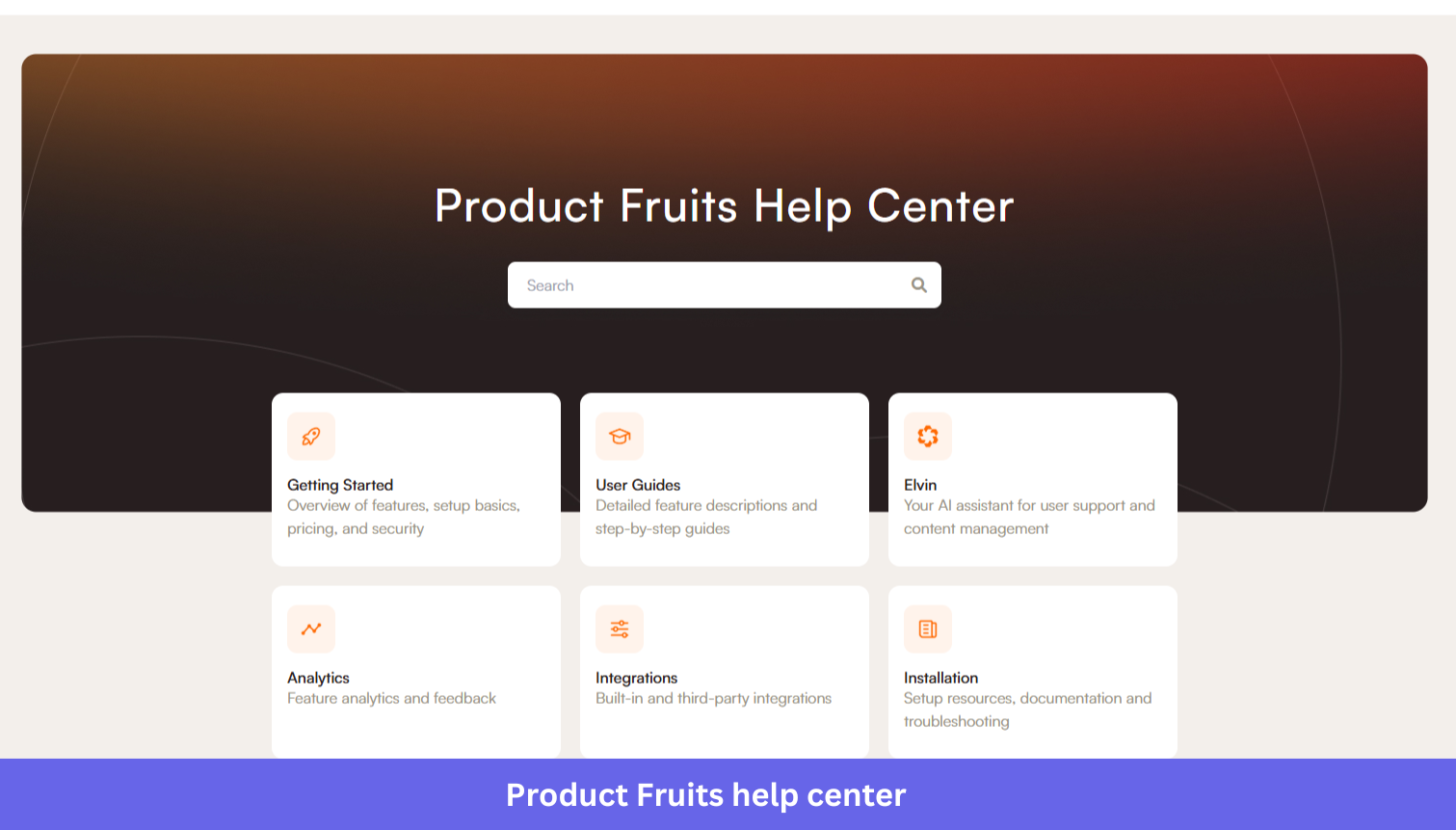
Product Fruits fits SaaS teams that want to launch onboarding without buying an enterprise platform. Alongside product tours and checklists, it includes a help center, knowledge base, announcements, and AI that helps create and localize content faster. Clear pricing and unlimited team seats also make it appealing for growing companies that don’t want licensing costs to rise as more internal users need access.
G2 rating: 4.7/5.
Why choose Product Fruits?
- Create onboarding content with AI Copilot: The Elvin Copilot generates interactive tours from your existing documentation, so teams don’t build from scratch.
- Combine onboarding with self-service support: A built-in Help Center and Knowledge Base lets users access documentation alongside onboarding flows without a separate support tool.
- Localize faster with AI translation: AI translation adapts onboarding content for multiple languages inside the platform.
-
Scale collaboration as your team grows: Product Fruits supports multiple workspaces, onboarding analytics, roles and permissions, and higher seat limits on Pro and Business plans.
Where it falls short
- The Starter plan focuses on core onboarding; Elvin Copilot, NPS, and surveys land on higher tiers.
- Product Fruits reports engagement analytics for its content but not the depth of product analytics or session replay in dedicated tools.
- It’s built primarily for web apps, with no native iOS or Android SDK.
Pricing
Product Fruits uses MAU-based pricing across Starter, Pro, and Business plans, with Enterprise available through custom pricing. For 1,500 monthly active users, pricing starts at $111/month for Starter, followed by Pro at $187/month and Business at $374/month.
Should you choose Chameleon or Product Fruits?
Choose Chameleon if advanced customization, granular targeting, and deep control over in-app experiences are your highest priorities. Product Fruits is stronger for teams that want onboarding, self-service support, and AI content creation with transparent pricing and unlimited seats.
Userflow: Best for adaptive onboarding journeys
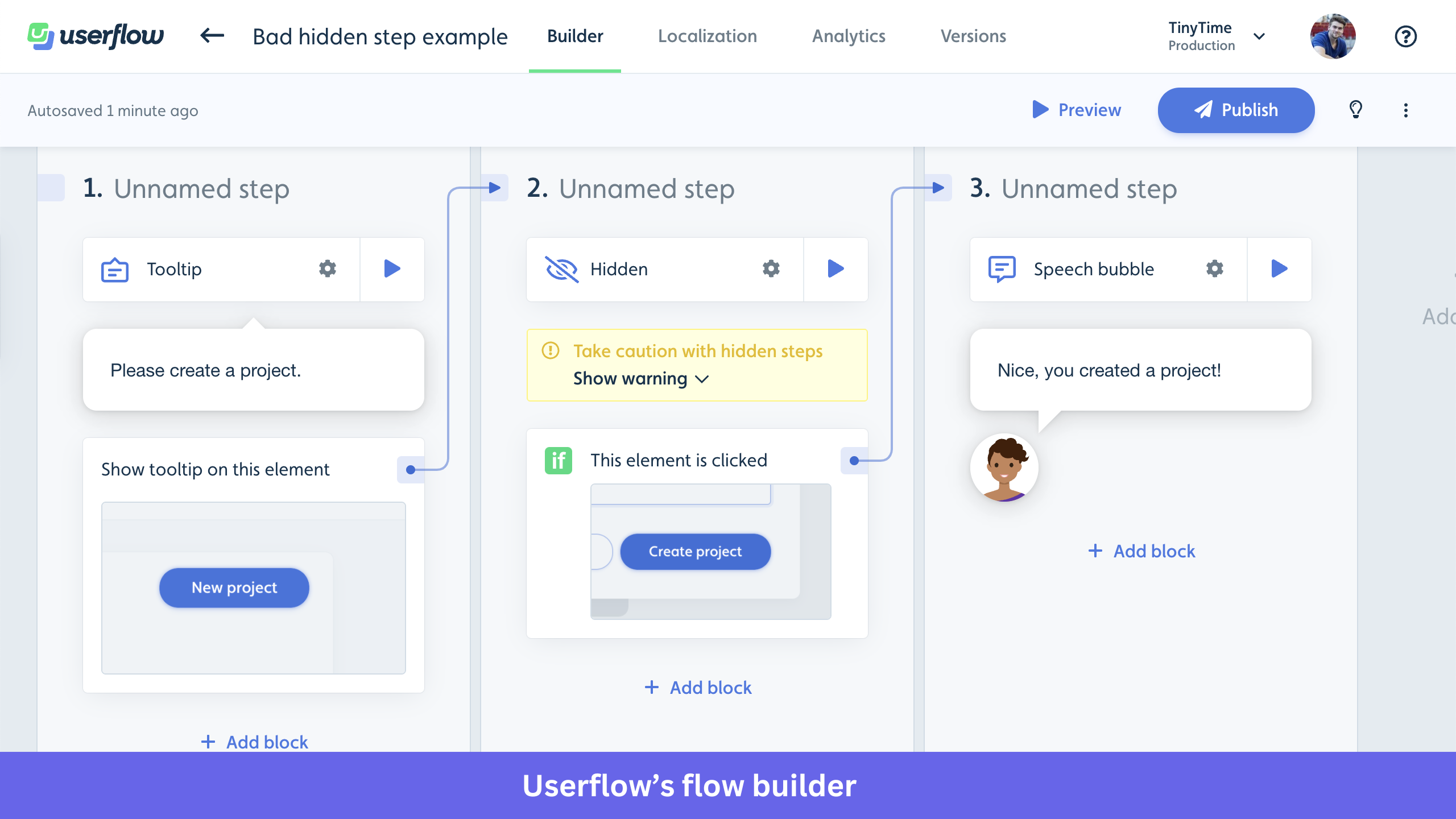
Userflow suits SaaS teams that want onboarding to adapt to different users without hand-building complex logic. Its visual builder combines advanced targeting, conditional flows, goals, and AI-powered workflow creation. Rather than emphasizing design flexibility, it helps product teams build and maintain sophisticated journeys with minimal engineering effort.
G2 rating: 4.8/5.
Why choose Userflow?
- Build onboarding that adapts to each user: Userflow supports goals, event triggers, segmentation, user and company attributes, and conditional logic, so different users see different experiences based on behavior instead of a fixed path.
- Create complex targeting with less manual work: The AI Condition Builder turns natural language into editable targeting rules, so teams build audience logic faster.
- Generate flows by demonstrating your product: With SmartFlows, you record a workflow inside your app and get an editable onboarding flow, which cuts build time.
- Expand without flow limits: Every plan includes unlimited flows, checklists, surveys, banners, and resource centers, so teams keep adding experiences as the product evolves.
Where it falls short
- Userflow is built primarily for web apps and doesn’t currently offer native iOS or Android SDKs.
- It includes onboarding analytics but isn’t a dedicated analytics platform, so teams needing automatic event capture, session replay, or advanced reporting integrate external tools.
- Some capabilities, including Flow AI, custom CSS, and extra customization, are limited to the Pro and Enterprise plans.
Pricing
Userflow offers transparent pricing based on monthly active users. The Startup plan starts at $240/month (billed annually), while Pro starts at $680/month. Larger organizations can choose a custom Enterprise plan with additional security, support, and governance features.
Should you choose Chameleon or Userflow?
Choose Chameleon if visual customization and fine-grained design control are your highest priorities. Userflow fits better when onboarding relies on sophisticated targeting, adaptive journeys, and AI-assisted workflow creation that keeps manual effort low.
WalkMe: Best for enterprise software adoption across multiple business applications
WalkMe is built to help employees adopt complex business software rather than onboard SaaS customers. Instead of focusing on one product, it delivers guidance, automation, and analytics across enterprise apps like SAP, Salesforce, Workday, Oracle, Microsoft, and ServiceNow. That makes it a better fit for digital transformation programs than for product-led onboarding.
G2 rating: 4.5/5.
Why choose WalkMe?
- Support employees across many apps, not one product: Guidance spans systems like SAP, Salesforce, Workday, Oracle, Microsoft, and ServiceNow, which suit organizations running several interconnected tools.
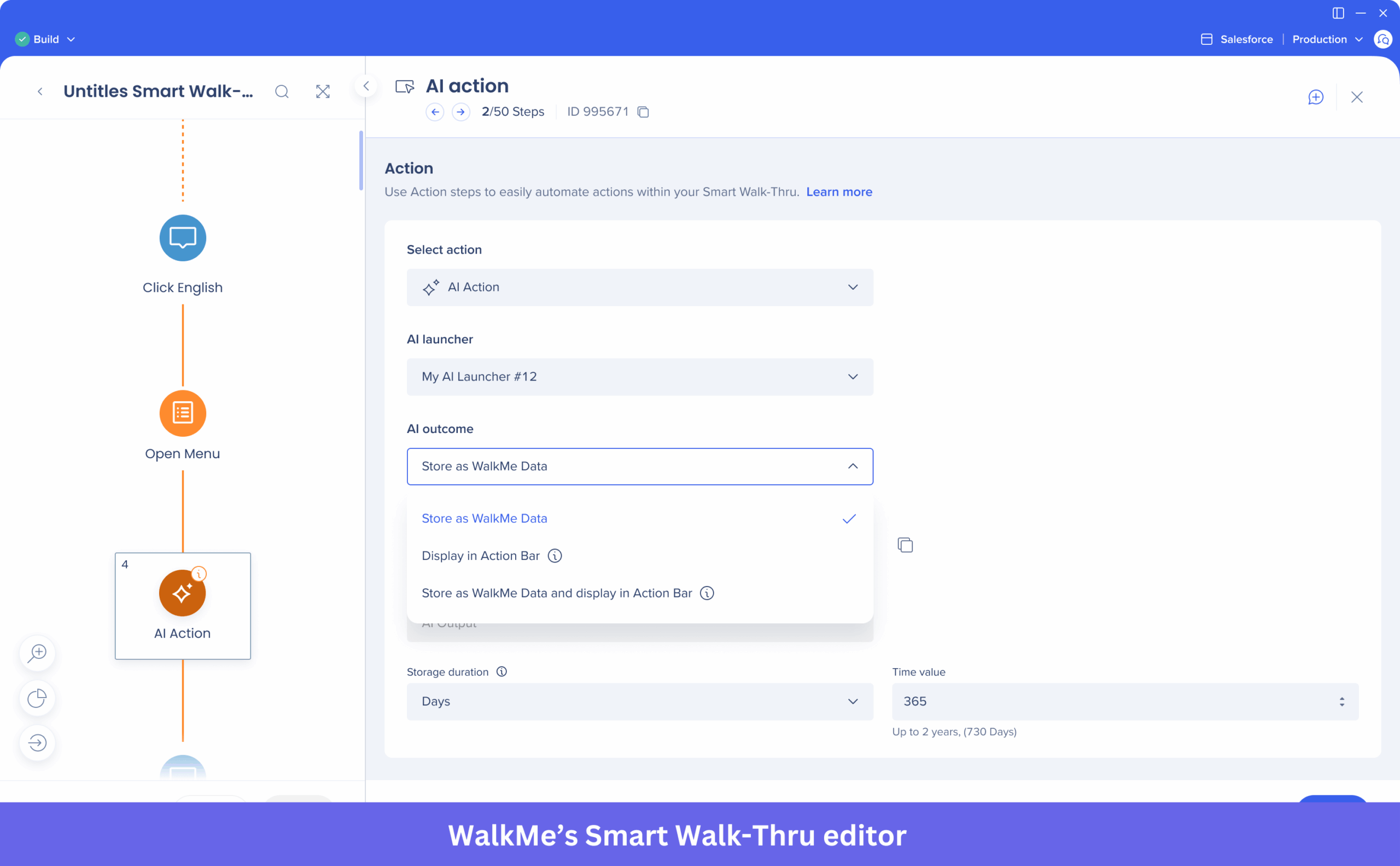
- Reduce repetitive work with automation: Beyond in-app guidance, WalkMe can complete fields, trigger clicks, and advance users through predefined workflows so employees finish business processes faster.
- Measure adoption across your stack: Discovery and analytics reveal application usage, adoption trends, and opportunities to cut unused software or improve efficiency.
Where it falls short
- WalkMe is built for employee enablement, so teams wanting lightweight customer onboarding may find it more than they need.
- WalkMe pricing isn’t public, and organizations work with sales to size licensing by deployment and modules.
- Rolling it out across enterprise apps usually needs IT, business, and implementation teams, so deployment is more involved than with no-code user onboarding tools.
Pricing
WalkMe doesn’t publish fixed pricing, so you request a custom quote based on applications, users, deployment scope, and required capabilities. Vendr reports a median annual contract near $39,000, though real contracts vary widely with implementation size.
Should you choose Chameleon or WalkMe?
Choose Chameleon if your priority is onboarding customers inside a SaaS product through interactive in-app experiences. WalkMe is stronger when the goal is employee adoption across many enterprise apps, automating repetitive workflows, and measuring adoption across your technology stack.
Whatfix: Best for hands-on software training with sandbox environments
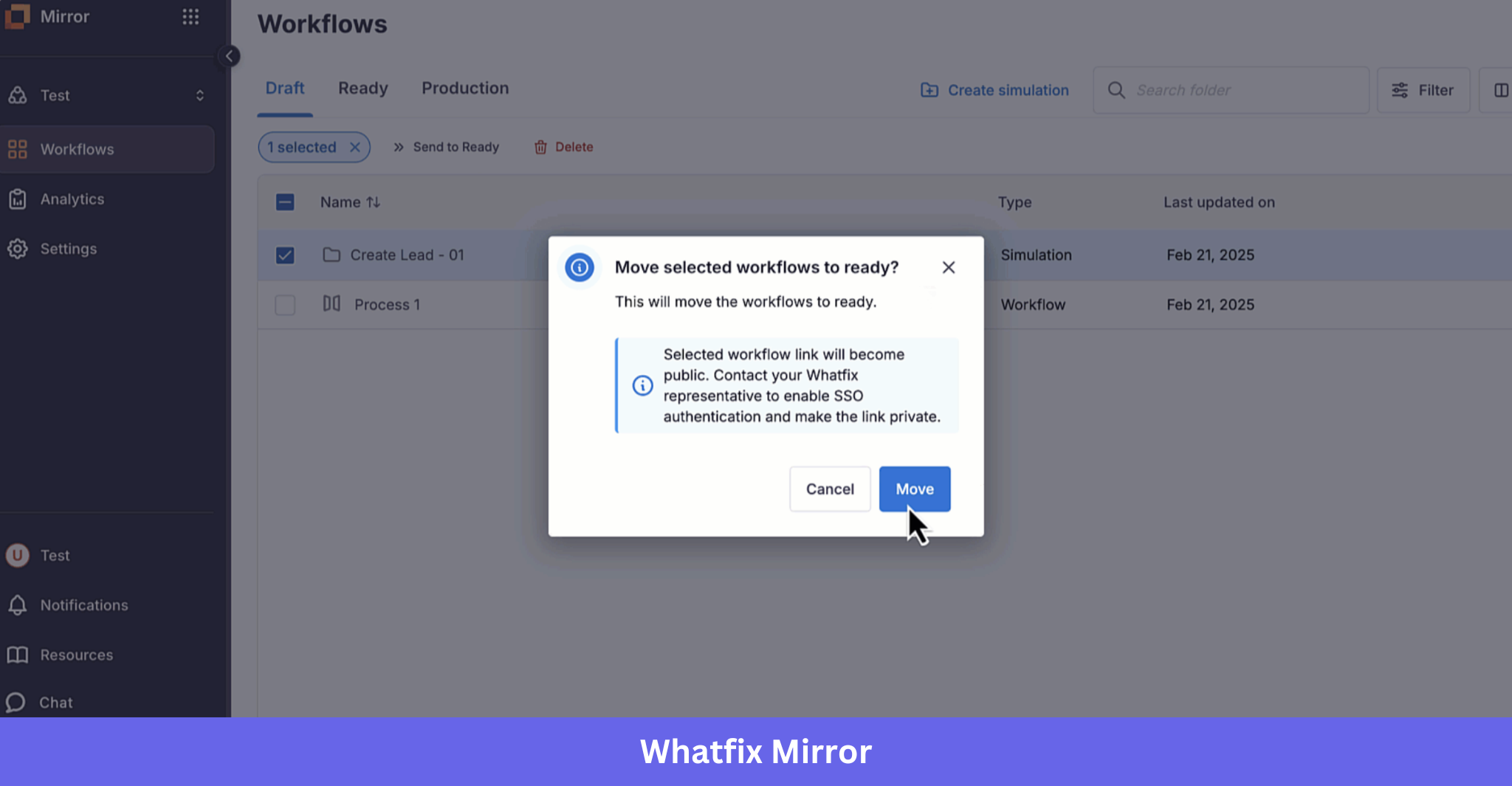
Some digital adoption platforms stop at showing users what to do, and Whatfix goes further by teaching people how to perform complex workflows through guided practice. Alongside in-app guidance, it offers Mirror, a sandbox where employees train on realistic replicas of business apps without touching production data. That makes it well-suited to organizations rolling out complex enterprise software where learning by doing beats step-by-step instructions.
G2 rating: 4.6/5.
Why choose Whatfix?
- Let employees practice before working in production: Mirror creates interactive replicas of business apps where users complete tasks and build confidence without affecting live systems, which is one of Whatfix’s most distinctive capabilities.
- Support every stage of adoption: The platform combines contextual guidance, self-help resources, workflow automation, and analytics so users learn, act, and find help without leaving the app.
- Connect guidance with formal learning: Integrations with leading learning management systems let organizations pair embedded guidance with structured training and compliance programs.
- Use AI to simplify content and support: Whatfix AI helps generate onboarding content, deliver contextual assistance, and surface adoption insights across enterprise apps.
Where it falls short
- Product Analytics and Mirror are licensed separately from the core Digital Adoption Platform, so you may need multiple products depending on requirements.
- Whatfix pricing isn’t public, so you contact sales for a custom quote based on deployment and product selection.
- The platform is built for enterprise adoption, so smaller SaaS teams wanting only lightweight onboarding may find its breadth unnecessary.
Pricing
Whatfix doesn’t publish fixed pricing, and you receive a custom quote based on the products you buy, deployment scope, supported platforms, and implementation needs. Vendr reports a median annual contract near $31,950, though real contracts vary with company size and modules.
Should you choose Chameleon or Whatfix?
Choose Chameleon if you’re mainly improving onboarding inside a web-based SaaS product and want more control over in-app design. Whatfix is stronger when adoption extends beyond one application, and you need guidance, training, and support across web, desktop, and mobile.
How to choose the right Chameleon alternative
There’s no universal winner among these Chameleon alternatives, so the right pick comes down to five questions. Run your shortlist through each one.
- Budget: If keeping costs low is your priority, look at Product Fruits (starting at $111/month) or UserGuiding (starting at $174/month, plus a free Support Essentials plan). Userpilot (starting at $299/month) and Userflow (starting at $240/month) are strong mid-market options, while Appcues, Pendo, WalkMe, and Whatfix use sales-led pricing.
- Channel coverage: Every platform supports web applications, but not all support native mobile applications. Appcues offers the broadest coverage across web and native mobile, while Pendo also supports native iOS and Android. If you want to combine in-app messaging with email and push notifications, consider Appcues or Userpilot.
- Analytics depth: If built-in product analytics matter, Userpilot and Pendo offer automatic event capture, funnels, user retention analysis, and session replay. The other platforms focus primarily on onboarding and engagement, so you’ll likely need a dedicated analytics tool alongside them.
- Implementation speed: Platforms such as Userpilot, Appcues, UserGuiding, Product Fruits, and Userflow can typically be implemented in days or weeks. Enterprise platforms like WalkMe, Whatfix, and larger Pendo deployments usually require longer implementation timelines and stakeholder involvement.
- Team size and expertise: If you want a no-code platform that product teams can manage independently, Userpilot, UserGuiding, Product Fruits, and Userflow are strong choices. If you’re deploying digital adoption across multiple enterprise applications, WalkMe and Whatfix are better suited to organizations with dedicated implementation and administration resources.
Ready to switch?
If Chameleon’s pricing or analytics limits pushed you here, moving is easier than the contract makes it feel. Userpilot runs a switch-from-Chameleon program with contract buyouts for qualified accounts, so you’re not paying twice during the transition. Book a demo, and we’ll map your current setup to an equivalent build.
DISCLAIMER: Userpilot strives to provide accurate information to help businesses determine the best solution for their particular needs. Due to the dynamic nature of the industry, the features offered by Userpilot and others often change over time. The statements made in this article are accurate to the best of Userpilot’s knowledge as of its publication/most recent update on July 15, 2026.
About the author