How to Reduce Churn Rate in the AI Era: 3 Causes, 5 Fixes


For years, the standard playbook for reducing churn focused on customers who were already showing signs of leaving. Teams improved onboarding, segmented users, and collected feedback to close value gaps.
AI has changed that.
- Today, many new signups were never serious buyers to begin with.
- Health scores tell Customer Success who’s at risk, but not why.
- By the time a renewal conversation happens, many customers have already stopped getting value weeks earlier.
These are three of the biggest churn challenges AI has introduced. In this article, I’ll explain why they happen and share five practical ways to reduce them.

What’s causing churn in the AI era?
Three things—none of them are onboarding problems:
AI tourists inflate your churn number
AI tourists, as a16z calls them, are a wave of one-time AI experimenters who sign up for your tool, try a feature once or twice, and leave within weeks. On your dashboard, they appear to be genuine customers, inflating your churn rate.
But in practice, they all drop off by month three. And the proof is a16z’s research; it found that the retention curves for AI products flatten around month three.
Our own cohort analysis found a similar take. When you segment accounts by behavior, the difference between AI tourists and engaged users becomes much easier to spot.
For example, we redesigned an onboarding checklist around a single activation milestone. By month three, retention increased by roughly 28% for users who completed it. Those are your actual customers, not the hobbyists inflating your churn rate.
Teams stop trusting AI they can’t explain
Churn isn’t only caused by inaccurate predictions. It also happens when teams can’t explain why AI produced a recommendation or health score. If they can’t justify it to customers or internal stakeholders, they stop using it altogether.
Kimberly Bloomston, CPTO at 6sense, has spent months studying why customers abandon intelligence products. She describes a familiar cycle:
Sellers don’t trust a score they can’t explain, so they stop using it. Marketing can’t demonstrate ROI, finance questions the investment, and the product gradually loses credibility.
The same pattern shows up in customer success. If a CSM can’t explain why an account is marked as “at risk,” they become less likely to rely on the health score during renewal conversations. Product teams also lose confidence in AI-generated insights when they can’t trace the reasoning behind them.
Bloomston’s conclusion summarizes the problem:
“This is a product design failure. When a user can’t explain what a system is telling them, the problem isn’t the user. It’s the product.”
AI is accelerating switching decisions
AI is shrinking the time between evaluating alternatives and deciding to switch. Now, customers can replace parts of your product much faster because AI features are appearing inside tools they already use. This means switching often takes days instead of months.
A clear example of this switch is a documented buyer’s experience on OnlyCFO. They dropped an $80,000-a-year vendor after another tool in their tech stack added roughly 60% of the same functionality. And they plan to fill the 40% gap with AI.
John Huber, Founder & Principal CS Consultant, stresses that:
“90%+ of AI-driven churn hasn’t hit yet. Customers are mid-contract. They’re updating their processes. But the decisions have already been made.”
In essence, accounts may appear healthy on your dashboard even though customers are already evaluating replacements. Equally, waiting until a renewal conversation to intervene is often too late because the customer has already made up their mind.
5 Strategies to reduce churn rate in the AI era
These five strategies help you separate real churn from AI noise, earn user trust, and intervene before customers decide to leave.
1. Rebase your churn calculation to exclude AI tourists
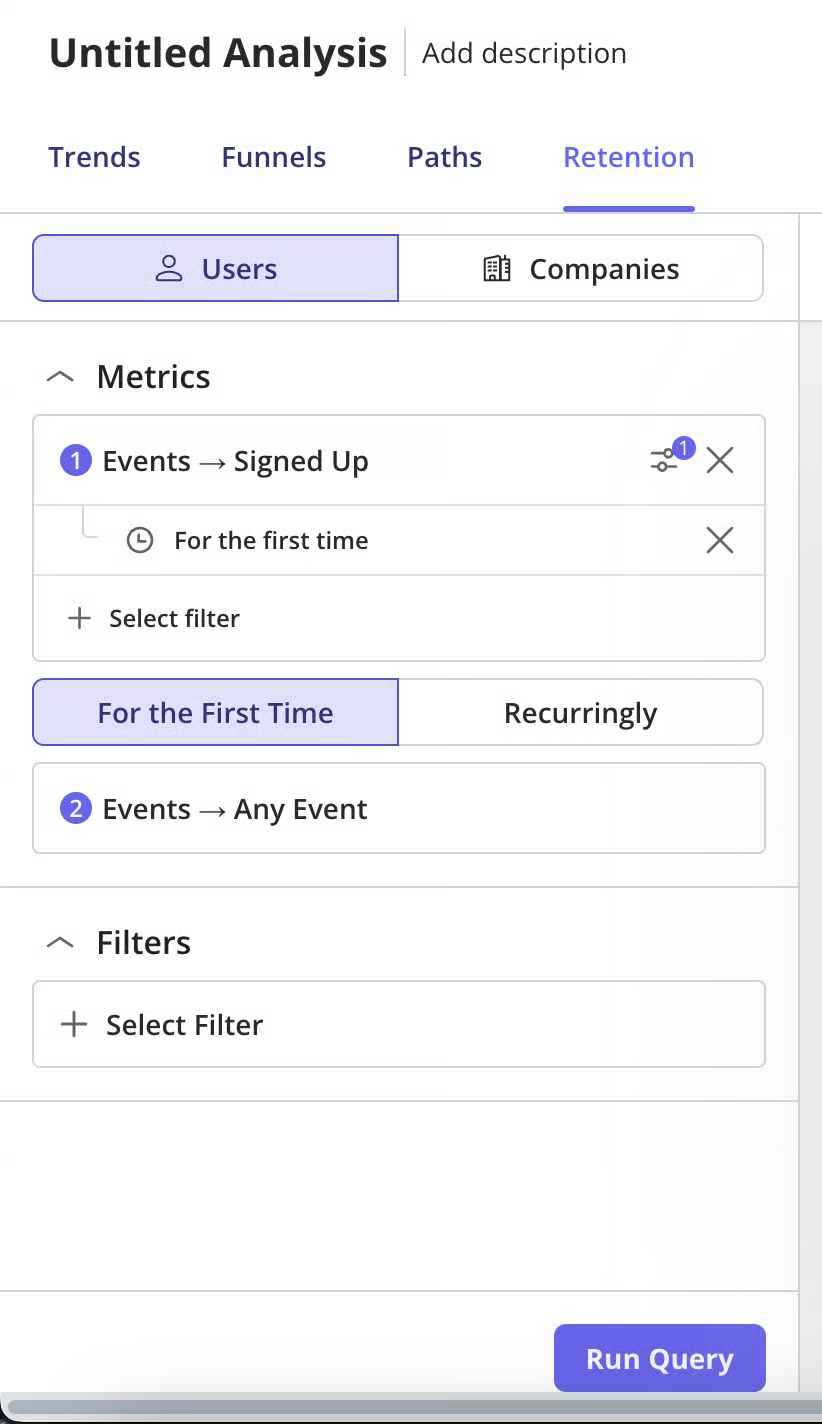
This simply means two things. First, exclude accounts under three months old from your churn calculation. Second, measure retention from the point users become genuinely active. This way, one-time AI tourists won’t count as lost customers, making your churn report more accurate.
However, before changing your calculation, define what counts as a genuinely activated user for your product. That might be creating a project, inviting teammates, or completing another activation milestone. Once you’ve identified that point, measure churn from there, not signup.
Userpilot helps here. It lets you create a segment based on signup date and your activation event.
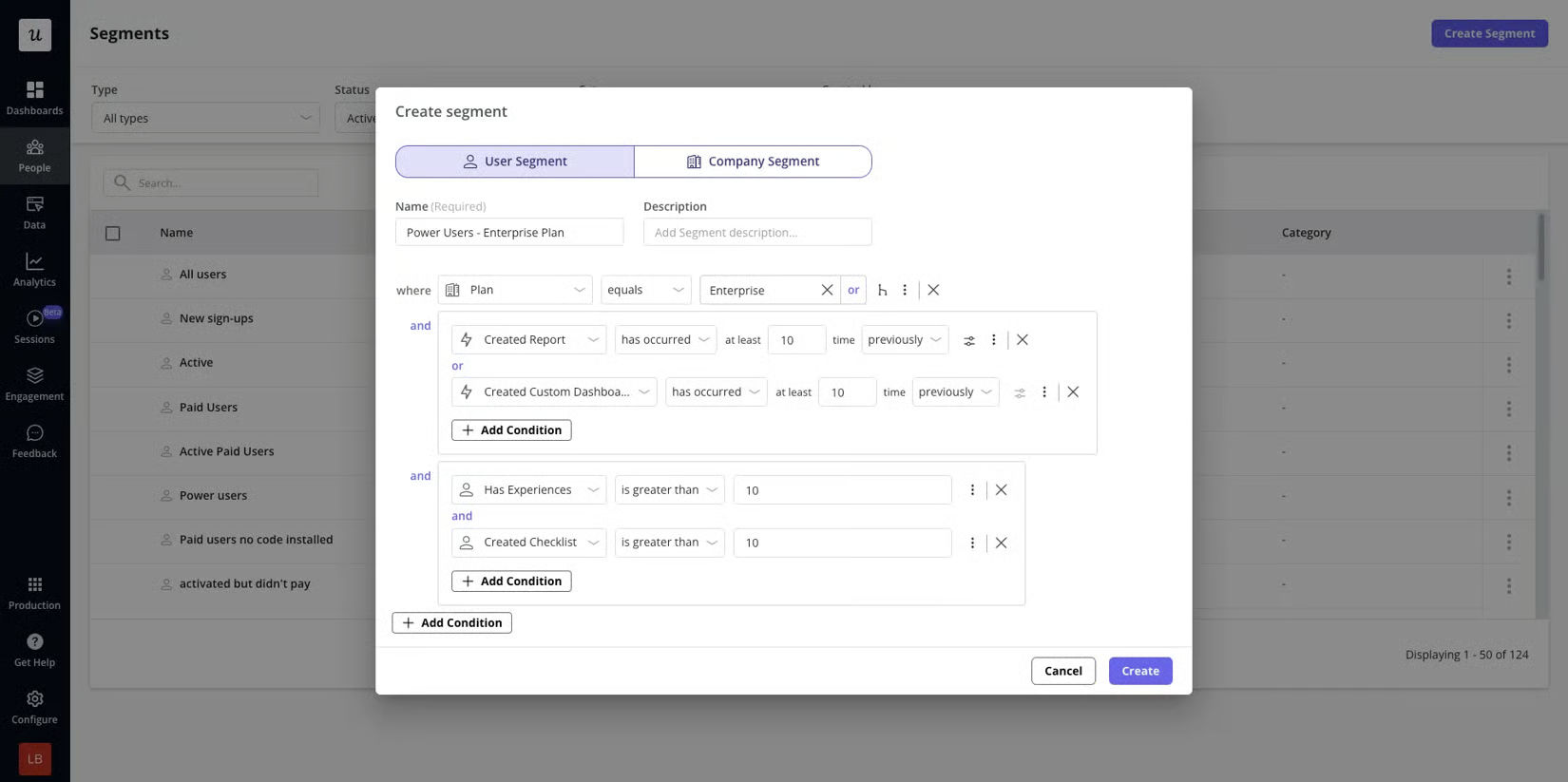
Then, you can filter your retention report by that segment, so that the cohort you’re reading is past the three-month mark.
2. Replace the churn score with a plain-language reason
A score alone doesn’t tell your team what to fix, which makes it difficult to explain risk to customers or internal stakeholders. And I ran into this on one account.
Every health score marked the customer as healthy because login frequency was high. But when I looked closely, I found that users were logging in without achieving the outcome they originally adopted the product for.
The problem? The primary user had changed three months earlier, and nobody had re-onboarded them for their new use case. A single percentage would have hidden that problem completely.
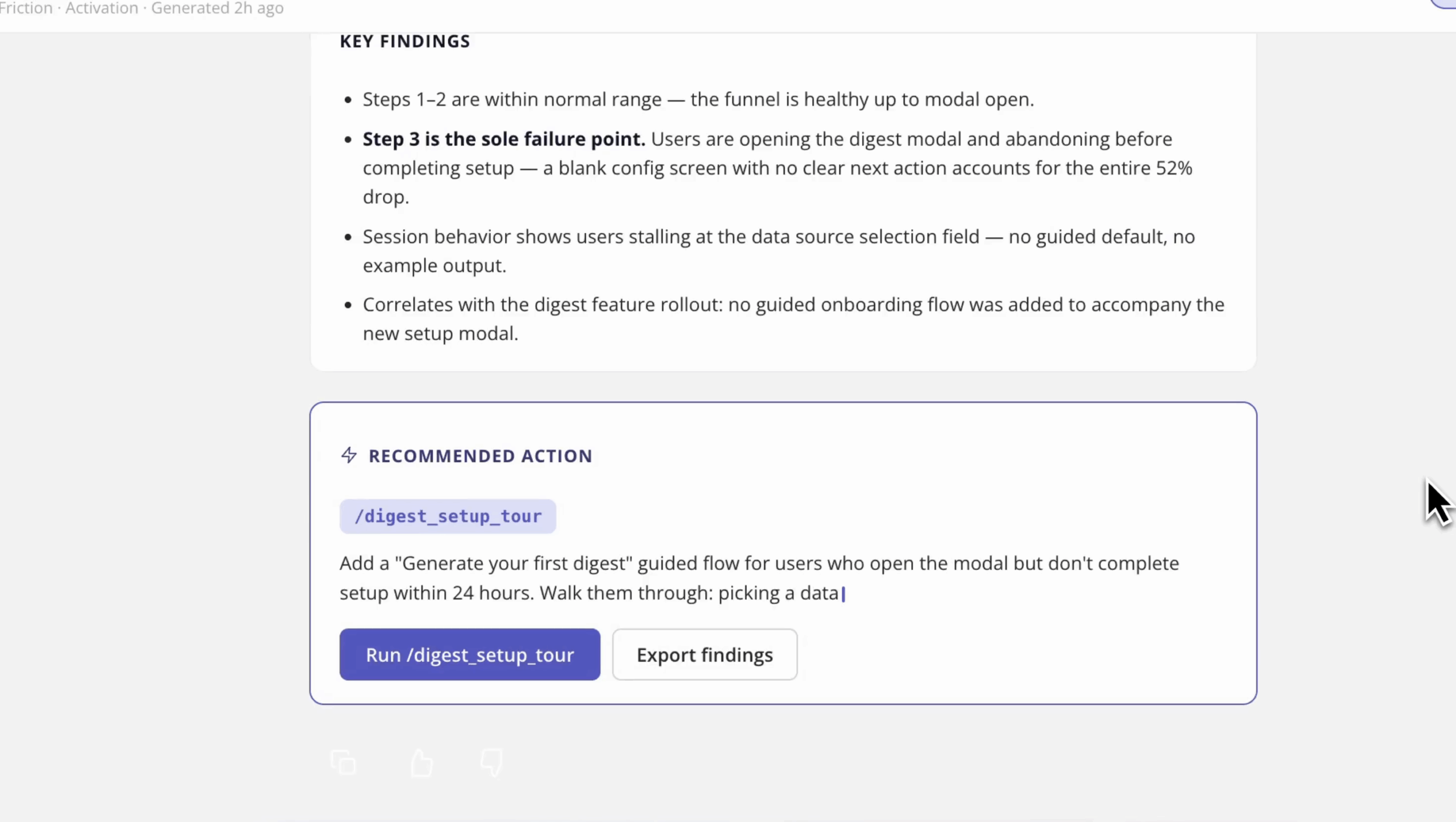
So, instead of asking whether an account is healthy, ask why it isn’t. Use product analytics and session replay to see the why. Then, add a sentence to explain: what feature or workflow did users stop using?
Lia, Userpilot AI, follows the same approach. Rather than showing a generic churn score, it explains what changed, when it changed, the likely impact on the account, and recommends the next best action before the customer leaves.
3. Auto-trigger the smallest in-app fix instead of routing everything to a human
Once you know why an account is at risk, launch the smallest possible in-app fix immediately. Abrar Abutouq, our product manager, did that after a new email feature showed a sharp drop-off at the domain verification step.
“Within a few hours, I just created a targeting tooltip and showed it to users and highlighted the correct steps for them to make it clear what to do next. That helped a lot in reducing friction and supporting users in real time without involving our dev team.”
Waiting to file an engineering ticket or until the renewal conversation would have compounded the friction. Auto-triggering a small fix, which might not be perfect, stops it from becoming customer churn.
And you can do the same in Userpilot in two ways. Flows or resource centers let you create and trigger contextual guidance at the earliest signs of friction.
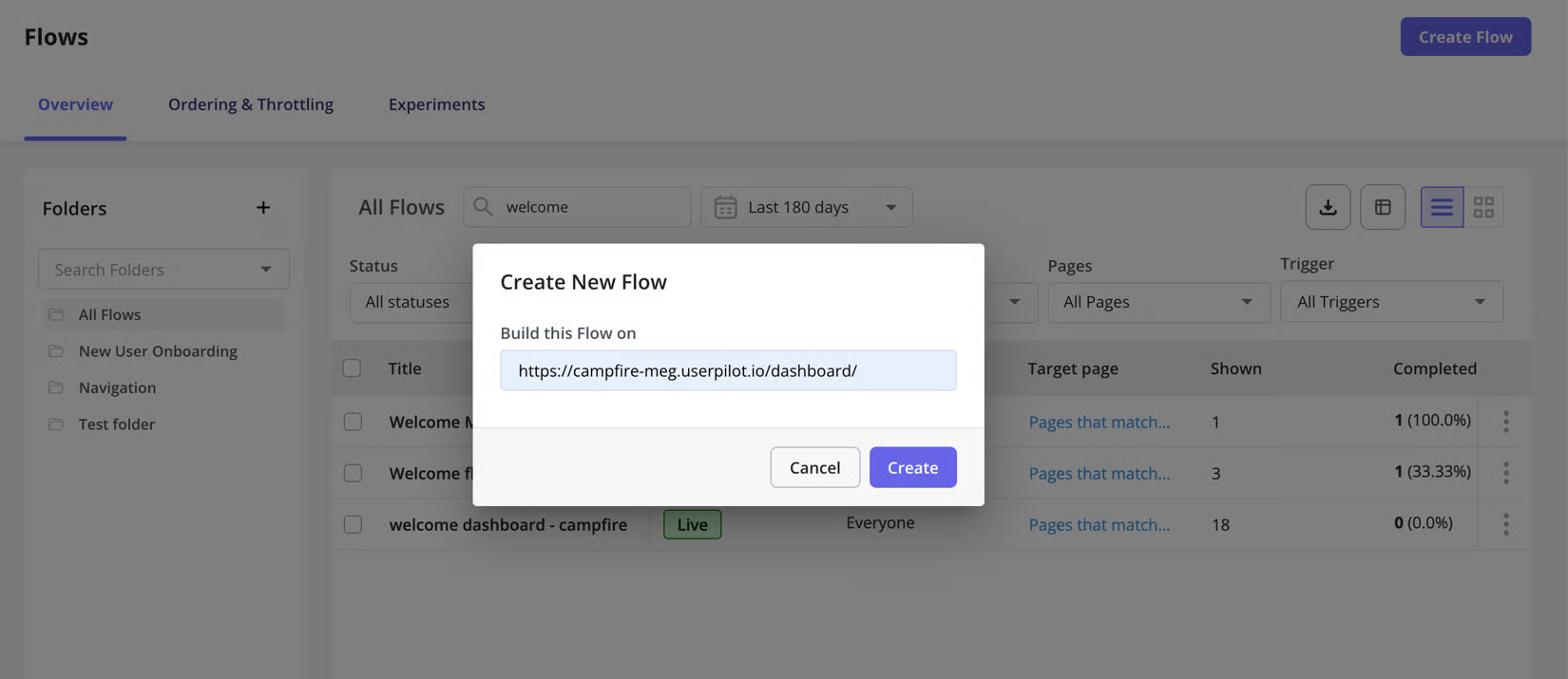
Also, Userpilot lets you design the guidance as a tooltip, modal, slideout, or driven action. Either way, you need zero coding while at it.
4. Watch the three behaviors that predict churn
Most health scores tell you that an account is at risk. These three behaviors usually tell you why, often before the score changes:
- Users keep logging in but don’t achieve meaningful outcomes.
- A previously engaged customer suddenly goes quiet.
- Users repeatedly struggle with a newly adopted feature.
These signals are often more useful than session volume alone. High login numbers only tell you customers are showing up. They don’t tell you whether customers are succeeding.
Each signal also gives you a different amount of time to intervene.
- Communication drop-off can appear weeks before a customer mentions a problem.
- Repeated struggle with a new feature needs attention within days because a user’s mental model of the product is most fragile immediately after they hit friction.
So, instead of relying on a blended health score, monitor each of the three behaviors separately and define a response for each one. Use a product analytics tool, like Userpilot, to configure alerts around these patterns. This way, you identify the right problem and respond before it turns into churn.
5. Track time-to-intervention, not just churn rate
As OnlyCFO revealed, AI-era churn decisions are made mid-contract, long before a renewal conversation. This also changes the metric to track to time-to-intervention, i.e., the time between the first churn signal and the first meaningful response.
As John Huber argues, if customers have already decided to leave before you notice, you can only do one thing. And that is to improve how quickly your team responds to early warning signs.
Measure the time between the first churn signal and the first action. The latter could be an in-app guide or human outreach.
Build a shared dashboard that combines product signals with account status. This way, product, customer success, and stakeholders work from the same timeline.
Fix the causes, not just the number
None of the five fixes I discussed replace each other. Each one solves a different problem:
First filter the noise from your churn data, then explain the risk, act on it quickly, catch it earlier, and finally measure how fast your team responds. Together, they give you a more reliable way to reduce churn in the AI era.
Also, the old playbook (strong onboarding, meaningful segmentation, and feedback loops) still works. AI just introduced new challenges.
Whether old or new churn problems, Userpilot still helps. It lets you identify the patterns driving your churn rate, then gives you the insights and in-app tools to respond before customers leave.
Book a demo today to see how it works!
About the author